


Hello Satsuki,
First of all, please ensure that you have right updated your theme to the latest version of the theme via FTP method because this is the surest way in this regard. Also, if the problem is still there, please provide your website so I can inspect it closer your setup page. Also, you can provide some useful screenshots for a better understanding.
Thanks for the message!
Hello,
yes as I said I updated the last version of the theme and the latest wordpress version. That’s when my problems began…
Here is the website: http://bento-daisuki.de.
As you can see for example here http://bento-daisuki.de/bento/bento-arten-689/ there are no line breaks, no gaps at all in my text anymore! There should be one before each bold name…
Thanks for your help.
Hello Satsuki,
I have inspected your website and I notice that you are using the Newsmag 2.3.6 which is not the latest version of it, as you can see here -> http://screencast.com/t/sPtUNmtc18cm First of all, you should update your theme via FTP. Clear all your caches and check the results. I guess that you are referring to these borders -> http://screencast.com/t/AU1eJuQ5sO7w which are present in Newsmag theme? Please check your theme panel at Theme color->Grid Line Color to have a valid color, like this -> http://screencast.com/t/npNIngoMrta
If is not what you mean, please provide more details so I will be able to provide a more accurate response.
Thanks for the message!
Hello,
that’s weird because I updated already yesterday and it says it was the latest version… So I can’t rely on the update center in WordPress right? Is there another way to automatically inform me about theme updates?
No I mean just the line breaks which are caused with the <br> tagg. The white speace between different paragraphs.
I just find out, that the problem is caused by a plugin after all… So I can handle it somehow…
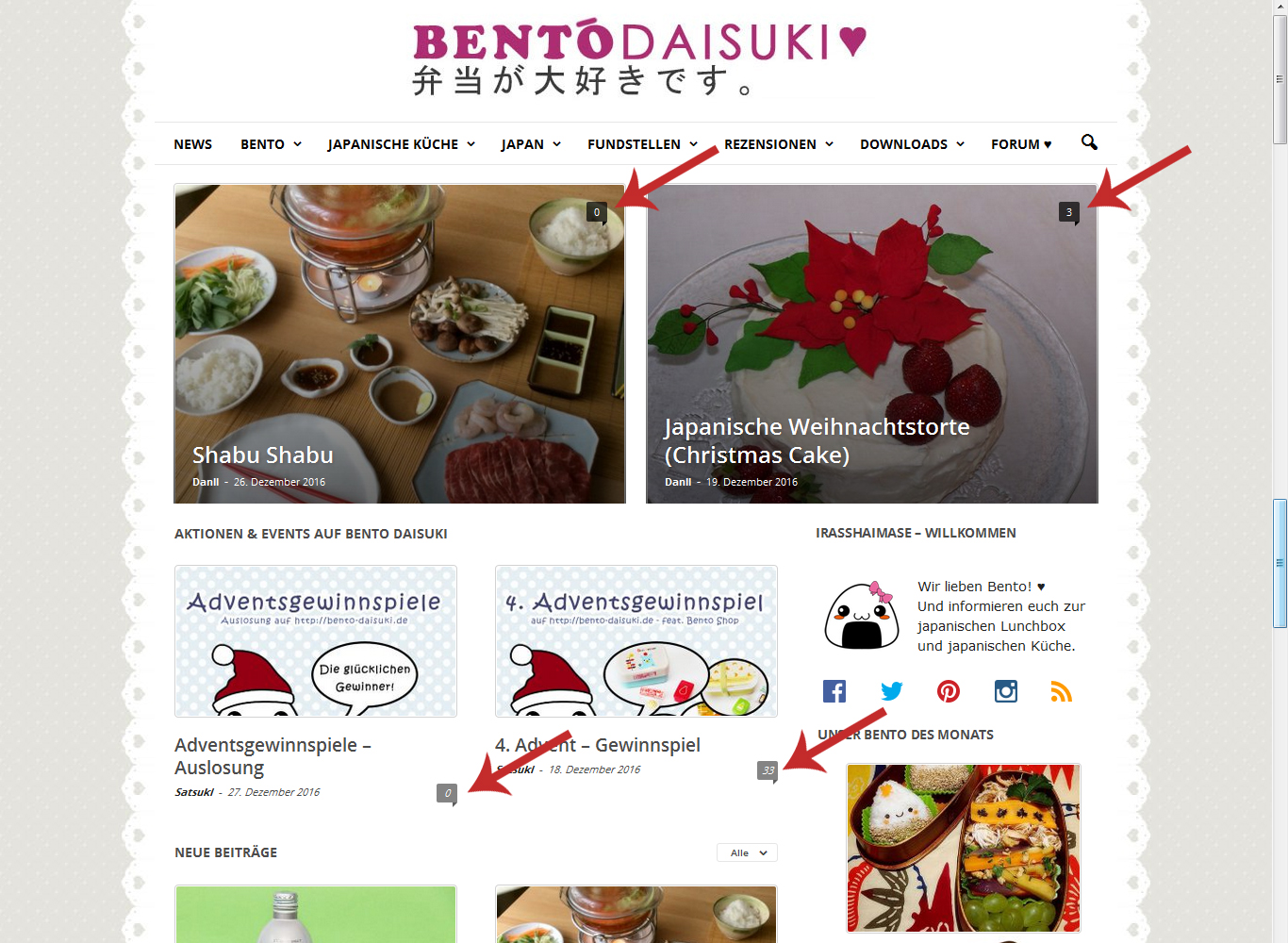
But with the update I have some NEW problems… Now the menue isn’t sticky anymore, the comment counter is back and most of my pictures are gone because you don’t gave us the latest version of Visual Composer…
Best regards
Hello Satsuki,
Please keep in mind that our theme allows you three way of theme updating as you can see in our documentation here -> https://forum.tagdiv.com/newsmag-how-to-update-the-theme/ The surest and safe way of theme installing is FTP and we recommend to update your theme through this method. Notice that when a new theme version was released you will receive a notification on email.
Regarding on your second request, I have inspected your website and I did not saw any problems regarding on your images. All of these seems to work as expected. Also, the theme come bundled with the latest version of Visual Composer which is 5.0.1 as you can see here -> http://screencast.com/t/jECaNxaqOl
If you need more assistance in this regard and if your problem is still there, please provide some useful screenshots where to explain the problem.
Hope this helps!
Thanks for your understanding!
Hello there,
thank you for your fast answers and help! I will keep that in mind.
Now I solved every problem except the comment counter. In my theme panel I turned them off (in “Post and Custom Post Types”), but they are still there (since the update).
Have a nice day!
Hello Satsuki,
There is an option for it in Theme panel, like this -> http://screencast.com/t/zTZ7b4plJrLt
Thanks for the message!
