Hi,
1) How can I add a search function into the main menu for both desktop and mobile?
2) How can I remove the 2x grey lines on the home page in the ‘INTERVIEWS’ section:
https://smallcaps.com.au/wp-content/uploads/2017/04/Grey-lines-remove.png
Regards,
https://smallcaps.com.au

I need the grid lines everywhere else, just not on the area specified on the home page.
Will wait for Avada support to answer as I need the correct code.
Thanks though.

Hello WakeUpCallProject,
1)Unfortunately, I do not exactly understand what you want to achieve. If you want to add something similar yo should edit the functions.php core file and there you should add as you wish.
2)I guess that you solved this problem, right? -> https://www.screencast.com/t/tIYL5uQNQQcu
Thanks for the message!
Thanks for your reply.
1) Am after something like this: https://ps.w.org/widgetize-navigation-menu/assets/screenshot-3.jpg
So people can search by clicking a magnifying glass icon or search box in the main menu.
Or even in the top menu like my other site where there is a search box up top: http://www.hangthebankers.com
Is there an option or code that allows it? Or do you know of a plugin that would work?
2) towards the bottom of the home page: https://smallcaps.com.au/
In the interview section.
This image is from my home page:
https://smallcaps.com.au/wp-content/uploads/2017/04/Grey-lines-remove.png
Thanks
Hello WakeUpCallProject,
1)This website does not use our theme and we cannot provide support only that for our theme, sorry! -> https://www.screencast.com/t/h0mEZT8n5
2)Try the code below and place it in Theme panel.
The code is ->
.td-container-border:after,

    .td-next-prev-separator,

    .td-pb-row .wpb_column:before,

    .td-container-border:before,

    .td-main-content:before,

    .td-main-sidebar:before,

    .td-pb-row .td-pb-span4:nth-of-type(3):after,

    .td-pb-row .td-pb-span4:nth-last-of-type(3):after {

background-color: white;

}

.td-pb-row [class*="td-pb-span"], .wpb_column{

border-color:white;

}
Thanks.
1) ok, but am asking if News Mag has anything similar?
That other site was just as an example to show kind of what I want.
2) the code also removed the line in between my posts and the sidebar.
I only want the 2 lines gone on the homepage in between the investor videos.
Also the CSS section said the ‘*’ would slow down the site.
Is there another code we can try? 🙂
With regards to the grey lines it seems odd that they don’t appear here:
https://smallcaps.com.au/interviews/
But do on the homepage in between the videos.
Hello WakeUpCallProject,
1)Unfortunately, our theme does not have any such an option for search button in Top Menu bar, but only for Main Menu, sorry! If you want to achieve this, you should do some additional customization through the code and if you aren’t aware of these, please consider hiring a freelancer/developer o help you! Another alternative for you would be using a plugin with this functionality and check how it will work for you.
2)Unfortunately, I do not know from where you achieve that borders on your side because the theme with default settings do not contain these, sorry! I recommend you to check all of your customizations and try to re-organize in a fresh install and check the results. You should check our demo preview -> https://demo.tagdiv.com/newsmag/ and there you will not found any intermediate borders as you have, sorry!
Thanks for your understanding!
1) so how do I put a search option in the main menu?
2) Is there a support person there that can login to my wordpress and see what’s going on?
It doesn’t let me change from the default theme settings to make the border #ffffff or to remove it to ‘none’.
Hello WakeUpCallProject,
1)By default, the search option is located in main menu bar, as you can see here -> https://www.screencast.com/t/nBcIoAX1ba
2)You can send us an email at contact@tagdiv.com with your log-in information (wp-admin) so we can further inspect it closer your setup page. Provide the link to this topic so we can quickly identify you.
Thanks for the message!

Dear,
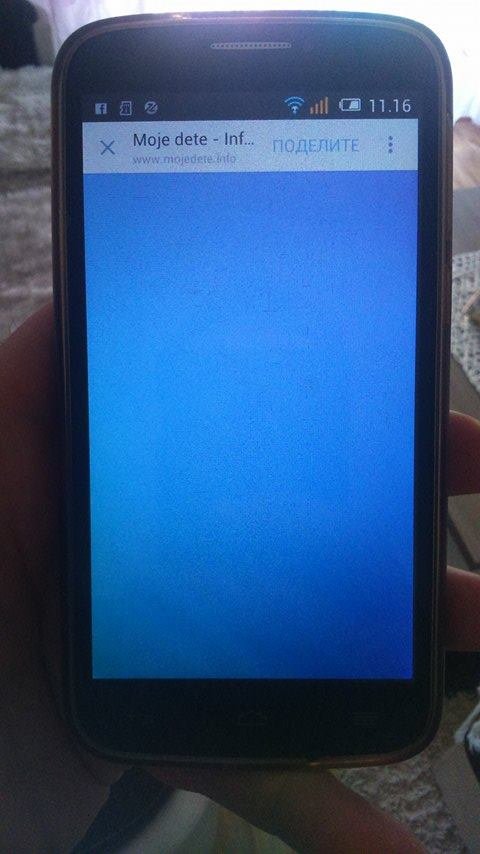
I have problem on my website http://www.mojedete.info. On some android devaces when I enter in over facebook, there is some blue screan as you can see in attachment. Could you help me please?
http://www.mojedete.info/wp-content/uploads/2017/04/18072620_10155218597467733_896012787_n.jpg

Hello pkonta,
I have inspected your website on an android device, like Samsung J5 and I did not saw any problems with your site. It seems to work as expected. What kind of browsers do you are using to open your website? Please notice that you should use a tested browser on your phone, like Chrome or Mozzila and do not use any other default phone browsers because that’s could be the reason of your problem.
Hope this helps!
Thanks for your understanding!