Hello guys.
I have created a homepage with some blocks at my website northbasket.gr. I face with a problem with the custom URLs I provide in the blocks. See for example ΕΚΑΣΘ or ΤΜΗΜΑΤΑ ΥΠΟΔΟΜΗΣ. If you click the first one, it redirects to another url(from a post) and if you click in second one, it appears broken link. Why this happens? I cannot understand it because also link seems to be right when you click and I have tried all of version but no result(for example “/εκασθ/” or “http://northbasket.gr/%CE%B5%CE%BA%CE%B1%CF%83%CE%B8/”).
Also I found that if I copy-paste the URL of second category(http://northbasket.gr/%CF%84%CE%BC%CE%B7%CE%BC%CE%B1%CF%84%CE%B1-%CF%85%CF%80%CE%BF%CE%B4%CE%BF%CE%BC%CF%89%CE%BD/) I get a broken link even if I get the copy from menu item!

Hi,
The URL for the block should direct to the address you want if the link is valid. If you want to direct the block title to the category page enter the address of the category
– https://www.screencast.com/t/JXLtuaIFT8S
– https://www.screencast.com/t/pP7txumnYzU
The current link you entered is not valid from what I can tell
– https://www.screencast.com/t/TqFpOBGpv – https://www.screencast.com/t/4fiXSOCttsk
Try creating a test page and enter a test address to see if it directs as intended, like google.com for example.
If this is not working, maybe there is a plugin or custom code that is affecting this. You could try to disable all your plugins except Visual composer, as a test and see if it works properly.
Thanks
I found the problem!
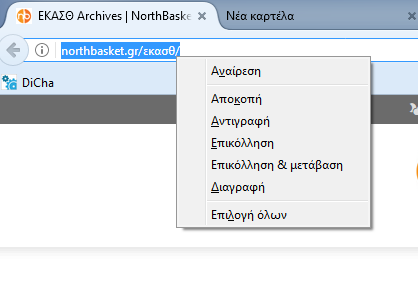
The problem is with the encoding of browsers! I don’t know why this happens but I am sure that this is the problem! Look images below:
This one:
https://i.gyazo.com/7b985122cc8ce031b6d26c889730388c.png
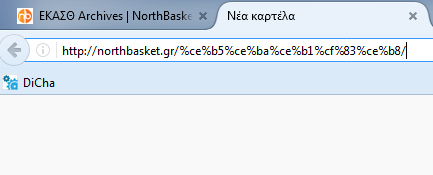
make the url encoded to this one(in firefox):
https://i.gyazo.com/c185822b0957406e0d9d0023d925b917.png
This encoding work perfect, the other in chrome not!
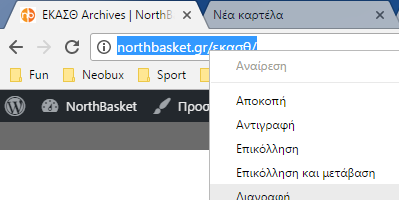
But when i try to copy from chrome:
https://i.gyazo.com/05306e320794720e5c49b9fcc2469837.png
I get this encoded URL:
https://i.gyazo.com/742a3d30038daa024da5cf3799996d2f.png
Why this may happens? Also I realized that if I am on page:
http://northbasket.gr/εκασθ/ and copy paste the URL in chrome browser it redirects me to another page!!!! Is this normal?
Please try it and tell me if you can suggest any solution for this!
Hi,
It seems to be a chrome encoding limitation from what I can tell. Chrome has a auto-encoding detection and that is the result – https://www.screencast.com/t/TqFpOBGpv
From what I found there are encoding extensions that you could use, but I do not know this would solve the problem for other visitors. You could search online for this problem and see what solutions you might find.
As for the redirection, it seems that there is a 301 redirect on the page
– https://www.screencast.com/t/sIntkGSCrd1
You can check your htaccess file and see if there are any redirects present, or check if you have any plugins with this role.
Thanks