

Greetings. When I access TD Composer and the Custom Typography option the typographic menu does not appear but this:
separator – text_separator
f_header_font_header – font_header
f_header_font_title – font_title
f_header_font_settings – font_settings
f_header_font_family – dropdown-responsive
f_header_font_size – textfield-responsive
f_header_font_line_height – textfield-responsive
f_header_font_style – dropdown-responsive
f_header_font_weight – dropdown-responsive
f_header_font_transform – dropdown-responsive
f_header_font_spacing – textfield-responsive
f_header_ – clearfix
f_ajax_font_title – font_title
f_ajax_font_settings – font_settings
f_ajax_font_family – dropdown-responsive
f_ajax_font_size – textfield-responsive
f_ajax_font_line_height – textfield-responsive
f_ajax_font_style – dropdown-responsive
f_ajax_font_weight – dropdown-responsive
f_ajax_font_transform – dropdown-responsive
f_ajax_font_spacing – textfield-responsive
f_ajax_ – clearfix
f_more_font_title – font_title
f_more_font_settings – font_settings
f_more_font_family – dropdown-responsive
f_more_font_size – textfield-responsive
f_more_font_line_height – textfield-responsive
f_more_font_style – dropdown-responsive
f_more_font_weight – dropdown-responsive
f_more_font_transform – dropdown-responsive
f_more_font_spacing – textfield-responsive
f_more_ – clearfix
separator – text_separator
m1f_title_font_header – font_header
m1f_title_font_title – font_title
m1f_title_font_settings – font_settings
m1f_title_font_family – dropdown-responsive
m1f_title_font_size – textfield-responsive
m1f_title_font_line_height – textfield-responsive
m1f_title_font_style – dropdown-responsive
m1f_title_font_weight – dropdown-responsive
m1f_title_font_transform – dropdown-responsive
m1f_title_font_spacing – textfield-responsive
m1f_title_ – clearfix
m1f_cat_font_title – font_title
m1f_cat_font_settings – font_settings
m1f_cat_font_family – dropdown-responsive
m1f_cat_font_size – textfield-responsive
m1f_cat_font_line_height – textfield-responsive
m1f_cat_font_style – dropdown-responsive
m1f_cat_font_weight – dropdown-responsive
m1f_cat_font_transform – dropdown-responsive
m1f_cat_font_spacing – textfield-responsive
m1f_cat_ – clearfix
m1f_meta_font_title – font_title
m1f_meta_font_settings – font_settings
m1f_meta_font_family – dropdown-responsive
m1f_meta_font_size – textfield-responsive
m1f_meta_font_line_height – textfield-responsive
m1f_meta_font_style – dropdown-responsive
m1f_meta_font_weight – dropdown-responsive
m1f_meta_font_transform – dropdown-responsive
m1f_meta_font_spacing – textfield-responsive
m1f_meta_ – clearfix
That is, where this should appear:
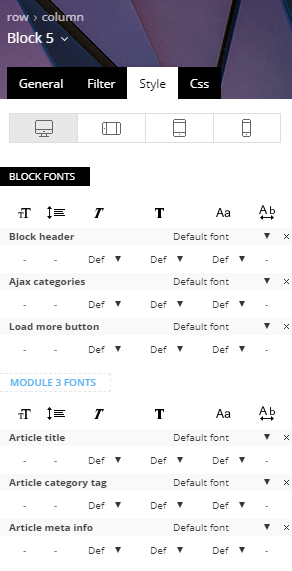
Instead that text appears without formatting
-
This reply was modified 8 years by
JavierVenegas.
-
This reply was modified 8 years by

Hello Bogdan. We did all that. We delete cache, we even reinstalled the update of the theme and its plugins. But the problem persists.
Hello again Bogdan. Resolved, suddenly, with a new connection, it appeared correctly. Thank you very much.
