Hello,
We’ve recently converted our site at https://www.theapex.racing over to a fully customized Cloud Template-based layout. We also use Blubrry’s PowerPress plugin to turn one of our categories into a podcast feed.
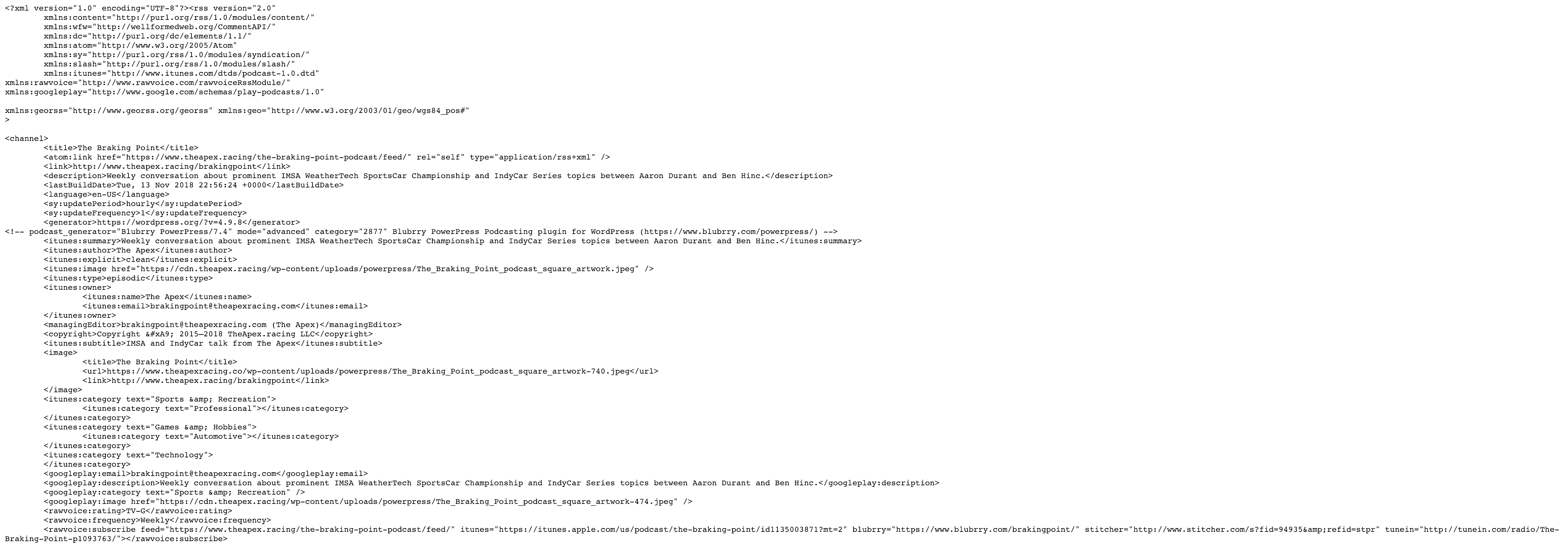
Using stock Newspaper, the plugin worked fine — you can see in this image where Blubrry’s additions to the category feed begin: https://f002.backblazeb2.com/file/dropshare-adbh/Messages-Image-316474783-/Messages-Image-316474783-.png
After I applied a Cloud Template to the category, the podcast-specific elements that Blubrry adds have disappeared as seen in this image: https://f002.backblazeb2.com/file/dropshare-adbh/Messages-Image-1686072585-/Messages-Image-1686072585-.png
Here are links to the category and RSS feed in question:
- https://www.theapex.racing/the-braking-point-podcast/
- https://www.theapex.racing/the-braking-point-podcast/feed/
My question at this point is: What about the Cloud Template being applied to the category would prevent PowerPress from being able to make changes to the category’s RSS feed. Second, what can be done to fix the issue?
Update:
I posted this issue to PowerPress plugin support forum and got this response:
Looking at your screenshots, it appears the theme was stripping the category feed of all of the settings applied by PowerPress. There is an option in PowerPress >> Settings, Advanced Mode >> Feeds tab to keep outside plugins from modifying podcast feeds (it can also help with theme-based issues sometimes). If you’re still having trouble, enable this option and save the changes.
Other than that, all you can do is get support from the theme developer. If the category-based podcast feed is working as expected under a default theme, the issue isn’t with PowerPress.
The full thread is located here: https://wordpress.org/support/topic/powerpress-incompatible-with-tagdiv-newspaper-cloud-templates/#post-10878019
I can confirm that I had the setting he refers to turned on already. Even with the plugin set to prevent outside plugins from adjusting the RSS feed of the category, it is still unable modify the feed when a Cloud Template is applied to the category.

Hi,
I can’t say I could help you with this unfortunately. If the problem is only when using cloud templates, then the cloud plugin would be the problem.
We haven’t made any testing in this matter with the plugin and cloud templates, I don’t know what could be the problem.
Maybe consider not using a cloud template for that category and have a working podcast feed. Our plugin is still in beta so it’s functionality will be improved in various aspects, over future updates. I am very sorry for the inconvenience.
Thank you!
Thank you Simion for your response.
We’ve invested a lot of time in carefully designing our website using your Cloud Templates so reverting to the standard category template isn’t an acceptable solution, nor is discontinuing the use of the plugin that enables our podcast to work.
As an interim solution since I haven’t gotten a resolution that solves the actual problem, I have created a page that is identical to the Cloud Template originally created for the category and redirected the category to it.
This way, when someone accesses the category — https://www.theapex.racing/the-braking-point-podcast, they are transparently taken to the page at https://www.theapex.racing/the-braking-point. Because the category itself retains a standard Newspaper template, the functioning of the feed located at https://www.theapex.racing/the-braking-point-podcast/feed is unaffected.
This solution has worked fine, except we also use your mobile theme. By redirecting the category to a page, we have to create a mobile page that acts like a category.
Is there a way I can add a post loop of posts from a specific category on a mobile page?
Hi,
Glad you found a workaround. That new issue would require some modifications to the mobile theme files. You could copy the homepage loop code in the page template file
– https://www.screencast.com/t/M9HjPo2HBl2
– https://www.screencast.com/t/95x0Twob
Then wrap that code in a condition like this to make sure it appears only in the page you want
– https://developer.wordpress.org/reference/functions/is_page/
Next add an additional parameter to make the loop display posts from a specific category you want
– https://www.screencast.com/t/dnoo7WyqkZy
That should display posts from a specified category in that page only.
Thanks