

Hello tagdiv !
1. How to remove latest articles in homepage? I’m using default demo, but I just want to delete latest article from front page but keep the same DEMO content!
2. As my website is in Arabic, and I didnt know that Newspaper doesnt support RTL, unfortunately among other errors there is this mistake in the theme.
== Below every post , there is “find related articles” , How can I fix this so that picture displays in left instead of appearing on right ( because they are hiding related articles titles ) this problem only appears when I navigate website with mobile.
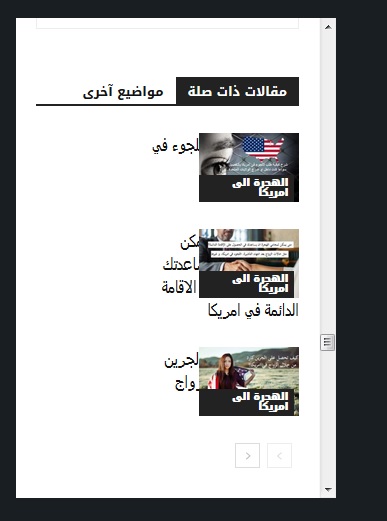
—- ————————————————————————–
I want to help NewsPaper in turning their theme into RTL support !
you might find this helpful! in the next update !
When website language turned to any RTL language , the menu is broken ! I used this CSS to fix it ! and PS Custom CSS in theme panel doesnt work at all!!!
#td-mobile-nav {
position:fixed;
}
.header-search-wrap {
display: none;
}
—– I hided search button because of an error in dispaly – it is mixed with menu button in the right! –
I will try my best to help TAGDIV !

Hi,
1. Please read our documentation for Page templates -> https://forum.tagdiv.com/page-templates-2/
You need to set a template with out latest articles.
2. If I’m right you are using theme mobile if is so you need to set the css in mobile theme not in custom code
https://www.screencast.com/t/IoE4DsIL
Thank you for your understanding.
Hello,
First of all regarding question 2: I’m not using the theme mobile , please see the picture and read what I wrote to understand what is my problem.
I gave that CSS code to help NEWSPAPER theme to support RTL in next update, I’m trying to find issues with RTL and fix them. the CSS code has no relationship with my 2nd problem.
Hi,
Please notice that our theme has not been optimized for the RTL version and also, do not support this way, sorry! If you are disappointed about this case, we can provide a full refund, sorry!
For example in this case
https://www.screencast.com/t/McrM2nws
https://www.screencast.com/t/2AOF9AH1NW
results: https://www.screencast.com/t/hVfoSOBwn
Thank you for your understanding.
Please note that the issue appears only in when I visite my website via mobile and Ps: I am NOT using the mobile theme.
Thank you in advance
Hi,
Please add this custom css in Newspaper>Theme panel>Custom code>Advanced code> Phones
.td_block_related_posts .td-module-image{

  position: relative;

  float: left;

}
See results: https://www.screencast.com/t/hcEZvS9mp
Thanks.
Work perfectly 100% ! Thank you Boss
Please note that Newspaper>Theme panel>Custom code> doesn’t work at all ! so I always add CSS in Theme> customization > Custom CSS
——–
Nevertheless, I’m going to submit an article about all RTL errors , so that the team can fix them, I have a feeling that NEWSPAPER 10 is going to support RTL
It makes me angry to see other RTL theme in themeforest stealing all original ideas from TAGDIV to put theme in their themes.
So I’ll help NEWSPAPER THEME to Support RTL and be the N01 RTL THEME !
Thank you again .
Best regards
