

Dear tagDiv Support,
I run a multiple author website, and I set JetPack only for Administrators and Editors. So I was sure that only Administrators and Editors were able to see stats.
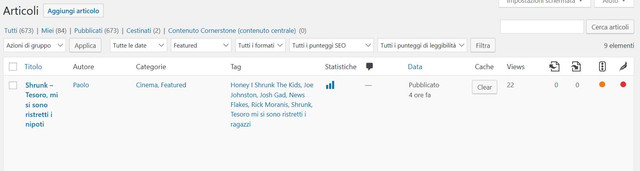
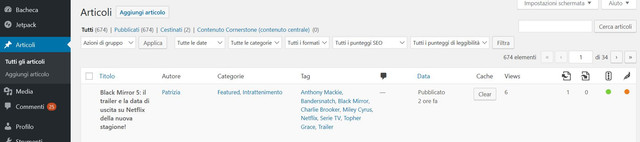
Unfortunately, I discovered that in any case all users can see POST VIEWS COUNT on back-end dashboard.
I really cannot show this sensitive data to authors and collaborators, these are for me non-disclosable information.
So I pray you to support me in making proper changes to avoid that authors and collaborators can see Post Views Count on back-end dashboard. Only Administrators and maybe Editors can see them.
If not possible, I can also accept that no one can see Post Views Count (I can use Analytics, JetPack stats, etc), but it urges for me to hide these non-disclosable information.
Waiting your courteous reply,
Best Regards,
Marco M.
-
This topic was modified 7 years by
marclaude.

Hi,
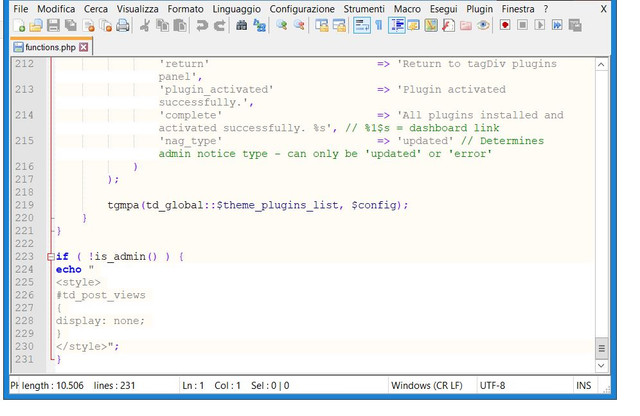
In order to show the views counter only for admin you need to set this custom code in wp-content/themes/Newspaper/functions.php
if ( !is_admin() ) {

    echo "

<style>

#td_post_views

{

  display: none;

}

</style>";

}
https://www.screencast.com/t/1XhDW6v4
Thank you!
Hi,
I checked that code again, and for me is working on the backed ( posts), but is look like is make some conflicts and change the fronted layout.
Please remove that code from theme file and try this one -> https://www.screencast.com/t/mBr94Famvr in wp-admin/edit.php
if( current_user_can( 'administrator' ) ){}else{

    echo " <style> #td_post_views { display: none; } </style>";

}
Please make sure that you clear all cache
Thank you!
Dear Calin,
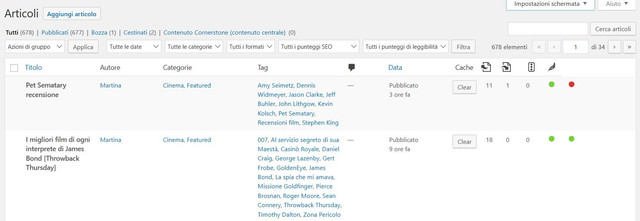
I applied your suggestion, and it happens something strange: “Views” label disappeared, but the views count numbers are still there in their column, even if now it is an untitled column.
Something wrong from my side?
Let me know,
Thank you and best regards,
Marco
