

In the theme panel, header section when selecting a cloud library theme of “No Template” I get the Main Menu, Sticky Menu option.
When I select any other option I don’t get the sticky menu option.
The problem is that there is a menu that appears when I scroll up and I can’t find where to set it. See the attachment.
Where do I set it?

Hello !
When using Cloud Template header the sticky header must be edited with tagDiv Composer Header Manager and you can set it up from here. If it is empty you will have to add content in it in order to display: https://www.screencast.com/t/Bzi8kbneOKQc
Thank you !
Hi Vlad,
I created a new header based on Header Template 10. As you can see in the Header Manager the Sticky Menus are set to off.
Yet when I scroll up on the site a menu appears. How do I disable this? I don’t want a header or menu appearing when scrolling up.
I have the latest version 10_10.1 installed.
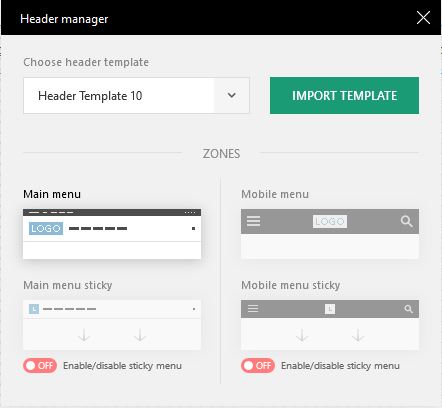

-
This reply was modified 6 years by
pscholtz.
Finally figured this out…
You need to go to Header Manager, then select the Sticky Menu to enable it. The editor will show the sticky menu, don’t close the Header Manager, hold your mouse over the header/menu and click Row in the popup, then without moving your mouse right click and select Clear. Now in the Header Manager set it back to a non sticky menu. Save and refresh.
