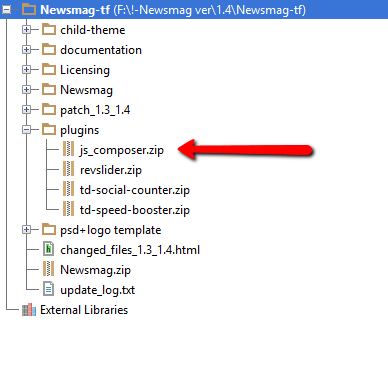
The Visual Composer plugin that comes with the theme is licensed to the theme, the license specifies that only we can provide the updates and you don’t have to buy it or register it. We provide updates on a regular basis, after we test the plugin for theme compatibility the plugin is included in the latest theme update, inside the Plugins folder:
https://forum.tagdiv.com/wp-content/uploads/2015/01/visualc_newsmag.png
Here is the guide on how to update the plugin – https://forum.tagdiv.com/how-to-update-visual-composer-plugin-wpbakery/
Conclusion – We’re testing the plugin latest version, if everything is ok we will include it in the next update and only then you can update the plugin by downloading the theme latest version and following the procedure presented in the plugin update guide.
Emil G.



Hi,
Try from here: http://screencast.com/t/3qAexpc5bDn but please note that we don’t guarantee it will work as it hasn’t been tested with CPT.
Thanks for the message!
It works! Thanks Lucian.
I have another question about the visual composer. In Backend Editor, we can set the column by clicking on the pencil icon (Edit menu this column). On the tab “width and responsiveness”, there is an option to hide columns on certain devices that are checked in. I try to check on some screens, but when checked from smartphones, there is no difference with the previous. This function does not work.
http://screencast.com/t/K9NAxYL0
How do I fix this? The goal is to ensure that the content on the small screen (smartphone) is less than on the desktop, so access is faster and more efficient. Thanks.
Hi,
Those VC features haven’t been tested. You can use the advanced css filed from theme panel to add css that applies just the a specific device screen width.
Ex: This will hide the post title from post template 8 on mobile only: http://screencast.com/t/rmzEKl71H
You can use them and built css for the parts sections you don’t want to show on mobiles/tablets/dektop screens and add your css like in the example.
You can also use this VC general setting: http://screencast.com/t/R6d2ES9hWz and set a custom class which you can use to target and hide the sections you don’t want.
Please open anew topic and post you questions in the main forum.
Thanks

Hello Support,
I just purchased Newsmag today. After I activated the theme, the plug-in WPBakery Visual Composer requires an update: http://www.screencast.com/t/TIvOsnesLD2 . I followed the instructions that mentioned on top of this thread, but I couldn’t manage to update it. Inside the setting of VC it requires its license key, which was not included with my purchase: http://www.screencast.com/t/YLsrRiR5ti . Could you help me to fix this?
Regards,
lex
-
This reply was modified 11 years by
enoxus. Reason: Image link was broken
Thanks for the reply. I’ve checked the VC plugin developer’s site and they have a pretty clear statement, something like this: If you did Not bought the VC plugin separately and you’d bought a theme package including the VC plugin, you will need to wait the theme developer to upgrade their package instead of updating the VC plug-in separately.


The license for Newsmag has nothing to do with Visual Composer.
The visual composer does NOT need a license key.
The license key from Themeforest for the Newsmag theme is ONLY to authorize the THEME if/when it asks you to do that.
As clearly noted in the theme docs, you cannot update the bundled version of the plugin yourself. You don’t have a license for Visual Composer. You have a license for the THEME, which includes a ‘bundled’ version of Visual Composer TIED TO THE THEME. The bundled version is ONLY updated when tested compatible with the CUSTOM modules and functions of the theme. So, the bundled version of the VC plugin is updated when the theme is updated, NOT separately.
As noted in the theme docs (links right side of this page), you can simply ignore any message in the WP admin panel about “update available” for Visual Composer. You cannot update it separately from the theme … PERIOD.
Hope that helps clarify!

After the latest update to visual composer our server CPU usage skyrocketed so we had to disable it. Have you tested it’s resource usage before including it in the latest package? We can’t use it in its current load. We are on dedicated hosting with very little usual load and tested it in different hours -loads of the day. Even the service provider sent us a mail regarding system resource usage of the bundled plugin. We had no such problem before the Theme update to 1.5 and bundled Visual Composer plugin.
Kind regards,

Hi,
The size of Visual Composer plugin has been increased because they have added some new features: https://www.youtube.com/watch?v=sBvEiIL6Blo
But you can use the latest theme update(1.5) with old version of the plugin(4.3.5).
Thanks!
Thank you for your reply. Unfortunately it’s not a matter of file size, but a matter of server resource usage. An minimal load of 3% jumps to 90% with this new version.
As for returning to previous version of Visual Composer, I can only download latest Newsmag from Themeforest and included Visual Composer package. Is there a resource for downloading older versions?
I believe a better course of action for you would be checking the CPU usage of Visual Composer and warning the developers. Perhaps your test load is too low, because when 500 to 1000 concurrent online users visit your homepage, it’s load on server becomes too big. We are using your theme on our site which recieves millions of pageviews per month, not a small personal blog.
I can’t warn developers because I have no license, as I’m using the bundled version that comes with the theme. I’m aware that this is not a directly Newsmag or tagdiv caused problem but you are responsible for your choice of bundled software and it’s nearly an integral part of creating a nice homepage for your theme. Since you have a deal of distributing it with your theme to increase user experience, it should be your duty to keep it positive.
Thanks,
-
This reply was modified 11 years by
aleister. Reason: Added more information
Hi,
Thanks for your message and sorry for the inconvenience!
We are doing our best to make this plugin full compatible with our themes however because of the new features added the plugin dose use lots of resources and there is little that we can do at this point. We will also address this to plugins developers and we will further investigate this.
If you don’t have the previous version of the plugin please send us a request for it via email at contact@tagdiv.com and we will send it to you.
If eventually you can’t use the theme or if you are unsatisfied of it’s performance, we can provide a full refund. Please contact us via email at contact@tagdiv.com for that.
Thanks

Hi,
@Boricua1 what theme do you use Newsmag or Newspaper?
If you use Newsmag lastest version(1.5) you should have Visual Composer plugin version 4.4.2 and for Newspaper lastest version of the plugin is 4.3.5
Please follow this guide to update Visual Composer: https://forum.tagdiv.com/update-the-visual-composer-plugin-wpbakery/ and also remove and install the VC plugin from the /plugins folder which came with the theme files.
Thanks!
-
This reply was modified 11 years by Alin [tagDiv].

Hi,
Please make sure that you enabled all elements from Settings -> Visual Composer and save settings: http://screencast.com/t/oY4yVWZW
Thanks!

Hello All,
Quick question:
I am guessing the VC plugin that came with this purchased theme is only particular to this theme ? And will not work on any other theme ?
I just want to be clear. I am pretty sure it is, just clearing my doubts.
Thanks much,
-Asim
Hi,
Yes, the Visual Composer that comes with our theme is full version(unmodified) of the plugin.
Thanks!

When I activate the visual composer plugin my website doesn’t work, I just see a white screen. Do you know what is going wrong?
Hi,
@marcos ponce
Please provide more details about your theme and Visual Composer versions and your site URL so we can take a look.
Also please disable all plugins, leave just Visual Composer active, empty cache and see if you still have this issue.
Thanks!