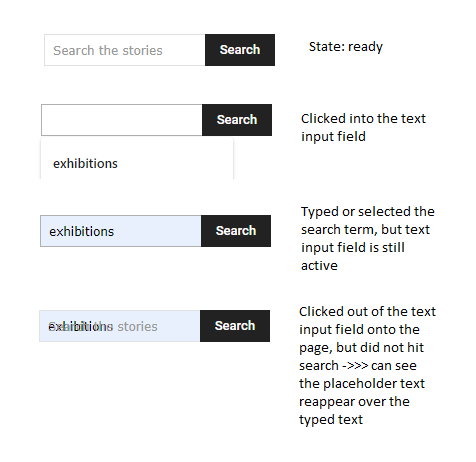
Click into search form.
Start typing and placeholder text disappears.
Click out of search form.
Placeholder text reappears over the typed text.
How do I make it that: placeholder text does not reappear over typed text.

Hello!
The placeholder disappears because when you click on search, the input is automatically focused there. If you click-right on the search button, then you can see again the placeholder name. A workaround there could be to delete the placeholder from the element’s settings.
Thank you!
Hello Bettina
Tx for feedback.
I like the placeholder so would want to keep it.
Let me explain in different way, and please see image of issue here: https://i.postimg.cc/yxXgxFQH/Placeholder-text.png
1. When I click into the search form text input field the placeholder text goes away (expected).
2. When I type into the search form text input field the what I typed shows and there is no placeholder text (expected).
3. When I click out of the search text input field (not clicking the search button, just somewhere else on the page) so that the text input field is no longer active, what I typed keeps on displaying, but the placeholder text reappears (over the text that I typed).
*In reference to the above post: The problem is that the placeholder text reappears over the typed text when you click out of the input field.
So my question is:
When the text input field already has some writing in it, is there a way to make the placeholder text not display when that input field is not active?
Tx!
Okay. Tx for feedback. I will correct issue on site with custom css.
Maybe devs will resolve the weird transition in future rollout.