Hello all,
I want to add this shortcode [td_ad_box spot_id=”custom_ad_1″] to my articles. I am trying to use the eco do_shortocode like this:
echo do_shortcode(‘[td_ad_box spot_id=”custom_ad_1″].
Now, where do I put this code in order to load it just below the previous/next article buttons at the end of articles?
Do I need to use this:
<?php
echo do_shortcode(‘[td_ad_box spot_id=”custom_ad_1″]
?>
And which file do I need to edit and at what part to add it?

Hi,
Please add the shortcode in the post template that you want(loop-single.php is default style)like this: http://screencast.com/t/nh21p2cM
Thanks!
Hi, with Adsense that works fine. But when I want to add this code:
<div id=”taboola-below-article-thumbnails”></div>
<script type=”text/javascript”>
window._taboola = window._taboola || [];
_taboola.push({
mode: ‘thumbnails-a’,
container: ‘taboola-below-article-thumbnails’,
placement: ‘Below Article Thumbnails’,
target_type: ‘mix’
});
</script>
It shows this http://screencast.com/t/nh21p2cM
Hi,
The theme Ad system was designed for Adsense and custom banner(image)+link ads, with other ad systems it may not behave properly. You can try to add all code in the template below the previous/next article buttons, but I’m not sure if it will work.
Thanks!
Hi,
For some reason it started working suddenly. What I want now is how to add a line just before the beginning of the article.
I want to make it from this: http://i.imgur.com/FRKdXy8.jpg
To this: http://i.imgur.com/bHEVhtG.jpg
Thanks
Hi,
You can do that using custom css. Please use inspector tool and add the border for post style that you want: http://screencast.com/t/toeztjmjRLua
.single_template_5 .td-page-wrap .row-fluid:first-child{

border-bottom: 1px solid black;

}
If you don’t have basic css/html experience you can always hire a professional to do this for you as we cannot provide any custom work for the moment. Sorry!
Thanks!
Hi,
One more thing. I am very annoyed by the fact that on the homepage, the thumbnails of the recent posts are not in a 16:9 ratio. All my images are on a 16:9 ratio and that are cropped out on the homepage. Is there any way to make them appear with the ratio of 16:9?
Hi,
Please check what modules do you use on homepage and try to change the size for those images from functions.php: http://screencast.com/t/uZIUSNAY8 and then regenerate your thumbnails using this guide: https://forum.tagdiv.com/how-to-fix-strange-thumbnails/
Thanks!
Hi,
One last thing. Is there any CustomCSS to make the text inside code tag look like this? http://i.imgur.com/HvgFOwf.png

Hi,
Use your browser’s inspector to check thew css for the code tag from this page for eg: http://screencast.com/t/I5PeToD7Op ..copy it and adjust it as you like.
Thanks
-
This reply was modified 11 years by Lucian.
Hi,
Is there any way to make the header 8 color with gradient?
One more thing,
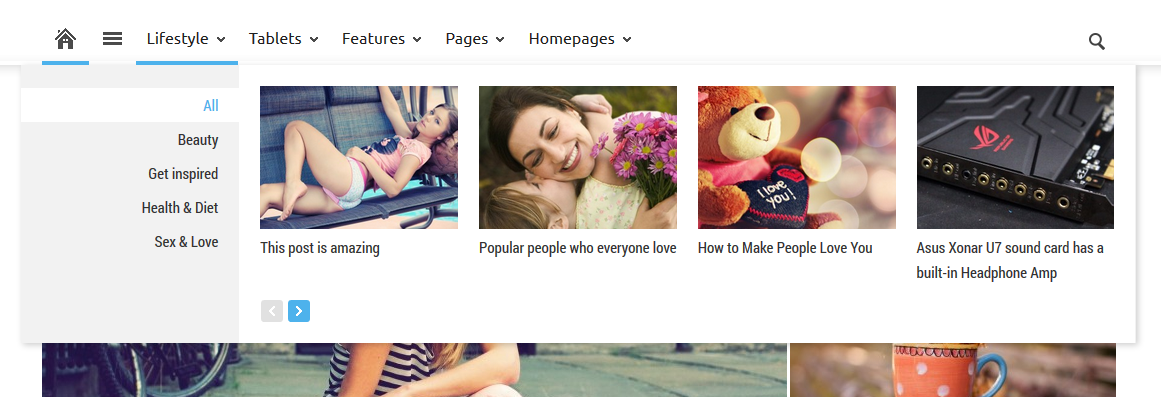
If you go here jayceooi.com, you can see that on the main menu there is a section called Featured and when you hover over that, it drops down showing articles. How can this be done and can it work on other categories as well? So if I add an category Reviews and it drops down showing the latest articles from this category.
Hi,
Provide more details about header 8 gradient as I don’t know what you mean.
Please follow our documentation about megamenu: https://forum.tagdiv.com/how-to-use-the-megamenu/
Thanks!
Hi,
At the moment, I am running Style 8 header (logo and menu in the same line).
The problem is that the theme settings allow you to set only one color for the header menu. I want to add a gradient to it. So the top of the menu is blue and the bottom is lighter blue.

Hi,
You can try to add background using css code: http://screencast.com/t/9g1oaC7WKLI
.td-header-style-8.td-menu-background {

background: linear-gradient(to bottom, rgba(18, 112, 237, 1) 0%, rgba(26, 150, 215, 0.23) 100%) !important;

}
Thanks!
That absolutely worked. But I am annoyed by that while line below the menu! Is there any way to remove it? But of course, I still want the blue line to show up when I hover to a category.

Hi,
The mega menu worked fine. But when I try to add sub menus, it doesn’t work.
I have configured it like this: http://i.imgur.com/PBFqcK3.png
Where Software is a normal menu while the sub items are set as mega menus.
However, they appear like this:


While I want them like this:
https://forum.tagdiv.com//wp-content/uploads/2014/02/2014-02-24_1704.png
What am I doing wrong?
And also, I am trying to make the space between the menu and the featured image in template smaller.
When I use element inspector and add this:
.single_template_3 .post .td-grid-wrap {
padding-top: 10px;
It works, But when I add this to Custom CSS it does not work.
Hi,
Please read the documentation, you don’t have to add sub-items You have to use a parent category if you want to have sub-categories. Also please make sure that the Item menu used as MegaMenu is in root of the Menu and don’t have sub-menus inside: http://screencast.com/t/ylITFpdn42 – http://screencast.com/t/NEqH3M2wU
Result: http://screencast.com/t/nwo4ngcfr
Please provide a link and more details about that so I can provide an accurate solution. Also you can try to use !important to your padding value:
.single_template_3 .post .td-grid-wrap {

padding-top: 10px !important;

}
Thanks!
That did the trick.
1) What is the code for the default template? For style 1 is .single_template_1 and so on, but what about the default one?
2) Can the white line below the menu get removed? If it can, I still want the blue underline to be shown when I hover over an category. http://i.imgur.com/L4ydlLB.png
These are my last two issues.
3) I successfully set up the mega menus. SO the parent category is Software and the sub one is Mods. The link to the mods category is site.com/category/software/mods. Is there any way to make it just site.com/category/mods?
If not, does this way of arranging categories damage SEO?
4) On my homepage, I have a big slide at the top and below, latest articles. Is there any way to remove the latest articles part so the article area can be as close as possible to the big slide? http://i.imgur.com/hf93sIS.png
Hi,
1. Unfortunately the default template doesn’t have a class like the others styles. You will need to add the the css code on .single class and rewrite it on others templates using those classes like .single_template_1 and so on…
Also for example if you want to change something for content only on default style you can add an extra class to the content like this: http://screencast.com/t/sYESDrlY – http://screencast.com/t/rp9O7ZcZ2OX
2. Please try this custom css in Theme Panel > Custom Css: http://screencast.com/t/TwdVKRFy01
.td-full-layout .td-menu-background:after, .td-boxed-layout .td-menu-wrap:after{

display: none !important;

}
3. You can try to find a plugin that will help you to change the permalinks.
4. I’m not sure wht you want to remove. If you want to remove the “Latest Articles” title you have this option from backend: http://screencast.com/t/1JuOiR8kg7
Thanks!
Hi,
I sorted everything out but the first one.
All I want to do is to remove the space above the image. I have customized loop_single.php to show the featured image above the title. Now I want to remove the space above the image between the menu. I can do so by adding padding but looks like it cannot be done with the method you gave. I successfully removed the gap on style 3 by using this code:
.single_template_3 .post .td-grid-wrap {

padding-top: 10px !important;

}
Now I want to do this on default.


Hi,
Unfortunately the default style doesn’t have a class like others templates, so you can add the css like this:
.single .td-grid-wrap {

padding-top: 10px;

}

.single_template_1 .td-grid-wrap, .single_template_2 .td-grid-wrap, .single_template_5 .td-grid-wrap {

padding-top: 49px !important;

}
Thanks!