Hi there,
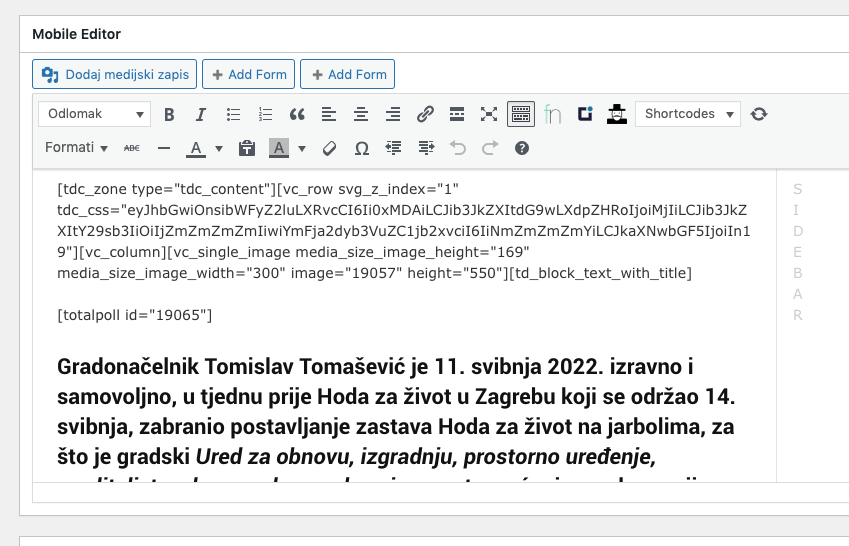
As you can see; When tagDiv Mobile Theme is activate, I see tagDiv shortcodes in pages (on mobile)… when I deactivate plugin, everything is ok. The problem is, that I want Mobile Theme plugin activ…
Plese check: http://www.vigilare.info/anketa
-
This topic was modified 4 years by
azinus.

Hello,
If this is a page, then please edit the page and check if in the mobile editor you have set this code -> https://i.imgur.com/ip4FnC7.png
Thank you!
Hi, i really don’t understand you’re advice…
On your screenshoot there is no any code, here is the screenshot of mobile version: https://vigilare.info/wp-content/uploads/2022/06/Screenshot_20220603-085132_Chrome.jpeg
and screenshoot of page edit: https://vigilare.info/wp-content/uploads/2022/06/Slika-zaslona-2022-06-03-u-08.51.42.png
Ok Anamaria, thank you.
But that is not write way… because, I have one design that I want on desktop and mobile. I’m really sorry that I cannot use TagDiv system to create mobile pages…. (Yes, when I have mobile plugin activate)
Look at these example: http://www.vigilare.info/doniraj – check it on desktop and check it on mobile…
Hello,
If you have the Mobile theme plugin installed and active, then you use the Mobile theme version. In order to display the responsive version, you need to uninstall the Mobile Theme plugin.
Also, please check this topic where I explained each mobile version -> https://forum.tagdiv.com/topic/mobile-version-not-working-properly-2/ and choose what mobile version you want.
Thank you!