

http://www.rcrwireless.com
The site is is going down due to 524 errors every 5 hours or so.
New relic is reporting that tdc_footer is causing the longest loading issues.
Theme name Newspaper
Theme version 11.5.1
Theme database version 11.5.1
Server software nginx/1.20.1
PHP Version 7.4.30
post_max_size 128M
max_execution_time 300
max_input_vars 3000
SUHOSIN installed false
WP Home URL https://www.rcrwireless.com
WP Site URL https://www.rcrwireless.com
WP version 6.0.1
WP multisite enabled No
WP Language en_US
WP Memory Limit 756 MB/request
WP_DEBUG False
Caching plugin No caching plugin detected
I will be emailing support with a login for the site, as well as some screen shots.
Server is hosted with WPMUdev
64GB memory
16 vCPU
640GB storage
30TB bandwidth
1M /month estimated visits



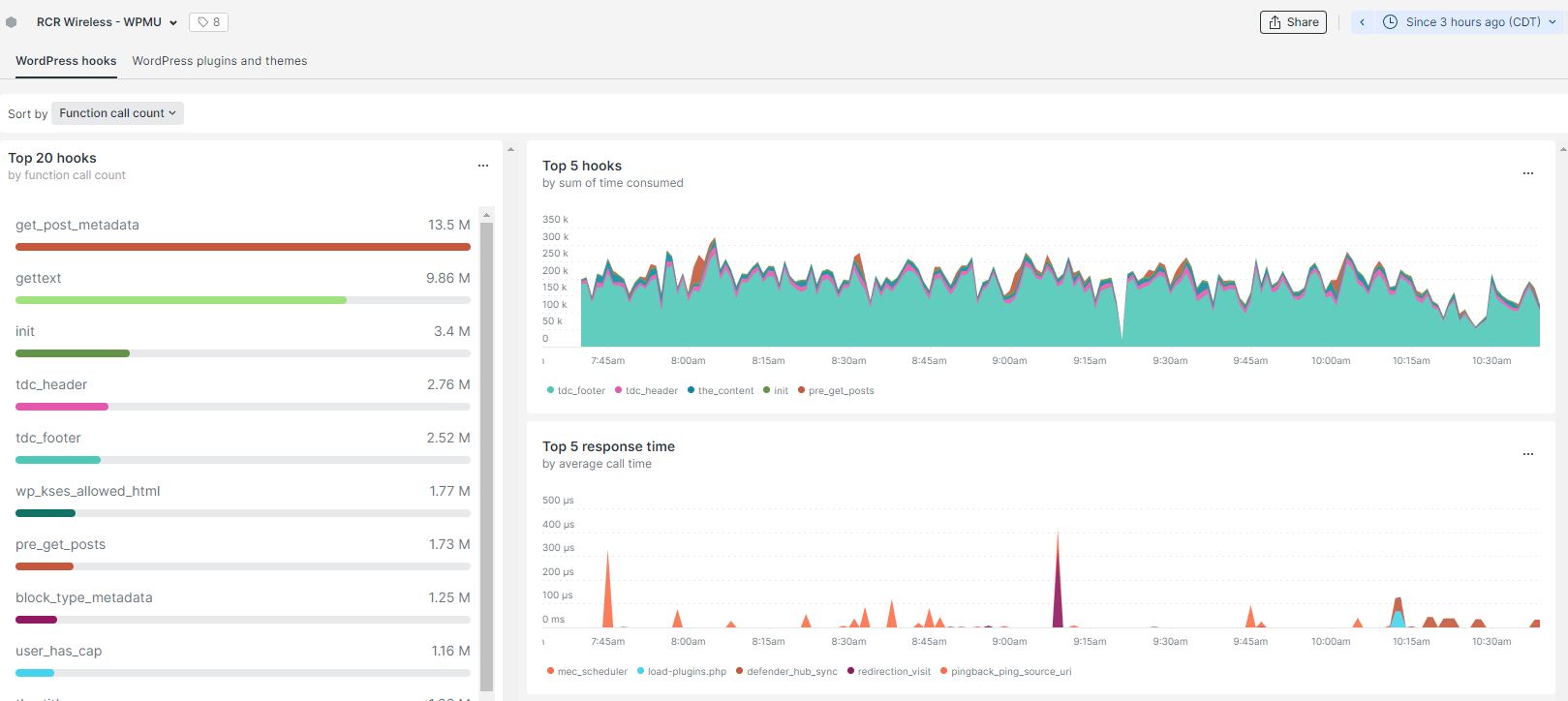

We are still experiencing severe issues with our site due to the slow queries caused by the TD_composer.
Similar to these other tickets:
https://forum.tagdiv.com/topic/very-slow-query-because-of-most-popular-news/
https://forum.tagdiv.com/topic/performance-issues-on-large-database/
even when testing the site with only tagdiv plugins enabled, the queries take quite a long time and will cause the site to timeout if there is high traffic.
This issue is critical and we have absolutely narrowed it down to the theme, its page builder, and the way it loads in posts per page.
Caching, optimization, server resources, plugin conflicts, etc have all been tested.

Most users, myself included, think that the “TD composer” plugin is a performance issue and that the developers somehow did not optimize the theme and the plugin. Even if we host it on a powerful server, it does not give the performance it should. Future updates should ONLY be for performance.

Hi,
On large websites with lots of content and high traffic most themes will struggle. In a way it is expected, a traffic spike for example can cause problems for the duration. Deactivating the composer is practically deactivating the theme, the composer is the theme basically.
To try and see if there is an improvement in the matter, I suggest reducing or removing temporarily the number of ajax pagination used.
For example https://i.imgur.com/ImkD7Qz.png Or replace that block with a post loop element and use numbered pagination.
Or here in the post page https://i.imgur.com/DTBWoxi.png Or anywhere else where ajax pagination is used. Try it as a test if possible.
Also maybe consider using either the cloud library plugin, or the standard pack plugin. Use one or the other, and deactivate the one you are not using. This is why we separated the theme options in 2 plugins, to try and improve the performance, assuming only one of them is used.
Cleaning the database periodically/regularly if possible does wonders as well. There are plugins that can be do this on a schedule even, like this one I believe https://wordpress.org/plugins/advanced-database-cleaner/
Also if possible, and you haven’t already, I suggest using PHP 8. There should be quite a difference in performance between for example PHP 7.4 and 8.
Our developer team have improved the composer drastically since it was introduced a few years ago. Maybe not every update contains improvements, but the next in line surely will. They will try to optimize it further.
Thank you!
Hello @Eighthats!
Some elements have different styles of pagination. The ajax pagination is the one which creates the multiple queries to the database, but you can choose other style of pagination.
We will try to improve this theme more and more to optimize also these aspects.
Thank you so much for understanding!
Hello @eighthats!
Please try to use the element called “Posts Loop” with the “Normal numbered” pagination.
Thank you!
Looks like the flex block using ajax was absolutely the problem.
I changed to the post loop for the main content area, and removed any blocks using ajax from the footer.
All performance stats on the site dropped by 50% pretty much right away.
Aug 24th – 10am-11am
Response time: 1.36s
CPU Utilization: 97%
Memory Usage: 13GB
Aug 31st – 10am-11am
Response time: .592s
CPU Utilization: 46%
Memory Usage: 7.5GB
For anyone else having these issues:
Don’t use any blocks / elements with ajax to pull in post data unless you absolutely have to.
Additional Problem:
When using the post Loop on element on the home page, with numbered pagination,
if you click any of the numbers, it goes to a blank page.
I had to change it to a load more button for now, but i’ll pull a copy onto staging to show and then link it here.
Hello @eighthats!
Please check the console if you have any error when this effect appear. If not, then please check this topic: https://forum.tagdiv.com/topic/articles-second-page-dont-work/
Thank you!


