https://www.theblackmorevale.co.uk/
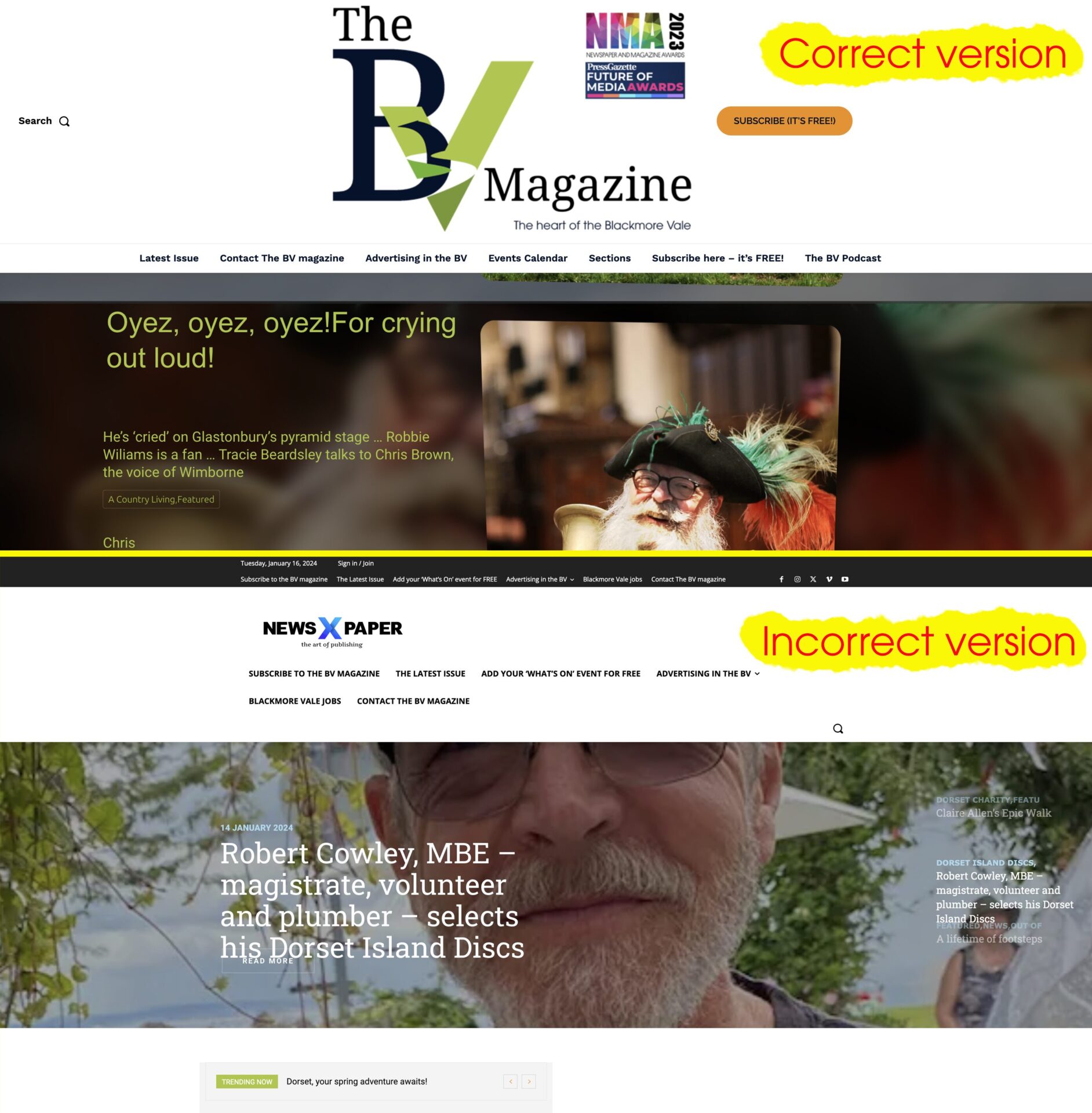
When I make changes to the website – even just creating a new blog post – the site displays incorrectly in Firefox; see a screenshot here https://www.theblackmorevale.co.uk/wp-content/uploads/2024/01/Screenshot-2024-01-16-at-14.02.52.jpg
The header is changed, and the logo defaults back to the ‘Newspaper X’ theme header.
I can easily fix it by manually clearing the cache (I use WP Rocket plug in), and then all is well again – but obviously I don’t want this happening at all.
I can only replicate it in Firefox, never in Chrome.

Hi,
I have checked using Firefox, but for me, this is displayed well https://i.imgur.com/d366KG8.jpg. Please clear the cache of the browser.
Thank you!
I’m sorry, it’s clear one of us is confused – maybe it IS me.
The incorrect Newspaper X version of the home page that appears has nothing to do with any form of the website which I have ever used, nor is it any part of any of the changes made to the site which cause it. Publishing a new blog post should in no way affect the appearance of the header of the home page.
So if I read your reply correctly, are you in fact telling me I need to install an additional 3rd party plugin to force every visitor’s browser cache to refresh every time I make a change to my own website?
My own browser is not the problem – I use Chrome, and it never happens for me. But every time it happens I get notified by one of the thousands of people who do see it. It’s unprofessional, harming my business branding and at this point I either need to know how to make it stop or simply switch away from the tagDiv system.
No – it’s not displaying the error right now because I have cleared the website cache and therefore it displays correctly.
Am I being stupid here?
The website should not revert to a broken, incorrect version on the home page when I create a new blog post.
That is not an error in someone’s browser.
They are not simply viewing a leftover unrefreshed echo.
It is a bug in the website itself – the home page template has zero connection to a new blog post going live.
Below are the two side by side – please explain how this occurs when I publish a new blog post, and how the source of the issue is the users browser?