

Hello
I set the switch in the Posts Loop module to the “Date – Show” position, but the dates are not displayed in the composer and on the page
The “Button – Show” switch works, the “Author – Show” switch works. But the date is not. It even seems that the parameter returns an empty value.

Example: https://birincimusic.com/category/relizy
What could be the problem? Thank you.

Hello @smga!
Please contact us via email at contact@tagdiv.com and provide the following:
– admin url and credentials
– provide more information (screenshots/video) about your issue
– a link to this topic in order to identify you
We will check the issue and let you know what can be done there!
Thank you!

Hi,
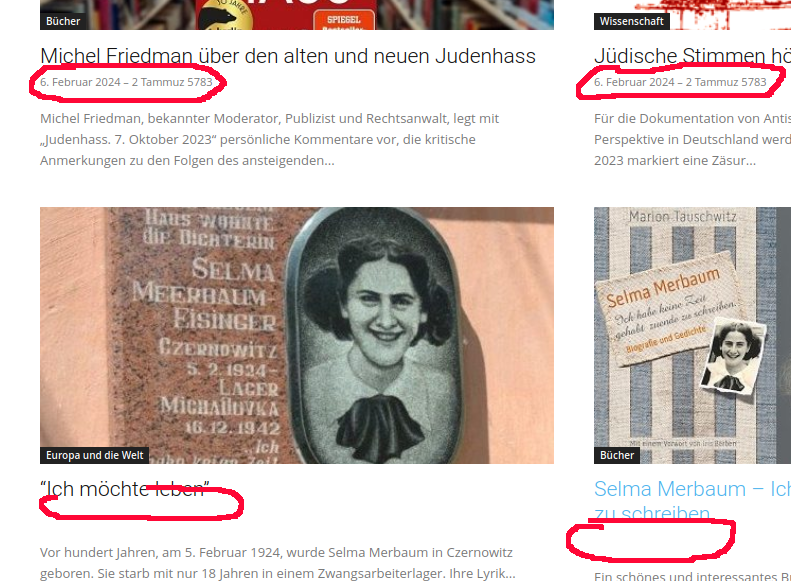
I think we have the same or a related problem on our website : The articles on the first page show dates underneath the article headers but there are no dates displayed when a user scrolls down and the next page is shown. The website is
hagalil.com
In the LayoutEditor “Show Date” is set to “Show” and “Show modified date” is disabled.
Thanks!
…and a screenshot :
Hi all
I decided to write here because it will help those who have the same problem
Thanks to the support service, they solved this issue, much gratitude!
This was my omission in the template settings (theme panel)
For some reason, I was convinced that the settings of an individual category template were higher in priority than the general settings, but in certain cases this is not the case.
In this case, the culprit was a disabled parameter – in the screenshot.

Hi smga,
thanks for sharing the solution for your problem. We have “Show date” enabled in the Block Settings, so I guess we have a different problem.
… and Hi Support,
in our case dates are displayed only on the first page but not in the following pages.
But : In the HTML code I can see dates on all pages in the datetime attribute of the time class definition.
To format the date we use the plugin “WordPress Hebrew Date”. If I disable this plugin – surprise! – the date is displayed on all pages. But another strange thing happens : The date format (e.g. names of months) is German on the first page and English on all following pages.
So something is different in the way dates are formatted on the first page and on all following pages.
Any hints about what might be the problem?
Thanks!
Hello @hagalil !
I suggest you do not use this plugin. The time format can be changed when you select custom format and paste one from here: https://www.screencast.com/t/xsWp71LD4g to have both date and time: https://www.screencast.com/t/CR4vB42DVH
Thank you!
Hi @Bettina,
thanks for your quick response. The date and time formats you mention basically control only the sequence of hour, minute, day, month, year and the way they are displayed. But all these show a date and time based on the Gregorian Calendar.
On our website we also want to show date and time based on the Hebrew Calendar which – like the Hindu and Islamic Calendar – is calculated completely different than the Gregorian Calendar. The plugin we are using is doing exactly that : It displays a date and time based on the Gregorian and Hebrew calendar.
Unfortunately this only works on the first page in the posts loop.
Can you give me a hint on what’s done differently in displaying the dates between the first page and the following pages? Maybe there’s something the plugin developer can do to make the plugin compatible with the Newspaper theme.
Thanks!
