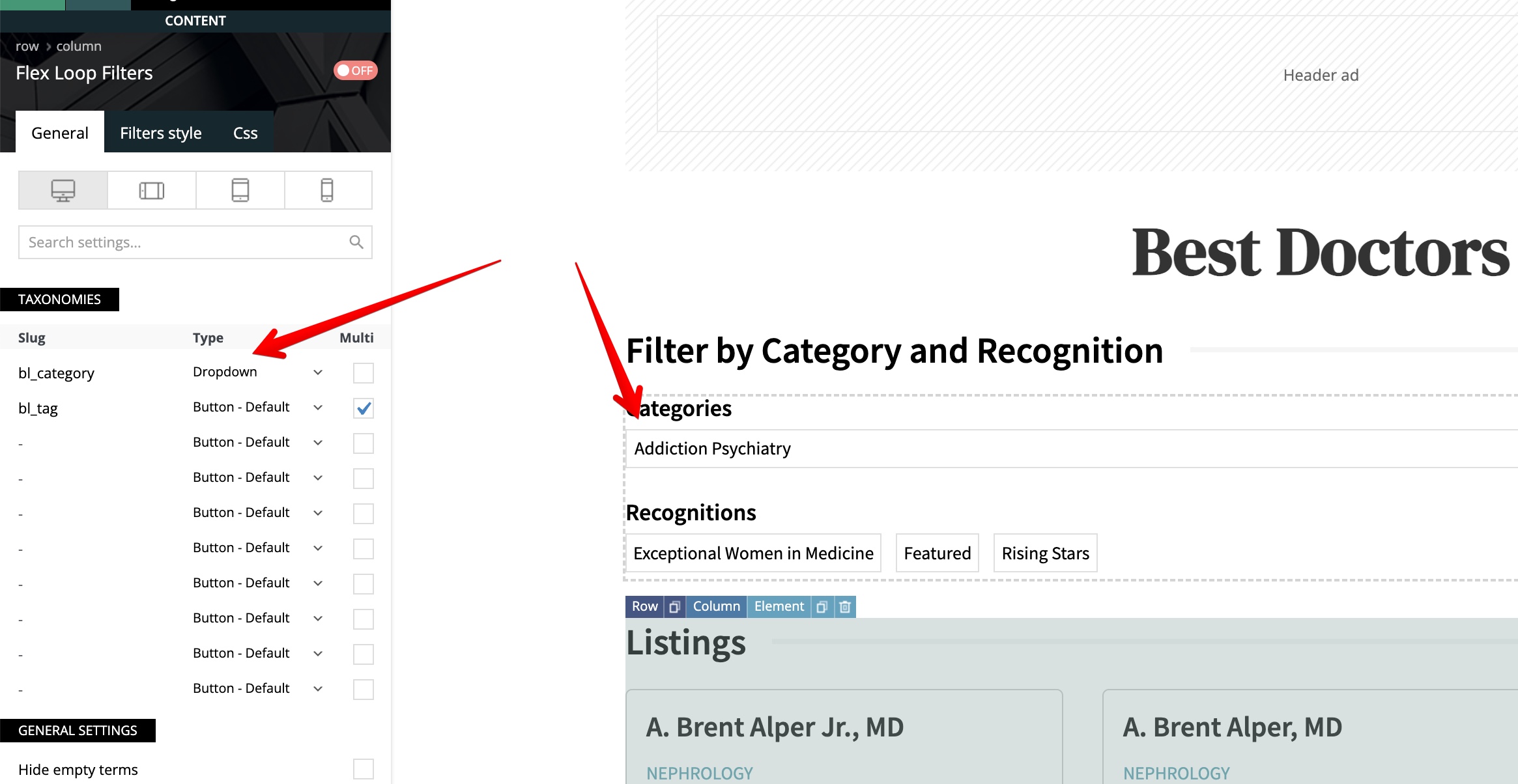
We have implemented the Flex Loop Filters on https://www.myneworleans.com/business/ and it is working really well for the most part. The one item that we can not figure out, is when you go into a subcategory the dropdown defaults to the first subcategory rather than –Select Category–
You can see for yourself by going to https://www.myneworleans.com/business/ and then select the category Dentists. That takes you to https://www.myneworleans.com/businesses/dentists/ where you will see by default the first subcategory is active but it is not actually filtering the results.
It makes it so a user that was actually looking for that first subcategory can not view the results without selecting a different category and then switching back to their initial category.
The settings for the widget is https://s3.amazonaws.com/pramadillo/pramadillo-2024-05-30-11-51-05.jpg
We are running all latest versions of theme and plugins 12.6.6
Things we have tried:
1.) Hide Empty Terms… When we enable this, all listings disappear, so that doesn’t work.
2.) Switched to Multi on Dropdown… That produces the output we want in the dropdown but it doesn’t actually filter the listings, so that doesn’t work
3.) Switched to Dropdown with Search… That doesn’t show the categories by default so that doesn’t help
The end goal one would expect would be if you goto https://www.myneworleans.com/businesses/dentists/ that the Category Dropdown would display –All Categories– and not Endodontics, as then a user can not browse just Endodontics without switching to different category and switching back.
Thank you in advance.

Hello!
I can’t access your links because it says 403 Forbidden.
Please check the “Multi” option for the first item there in the tagdiv Composer settings and try again.
I’ve tested the flex loop filters with the flex loop shortcode too in the latest update of the theme, and it is working well.
1. The option “Hide empty terms” will hide the items or categories without posts.
2. It should work well. Try with the slug “category” and check if it is working too on your end.
3. It is working well on the latest update of the theme.
So, the issue is on your end. Please deactivate all plugins except tagDiv ones. Also, if you are using a cache plugin, deactivate it, clear all cache, and try again.
Let me know the results!
Thank you!
Hey Bettina,
I have temporarily lifted our block on international traffic. You should be able to view those links now.
We have tried the Multi option and have saved and resaved many times with no luck on it actually filtering.
1.) We are using a custom post type, and it appears when you enable hide empty terms it just doesn’t show any posts, even though they are all in the custom taxonomy we are filtering by. Are you testing with a custom post type and a custom taxonomy?
I can confirm when using standard posts, and default category and tags, the filtering works as you mentioned. But is does NOT work when you utilize a custom post type and custom taxonomies
Hello!
1. Yes. Please try to add also the button “Clear all filters”. If you select a category first, then the recognitions won’t show anymore.
If the problem is still there, then please contact us via email at contact@tagdiv.com and provide the following:
– admin url and credentials
– a link to this topic in order to identify you
Thank you!
Hi Bettina. More info on the flex loop filters, but with a different site this time … Arlington Magazine. Here is a video that shows the issue:
https://www.loom.com/share/0b4a0a32247a4bc3b6975e0ddd1499b2?sid=0e4b16be-d9d5-40b6-9652-191ff263300b
Please note that the URL in question right now is https://staging.arlingtonmagazine.com/listings/top-doctors/, but we are launching the site live today so the URL will be https://www.arlingtonmagazine.com/listings/top-doctors/ after we launch.
The flex loop filter element is “preselecting” the first value … Addiction Medicine. The filter hasn’t actually been applied yet, but it’s displaying the first value. Instead, it should be displaying — Select Category — … you’ll see this behavior in the video.
This seems to only happen when the filter is a category … when the URL needs to change to the proper category slug. It doesn’t seem to happen when the filter is a tag because in that case TagDiv handles the filter as URL parameters.
Anyway, please check the video. We’re going to launch this today with the dropdown so that your team can look at it. But we’ll need to change it back to the buttons soon because of this bug.
BTW, the buttons aren’t really an option because this list has a LOT of categories that make it too long for mobile. We really need to display this filter as a dropdown as soon as the bug is fixed.
Thanks and have a great day!
–Eric
Hi Bettina. As requested, I just emailed contact@tagdiv.com the login info for the Arlington Magazine staging site.