

Hi guys,
Is there a way to change the position of the 320×50 mobile leaderboard ad? My concern is ad-blindness vs click through rates. At the moment the mobile leaderboard loads “above the menu”. I hardly notice it. My eye-pattern recognizes “top menu” then I look down to get started on the content.

I’d like to position the mobile leaderboard ad BELOW the nav menu, just not sure how to do it without messing anything else up.
Appreciate any help!

Hi,
Unfortunately theme doesn’t have an option to change header ad position on mobile. A solution could be to disable header ad on mobile, use a custom ad bellow the menu for header style that you use(edit header.php file and use do_shortcode function) – http://screencast.com/t/PpSNXg2mbCII off course enable this custom ad for mobile from Theme Panel.
echo do_shortcode('[td_ad_box spot_id="custom_ad_1"]');
Result: http://screencast.com/t/ySMAR0Jp78IF
Thanks!
Thanks a ton Alin. It worked like a charm.
There’s one problem tho. I’m noticing that inserting the ad right there creates a gap between the nav menu and the main article block. The blue part (in the screenshot) is actually our background image showing through.
Is there a different place I can insert the “echo do_shortcode(‘[td_ad_box spot_id=”custom_ad_1″]’);” code so that it shows up in the (top) of the main body section?
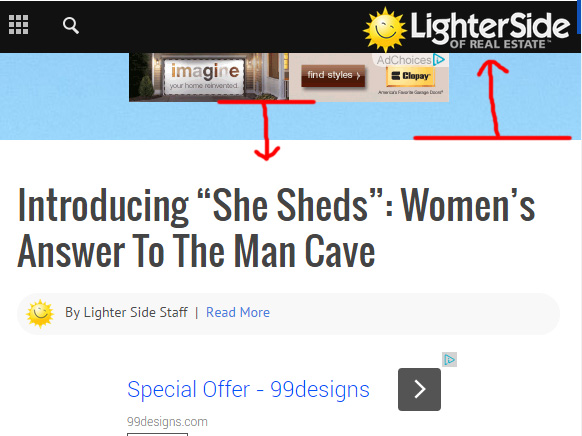
Thanks again Alin.
-
This reply was modified 11 years by
lighterside.
-
This reply was modified 11 years by
Hi,
Please provide a link so I can inspect this to provide an accurate solution for that gap.
Also I’m not sure what you mean “if there a different place..”. Where you want to place the ad.
Thanks!
Regarding different place:
I was wondering if there was a different spot to add the code to. Right now it’s added under the “// this is the default header configuration” comment in header.php. The same place you told me to add it to.
But, it seems to be placing it between the nav menu and the main body section below.
I’m wondering if there’s a different spot in a php file to add the same code, in order for the ad to appear within the body section, at the top. Hard to explain. I tried to imply with the first arrow in the screenshot in my last message.
Hope that makes sense.
Hi,
You can use this css only for mobile screens – http://screencast.com/t/rMDSomt6J
@media (max-width: 767px){

.single .td-page-wrap .td-grid-wrap{

padding-top: 10px !important;

}

}
About placing the code in the body you will have to to this for each template where you want to appear – page template that you use, post template, category… I think that what you done is the best solution.
Thanks!
