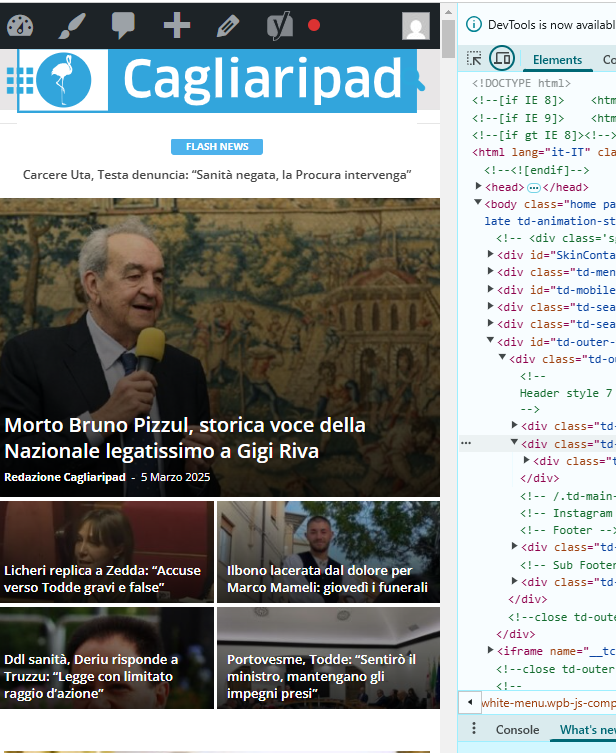
Dearest,
we need to load an SVG vector logo in the header.
We have already updated wp to receive SVGs.
When I load the svg logo, it appears full page width.
I would like to know how to give these measurements:
– logo 400x66px
– header height 118px with logo centered in height and width
– background header all filled: white
Thank you so much
https://www.cagliaripad.it/

Hi,
I’ve set the svg logo https://prnt.sc/_nvAucjCkl0_ and it seems to display correctly https://prnt.sc/XG9SXm3D1zJ6 But without the CSS code you entered in the theme panel it would not.
The thing is that header style 7 does not have any size limitation for the header logo https://prnt.sc/UZxlj1nDUGw2 It will be displayed as it is originally, limited only by the width of the theme. Your code will limit it however.
I didn’t leave the svg logo set, in case there are problems that I am not seeing. I set the old one back. But you could set it again, and with the code from the theme panel the logo should be displayed better.
Thank you!
Thanks Simion!
Charged and working.
But the header is still not correct.
I’ll write down the other needs of the task header:
– logo centered
– header height 118px with logo centered in height and width
– background header all filled: white (if you now scroll the page the header is transparent and not completely white. This impacts the vision of the SKIN advertising format surrounding the page).
Thank You!
Best regards
Michele

Sorry! But the logo is not centered!
please, take a look.
Furthermore, this still occurs:
– background header all filled: white (if you now scroll the page the header is transparent and not completely white. This impacts the vision of the SKIN advertising format surrounding the page).
Many Thanks
michele
I see the skin ad isn’t appearing anymore. Did you turn it off perhaps? I adjusted the ad vertically https://prnt.sc/BrZH7VLUypiJ but if there are still issues we may have to think about modifying it in a different way. The modifications I made with the top menu being below the logo are the ones causing spacing issues. I could modify the header template in a child theme which could produce better results. Or I could continue adjusting it based on how it is now, but it seems to be a bot tricky to get it right. Please let me know when the skin ad is back, in caser there are problems with the header again.
Thank you!
Good morning!
I managed to fine-tune the header and the logo with the skin… using custom css.
Some header-related issues remain:
– the topbar no longer allows connection to social icons, but the skin covers the URLs (very strange because the WhatsApp subscription on the left works)
– the svg logo in the footer inherits the .td-retina-data of the logo in the header (this is bad because as you can see the white background and the top-bottom padding make it wrong. What solution can we follow?
Many thanks
Michele
–
Checking now.
1. It looks like the skin has a z-index which makes it appear over parts of the header https://prnt.sc/6QPbkPTLTdM5 I made the header use a higher z-index https://prnt.sc/SdXI3-1WXGrq Now the social links are getting through https://prnt.sc/L_PDsAYFjW4e
2. The code for the background color should target the header logo specifically, like this https://prnt.sc/wdmFEbU_6nXv That way the footer logo will not be affected https://prnt.sc/QWKTV-jVtOeB
Please let me know if I can help with something else.
Thank you!
I moved the custom css-desktop to the top of the style.css file. This is to avoid the full-page zoom effect of the header SVG logo.
Two problems remain.
1) One concerns the topbar: the menu items are no longer centered in the gray bar.
2) The logo performs in mobile resolutions.
Example:
https://assets.cagliaripad.it/wp-content/uploads/2025/03/05085711/SCREEN_0503.png
Many Thanks!
Checking now.
1. There was some padding there and that caused the menu items to appear not centered vertically. I removed that padding and it looks fine now https://prnt.sc/1doWFdOfs8jq
2. The logo on mobile was already looking fine by the time I checked https://prnt.sc/jYinsehWY0dz I see you corrected the problem in the meantime.
3. The logo is first loaded in full size and then resized by the CSS code. To remove that effect or at least reduce it, the CSS code could be loaded faster, in this panel here https://prnt.sc/RAk9j2_ZLHB8 I moved parts of the code there, and now the header doesn’t even jump on refresh/load. It loads much better. Please check it as well.
Thank you!
I modified the code for the height of the logo to also include tablet, now it looks fine https://prnt.sc/oVcD3y8s9FtZ
Thank you!