

Hello,
Using Newspaper V6.5.1, I tried changing this CSS:
.td-header-style-3 .td-header-sp-logo {
width: 224px;
margin-left: 0;
}
to this CSS in “Tablet landscape”:
.td-header-style-3 .td-header-sp-logo {
margin: 21px 20px 0px 0px!important;
width: 300px!important;
height: 100px!important;
}
…but the changes are not taking effect.
I’ve also made similar !important changes in Tablet Portrait which aren’t taking effect either. Modifications in both tablet Advanced CSS areas don’t even show in browser debugging.
However, changes I’ve made in Desktop (1141px +) ARE taking effect… even without adding “!important”.
Am I doing something wrong?
Thanks you

Hello,
You have to be careful with css as it is a very specific language, so a code that will work on one header style will not work on another. We generally use the browser inspector (chrome) and an extension called live css editor when creating the code. It helps a lot!
I have checked your site and it seems that your modifications apply.: http://screencast.com/t/fuMVmyU2S – http://screencast.com/t/QQ73ujGNyDQx
Thank you!
Thanks Bogdan, and I understand all that. I’m using the same inspector in chrome and not seeing my code.
Those examples you screencapped are Newspaper CSS entries, not mine.
If you look at my code in my original post, it is different than what’s on your screenshots.
Can you please re-read and let me know?
Thank you sir.
Hello,
I tried your code on my end and it applies. If i edit your website the css applies also: http://screencast.com/t/42EdAyKx
Maybe something on your end requires a more specific approach.
Please use your code like this:
div.td-header-style-3 .td-header-sp-logo{

margin: 21px 20px 0px 0px!important;

width: 300px!important;

height: 100px!important;

}
Thank you!
Bogdan, either I suck at explaining things, or you just aren’t understanding.
First, how could you have really this problem on my website without having login credentials? If you are referring to editing CSS in Chrome’s browser inspector, then yes, that obviously works for me too. But those edits are cosmetic and temporary as you know.
What ISN’T working… is when I enter ANY code in the tablet panels. My custom edits just don’t show up in chrome at all. And it’s not because my code is typed in wrong. So please, let’s move on from browser answers.
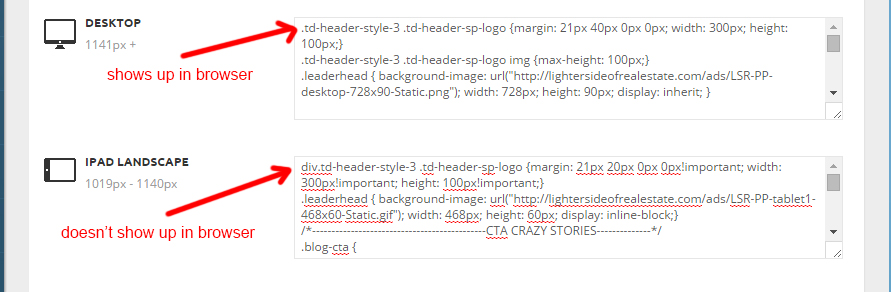
CSS entered into either “Tablet” CSS areas in the theme panel simply isn’t being recognized or reported by the browser.
That’s the problem I’m having.
I’m thinking it’s something that can’t be troubleshot from the browser. I can give credentials if need be.
Hi,
Please send an email at contact@tagdiv.com with your login info se we can take a closer look at the problem.Please also provide a link to this topic.
Thank you!
