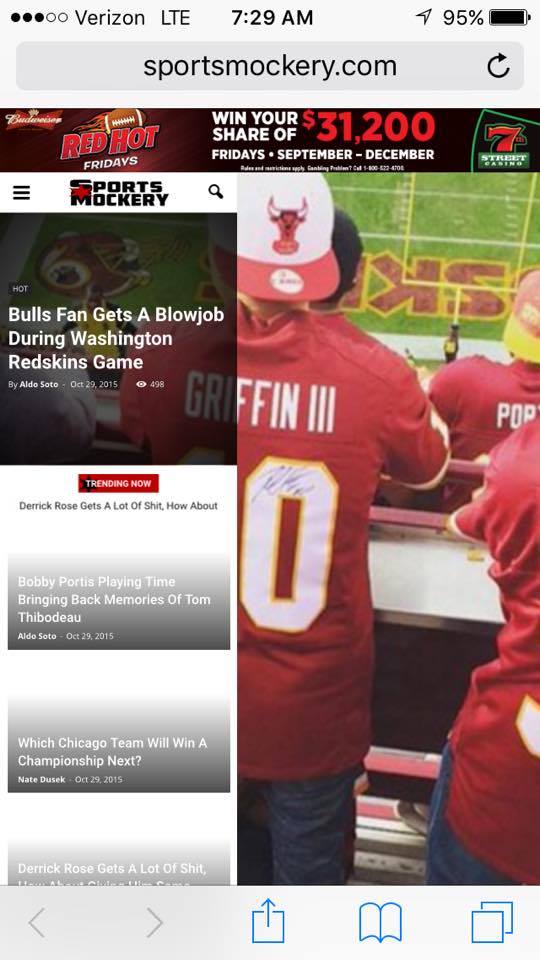
The homepage post widget for the homepage is great, only problem is it totally messes up my mobile.
Example: http://sportsmockery.com/wp-content/uploads/2015/10/12204794_905692468634_52261014_n.jpg
Do you know why this happens? I really want to use the homepage post on my site.
Thanks in advance.

Hi cbur2107,
I’ve checked your site and you are using an older version of Visual Compser plugin (4.5.2) http://screencast.com/t/xZuFfmjaB
Please upgrade the plugin to ultimate version like this: https://forum.tagdiv.com/newsmag-how-to-update-visual-composer-plugin/ . If the problem persist, you can check this without any plugins active except of Visual Composer, clear cache and see if you still have this issue.
Let us known how it goes!
Thanks.
That didn’t work.
Could it be any of this custom CSS? I will try to remove it all later, but it would be like searching for a needle in a haystack adding it back if it is.
************
.td-header-top-menu, .td-header-top-menu a, .td-header-wrap .td-header-top-menu-full .td-header-top-menu, .td-header-wrap .td-header-top-menu-full a, .td-header-style-8 .td-header-top-menu, .td-header-style-8 .td-header-top-menu a {
font-weight: bold;
}
.post header .entry-title {
font-weight: bold;
}
.td-trending-now-title {
font-weight: bold;
}
.block-title > span, .block-title > a, .block-title > label, .widgettitle, .widgettitle:after, .td-trending-now-title, .td-trending-now-wrapper:hover .td-trending-now-title, .wpb_tabs li.ui-tabs-active a, .wpb_tabs li:hover a, .vc_tta-container .vc_tta-color-grey.vc_tta-tabs-position-top.vc_tta-style-classic .vc_tta-tabs-container .vc_tta-tab.vc_active > a, .vc_tta-container .vc_tta-color-grey.vc_tta-tabs-position-top.vc_tta-style-classic .vc_tta-tabs-container .vc_tta-tab:hover > a, .td-related-title .td-cur-simple-item, .woocommerce .product .products h2, .td-subcat-filter .td-subcat-dropdown:hover .td-subcat-more {
background-image: url(“http://sportsmockery.com/wp-content/uploads/2015/10/stars-tew-proper.png”);
}
.td-related-title {
margin-bottom: 0px;
}
.entry-crumbs a {
color: #bc0000;
}
.entry-crumbs
{
color: #000000;
}
.td-footer-wrapper {
padding-top: 0px;
}
.aligncenter {
margin-bottom: 10px;
}
.td-main-content-wrap {
padding-bottom: 0px;
}
.td_block_big_grid_1, .td_block_big_grid_2, .td_block_big_grid_3, .td_block_big_grid_4, .td_block_big_grid_5, .td_block_big_grid_6, .td_block_big_grid_7, .td_block_big_grid_8 {
padding-bottom: 1px;
}
.block-title {
margin-bottom: 0px;
}
.td_block_wrap {
padding-bottom: 1px;
}
.td_block_14 .td-block-row:last-child {
margin-bottom: 1px;
}
.td-a-rec-id-sidebar > div {
margin-bottom: 5px;
}
.wpb_row, .wpb_content_element, ul.wpb_thumbnails-fluid > li, .last_toggle_el_margin, .wpb_button {
margin-bottom: 5px;
}
.sep {
font-size: 200%;
}
.td-page-content blockquote p, .td-post-content blockquote p, .wpb_text_column blockquote p, .td_block_text_with_title blockquote p, .bbpress blockquote p, .woocommerce #tab-description blockquote p, .mce-content-body blockquote p, .comment-content blockquote p {
font-size: 16px;}
.td_module_wrap {
padding-bottom: 1px;
}