Hello,
i have a problem with font awesome icon.
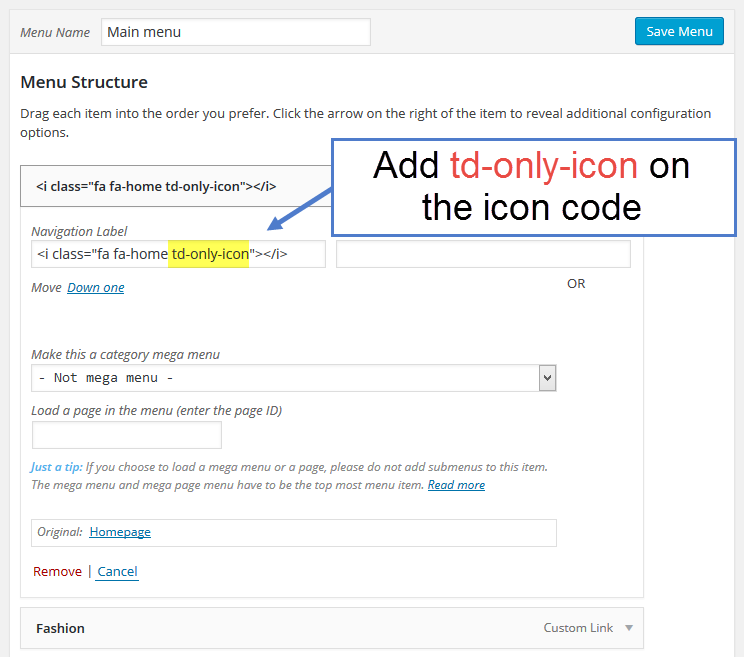
first of all at your documentation you have this: https://forum.tagdiv.com/wp-content/uploads/2015/05/2015-06-18_13-00-03.png
but at my site when i’m going at menu edit, is like this :

there where i have “fa-home” if i put all “<i class=”fa fa-home”></i>” the icon is not displayed at the page, if i put only “fa-home”, the icon is displayed correct with the menu name after that. If i put “fa-home td-only-icon” i have the same result as to have only “fa-home”.
Why my menu edit is different from your documentation? and how can i have only the icon without the text?
Here is my page: http://testgeolits.myipservers.gr/Olaballa/ . Now i have at class css this “fa-home td-only-icon”
I post the link of my menu edit again , because it is not displayed in my previous post.

Hello geolits,
Please try this class for your code class="fa fa-home" and add it in the menu item field from menus area, like this -> http://screencast.com/t/9csA2MK1cFt without any text and the result you should see here -> http://screencast.com/t/dthYyPEPv3k
Thank you for the message!
Hello geolits,
I have checked your previous image again and you have the ‘Navigation label’ field, as you can see here -> http://screencast.com/t/bcFsnr8RasZa Please try to implement this feature of that plugin according with our documentation here -> https://forum.tagdiv.com/how-to-add-icons-in-menu/ it is tested with our theme and should work fine with this.
Than kyu for the message!