

Hi Simon,
I use Newspaper 8.1.2
http://makanangin.de
On IPhone there is always shown the code from the Block 4.
See Screenshot:
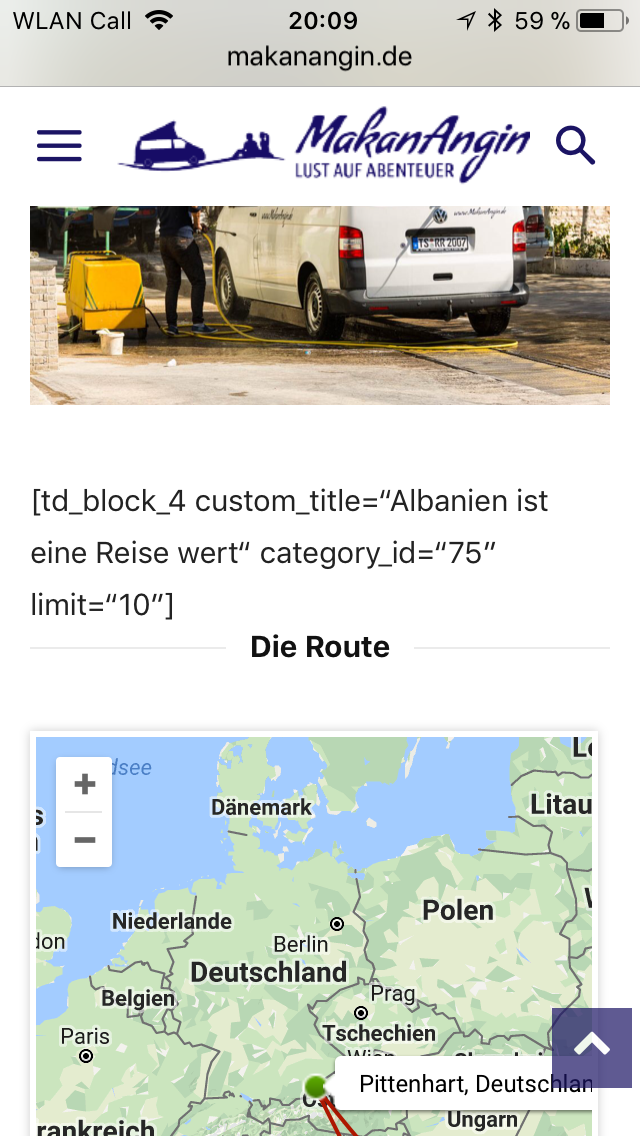
Where can I make a setting, that the code is hidden?
Thank you
Best regards

Hello Ginebiene,
I have inspected your website on my iPhone and it seems to work as expected and the shortcode does not appear. Also, I saw that you are using the Mobile Theme plugin which has a default structure and which do not recognize any additional shortcode like above map route. If you want to display the exact layout from the desktop on mobile devices but the responsive mode, you should simply disable the mobile theme plugins. For more information about mobile plugin, please check the following useful documentation here -> https://forum.tagdiv.com/the-mobile-theme/
Hope this helps!
Thanks for your understanding!
Hi again,
thank you for answering. But it is not the code for the plugin nomadmap! Is the code from the theme. So I think the problem ist not the plugin, the problem is on the theme. The map showing well. Could you please have a look again. See at the screenshot!
You have inspected the website at a responsivchecker on your desktop. There is it shown right. But on real mobil it is not shown in the correct way.
Thank you
Best regards
-
This reply was modified 8 years by
Ginebiene.
Hello Ginebiene,
I have inspected again your website and I saw that you are using Visual Composer elements inside the post content and if you are using the mobile theme, thatțs why you bring the shortcodes on mobile devices because the mobile theme plugin does not recognize any shortcodes. The easier way, in this case, would be to disable the mobile theme because the theme will be switched to the general responsive mode and then, all of the shortcodes will be correctly displayed for any devices.
Thanks for the message!
