


Hello,
Please check the following useful guide from here -> https://forum.tagdiv.com/facebook-share/ and ensure that you have followed all the steps from there. Remove all of the untested plugins, clear all the caches and check the results.
Thanks.
disabled all plugins cleared cache still not working I need this fixed asap mate
https://thephatvegan.com/2018/05/say-bro-is-your-beer-vegan/
-
This reply was modified 8 years by
Thephatvegan.

disabled all plugins
???
/wp-content/cache/autoptimize/
/wp-content/plugins/onesignal-free-web-push-notifications/
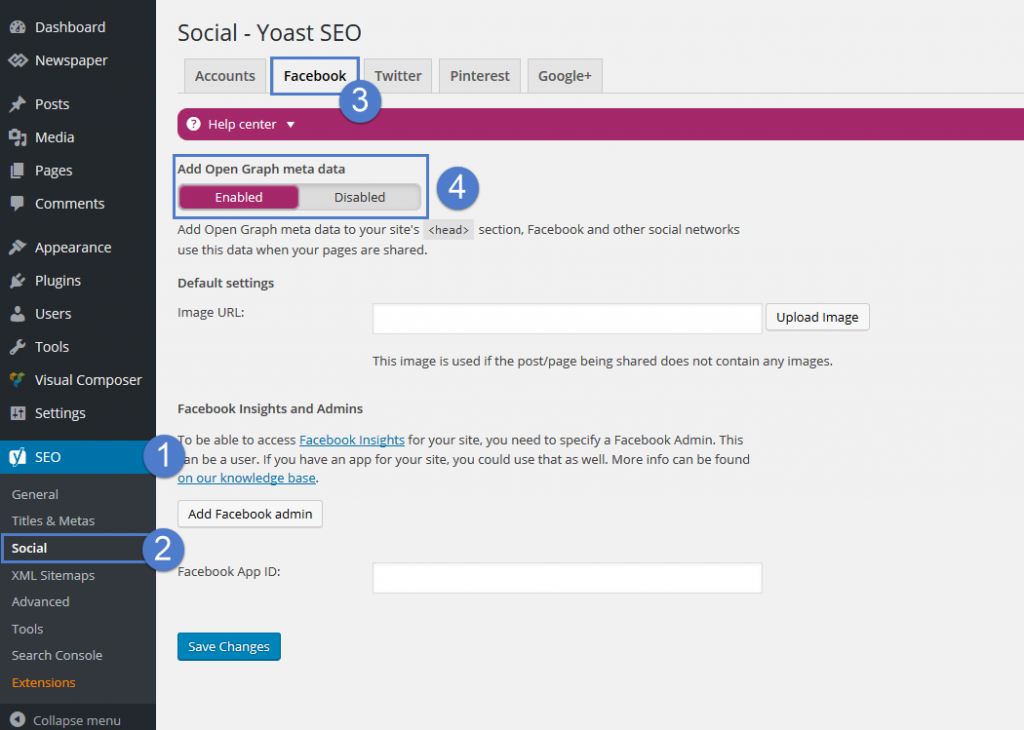
By default, the themes don’t come with any OG data. We decided not to add them because most SEO plugins come with such a feature. For best results, we recommend using the WordPress SEO by Yoast plugin, the Facebook metadata can be enabled from SEO -> Social -> Facebook:
Yes i have yoast installed
am i not supposed to have simple plugins in order for this to work?
Hello Thephatvegan,
Please notice that by default, the Facebook Sharing works as expected, without any problems. So, if you will check our demo preview you will see good results. Do you have setup it via Seo Yoast? Clear all the caches and check the results. Also, you can try to make a new install to another sub-domain for testing only with the theme, without any untested plugins and check the results.
Thanks for your understanding!
