Hi
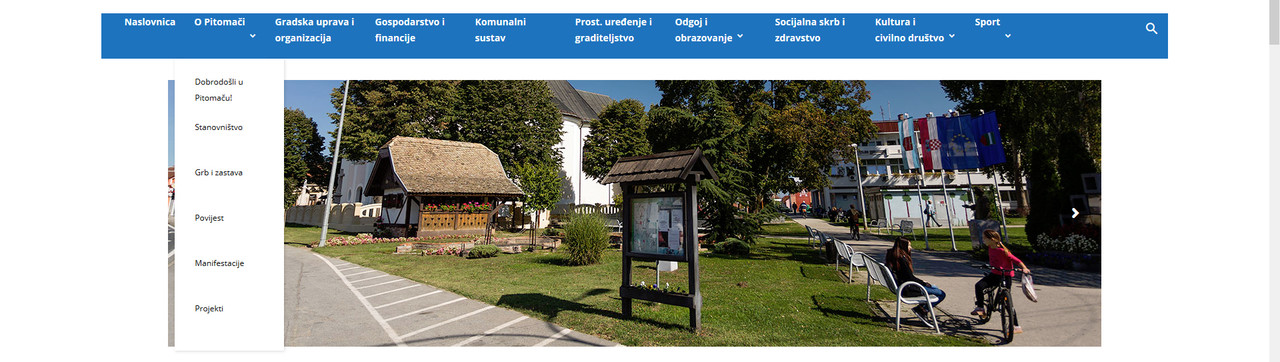
how can I get my menu items to look like this (wrap) ?
my: https://i.postimg.cc/05hV3mCp/menu1.jpg
what I want: https://i.postimg.cc/FscTQRPw/menu2.jpg
tnx 🙂

Hi,
A link to the website would be helpful, so I can try to create a code and test it.
Basically you want to set a border between each element from what I can see. It would be best to stretch the menu first, to have them in one line
– https://www.screencast.com/t/3arqYWPf3EJz
Let me know.
Thanks
If I understand correctly you want to break the menu items name into two rows. What header style are you using?
It will require to set a width, then break the words, maybe like this
– https://www.screencast.com/t/7Ql9xhxE5N5
More design modification may be required for the header, also depending on what header style you use. I tried with header style 1, this is the code used in the example
– https://pastebin.com/UzuTvHKR
I’m using style3 header
This is what I get now… https://i.postimg.cc/cCfP3Ldz/easgfswfwfw.jpg
In my case with header style 3 and some modifications to the code, the results are like this
– https://www.screencast.com/t/5FXJuAZHiDkl
But they may be different for you. Try to change the values in the code and experiment with it
– https://pastebin.com/2wUj0qJB
Use the theme live CSS for example to test the results live, while you modify the code
– https://www.screencast.com/t/DSSzgYLUtgCL
yes now it works
but I need it to be verticaly center aligned… and I noticed that the submenu is also now breaked into two rows, but that I need to be as it was, not like this…
https://i.postimg.cc/N0KvTq93/hsergsfsfs.jpg
AND I need those arrows for submenu removed…
Made some more modifications, try it again – https://www.screencast.com/t/cK8jfVwf
– https://pastebin.com/53eHPmgc

Hi Matija,
In order to center align the main menu please add this custom css to above css
.td-header-style-3 #td-header-menu {

  margin: 0px auto;

  display: table;

}
See results: https://www.screencast.com/t/R7xYO4GKmzA
Thanks.
-
This reply was modified 7 years by
 Calin.
I now have this: https://postimg.cc/3yr73zdV
this is all my custom css:
.td-header-style-4 #td-header-menu ul.sf-menu > .td-menu-item > a {
word-break: break-word;
max-width: 142px;
min-height: 78px;
line-height: 20px;
/* Internet Explorer 10 */
display:-ms-flexbox;
-ms-flex-pack:center;
-ms-flex-align:center;
/* Firefox */
display:-moz-box;
-moz-box-pack:center;
-moz-box-align:center;
/* Safari, Opera, and Chrome */
display:-webkit-box;
-webkit-box-pack:center;
-webkit-box-align:center;
}
.td-header-style-4 #td-header-menu .td-icon-menu-down {
display: none;
}
.td-header-style-4 #td-header-menu {
margin: 0px auto;
display: table;
}
header style is 4…
Hi,
If you are using header style 4 please replace the above custom css with this one
.td-header-style-4 #td-header-menu ul.sf-menu > .td-menu-item > a {

word-break: break-word;

max-width: 142px;

min-height: 78px;

line-height: 20px;

/* Internet Explorer 10 */

display:-ms-flexbox;

-ms-flex-pack:center;

-ms-flex-align:center;

/* Firefox */

display:-moz-box;

-moz-box-pack:center;

-moz-box-align:center;

/* Safari, Opera, and Chrome */

display:-webkit-box;

-webkit-box-pack:center;

-webkit-box-align:center;

}

.td-header-style-4 #td-header-menu .td-icon-menu-down {

display: none;

}

.td-header-style-4 #td-header-menu ul{

margin: 0px auto;

display: table;

}

.td-header-style-4 #td-header-menu img,

.td-header-style-4 .header-search-wrap .td-search-btns-wrap{

margin-top: 15px;

}
Hope this will help you.
Thanks.
tnx I think it works now
but the logo (little house – home) is still on the left hmm
Hi,
Please replace the above css with this one:
.td-header-style-4 #td-header-menu ul.sf-menu > .td-menu-item > a {

word-break: break-word;

max-width: 142px;

min-height: 78px;

line-height: 20px;

/* Internet Explorer 10 */

display:-ms-flexbox;

-ms-flex-pack:center;

-ms-flex-align:center;

/* Firefox */

display:-moz-box;

-moz-box-pack:center;

-moz-box-align:center;

/* Safari, Opera, and Chrome */

display:-webkit-box;

-webkit-box-pack:center;

-webkit-box-align:center;

}

.td-header-style-4 #td-header-menu .td-icon-menu-down {

display: none;

}

.td-header-style-4 #td-header-menu {

width: 1024px;

margin: 0px auto;

display: table;

}
Thanks.
Hi,
If this is what you like https://www.screencast.com/t/h4CYmscDfpu , all you have to do is to have the search in menu enable and paste the below custom css
.header-search-wrap{

  position: absolute;

  top: -100px;

}

.td-header-style-4 .header-search-wrap .td-icon-search  {

  color: black;

}
Thanks.
Hi,
You want something like this?
https://www.screencast.com/t/O8bZMt3s
.header-search-wrap .td-drop-down-search{

  position: absolute;

  top: -110px;

  opacity: 1;

  visibility: visible;

}
Thank you.
I want it like this: https://postimg.cc/qtCXC7yN
the logo above is actually the header ad code: 
I resized it so that we can put that widget there on the right
Hi,
Please try this custom css
.header-search-wrap .td-drop-down-search{

position: absolute;

top: -110px;

visibility: visible;

    visibility: visible;

    opacity: 1;

    pointer-events: auto;

}

.header-search-wrap .td-search-btns-wrap{

  display: none;

}

.td-header-wrap .td-drop-down-search:after,

.td-header-wrap .td-drop-down-search:before{

  display: none;

}
This is all I can do without a link to your website.
Thank you for your understanding.