

Hello I’m using contact form 7 shortcode and wordpress gallery shortcode in text element from tagdiv composer and when editing page always converts shortcodes to html and the shortcode is lost. Any ideas on how to use shortcodes and make tagdiv to not modify them?
Thanks.

Hi,
We are aware of this issue, shortcodes entered in column texts for example will be rendered upon re-editing the page. The result is that the shortcode cannot be edited or modified anymore and it has to be reinserted.
We will try to find a solution to prevent this from happening as soon as possible. Sorry for the inconvenience.
Thanks

Hello Simon, thank you for the reply.
What is the estimate time to solve this issue? I need a solution on a clients webiste.
This is a basic feature that all composers have, they can’t modify shortcodes that the user inserts, neither render them because that’s one of the shortcodes purpose, to edit them in only one place and render them on frontend.
Thank you again,

Hello danielcharrua,
After further deeper investigations, we found a quick solution in this case. Please follow the next images and try to make the changes from these -> https://www.screencast.com/t/tq7JYQ6XmV -> https://www.screencast.com/t/einHpS3PKc7 -> https://www.screencast.com/t/dE9kgZKp6 Maybe you can improve the rating!
Thanks for your understanding!

Your fix worked – please release it – as we basically stay alive with these plugins and our editors need to be able to edit them freely.
Hey, @rvt @Catalin – so if there’s a blank tagdiv composer editor, then this is what it caused in my case: 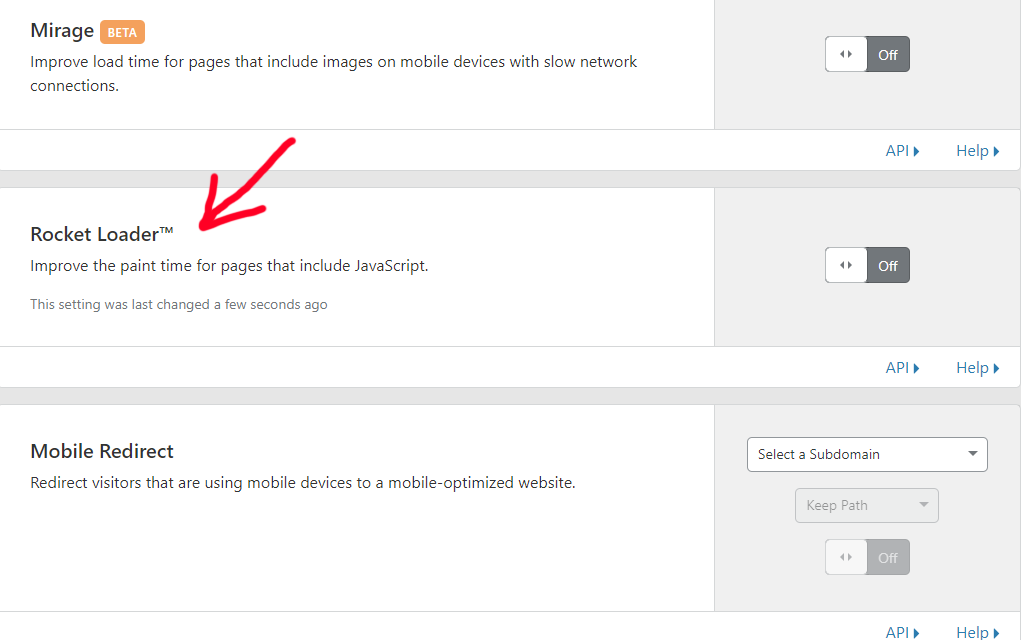 – this is a setting in cloudflare – in the speed tab. If it’s on, tagdiv composer editor is blank.
I hope this helps and you will include a fix for it @Catalin.
-
This reply was modified 7 years by
pavel@earnware.com.
-
This reply was modified 7 years by
Hello pavel,
If you are looking for the Rocket Loader on our forum you will find more topics related to this plugin and notice that we do not recommend its use since it is a problematic plugin, sorry! Also, notice that we do not recommend using such untested plugins because we cannot provide support for untested plugins.
Thanks for the message!
Good to know, but in my case, no Rocket Loader. I’m not even caching the site yet (I use WP Fastest Cache). The tagdiv composer works fine until I edit the plugin then it stops working.
pavel since you got it to work, I will try again and see if I can get it to work properly. Big fingers = possible typing mistakes.
catalin, updates soon? Then I’ll know if it’s my editor or my typing causing the problem. (I use BBEdit on the Mac)
Best,
Kim

It’s not a plugin, it’s a setting inside Cloudflare.
Hello @Catalin, unfortunately you have missed a comment change on https://www.screencast.com/t/dE9kgZKp6
You need to add to that screen: comment
/*if ( ! ( td_util::tdc_is_live_editor_iframe() || td_util::tdc_is_live_editor_ajax() ) ) {
	$content = do_shortcode( shortcode_unautop( $content ) );
}*/
The changes suggested on 3 files, two on plugin “td-composer” and one on parent theme shortcodes folder seems to be working as expected. This files will be changed on plugin and theme next update?
Thank you. I’ll change my rating on TF.
I tried to install the plugin again, and very carefully checked all of the text entries. I am still getting a white screen when I click on the tagdiv composer button when editing a page…
I’m running Advanced Ads, bbPress, Paid Memberships Pro and WooCommerce along with a few other plugins for functionality or utility.
Best,
Kim
Hello rvtravel,
Check your system status parameters to be increased according to our documentation from here -> https://forum.tagdiv.com/system-status-parameters-guide/ Also, please try the below solution ->
Set up the below code in .htaccess!
<IfModule mod_substitute.c>
SubstituteMaxLineLength 10M
</IfModule>
Thanks.
I did check the system, and I finally found my error in the modification of the plugin. So now it works!
I did notice that you still have to use column text or text with title to get the ShortCodes to both render and still be editable. When I tried HTML code or another of the element types, all I got back was a simple echo of the shortcode.
It would be nice if this was included in an update and that you added an external shortcode element to make it a little easier to use…
Best,
rvtravel.

Catalin, I would very much like to be notified if a bug fix is released to solve the Shortcode issue described above. I have a row of elements containing shortcodes at the top of my site and all I can see is an echo of the code…BIG PROBLEM..!
Are the developers any closer to hinting at when a bug-fix-release may occur?
Thanks
