

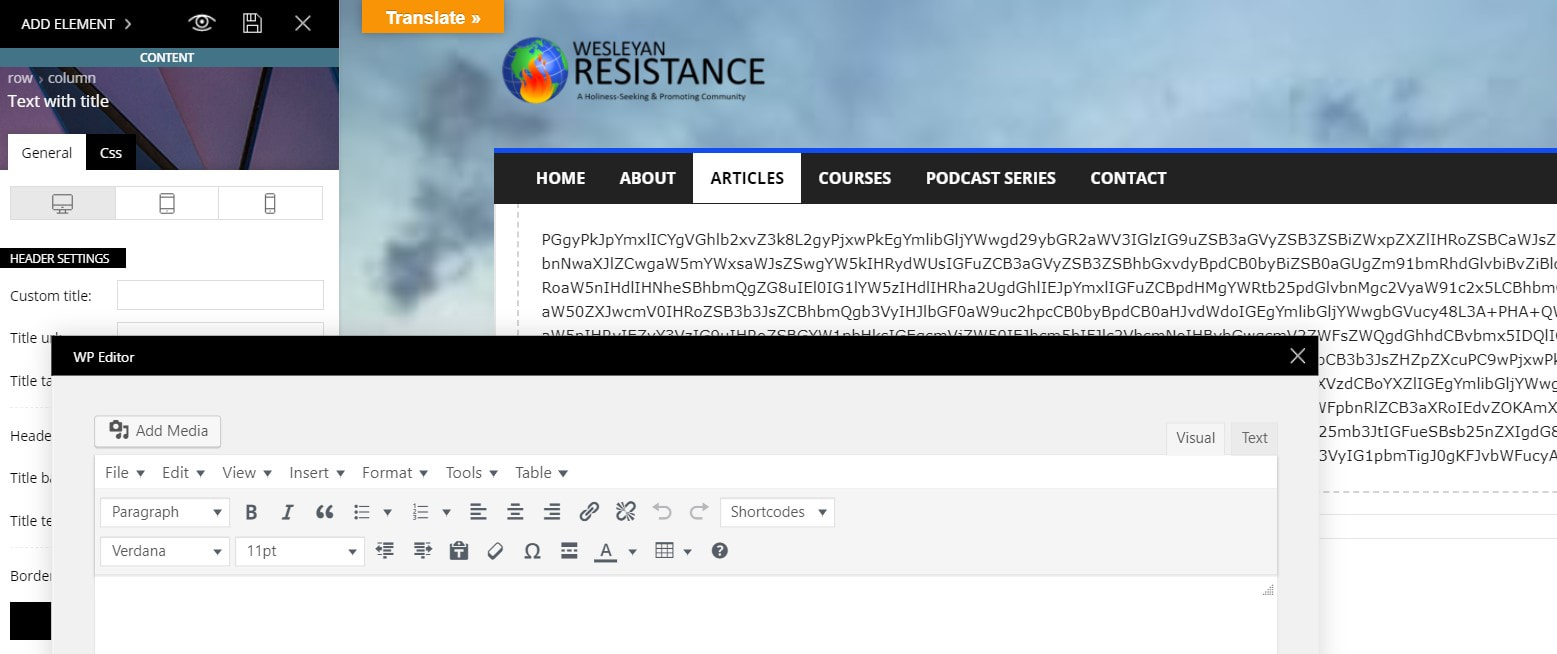
In TagDiv editor, when I try to edit a text block I added to my page, the WP Editor (visual) is blank and I can only see text in the html tab (text). The wysiwyg section just shows a long string of letters and numbers. However, when I save the page, it looks fine in a browser referencing my site (not in admin view). Could this have anything to do with the fact that I’m not using Gutenberg (I reverted to classic view)?
Overall, I love the typographic control of elements, but I’m just having a very hard time getting my existing WP site up and running in my new theme. I’ll keep working on it, but I may need to revert to a backup of my site if there are too many elements I can’t get to work (like the slider revolution, which still won’t work even though I’ve installed the plugin — there are two superimposed sets of headlines on the initial image, and the other images in the slider populate the entire page so that nothing else is readable).
Thanks for any help you can offer.

Hello,
These kind of problems usually appear when there is a plugin conflict, please deactivate ALL plugins except tagDiv Composer, also if you are using child theme or cache plugin, deactivate them, clear all cache and try again.
Also for revolution slider you can check our documentation from here:
How to install Revolution Slider v5
Import Revolution Sliders on demos
Let me know the results!
Thank you!
I deactivated all plugins except the tagDiv composer, cleared all caches, and still experienced the same issues. Could this be caused by the fact that I didn’t install the demos when I installed the theme?
Also, I was just reading this on your site (https://tagdiv.com/newspaper-theme-customize-the-header-manager/?utm_source=newsletter&utm_medium=email&utm_campaign=td_blog&utm_content=zap2&utm_source=tagDiv+Forum+Registration&utm_campaign=12cc45a35e-AUTOMATION__Zap_2&utm_medium=email&utm_term=0_3c84948243-12cc45a35e-96366799&mc_cid=12cc45a35e&mc_eid=f53a03cc5a):
“With this new feature, you can now have different Headers for every page of your website. Each of them customizable right through our front-end page builder. Let’s take a look! Open the tagDiv Composer on any page of your website, or even an empty page, then click the orange Header Manager button.”
I don’t have an orange Header Manager button at all. Something doesn’t seem quite right with my installation of the theme. Am I missing something?
Thanks for your help.
Patty
Hello,
If you want, you can send us an email at contact@tagdiv.com and provide admin login, as well as cPanel or FTP if possible. We will take a look. Include a link to this topic in the email.
Please notice that the Header Manager and tagDiv Composer are available only on Newspaper theme.
Thank you!
