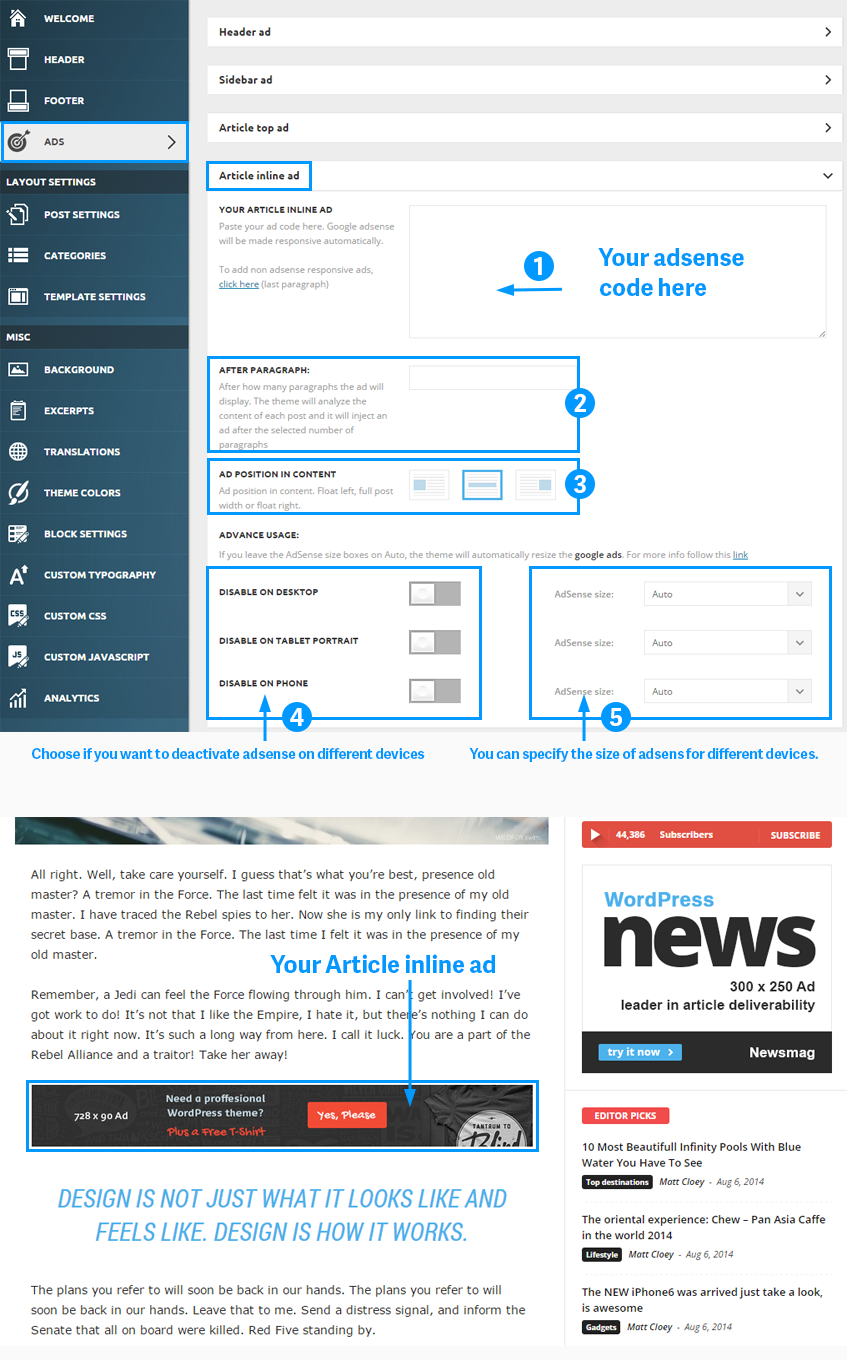
Hi
how to set 728 x 90px ads in article inline ads, because i see in ads full guide you can add 728 x 90px ads in article.
https://forum.tagdiv.com/ads-system-full-guide/ — section “Article inline ad”
i try to use 728 x 90px ads in my article but its not fit because the article content width only about 630px.
Sorry my bad english because i am indonesian
Thank you

I believe what i refer is for Newsmag not for newspaper, as you can see in this link https://forum.tagdiv.com/wp-content/uploads/2014/10/ad-system-inline.png
The link which i refer above is newsmag documentation. Correct me if i’m wrong. There are a section which obviously told me that it is for 728 x 90px.
If it’s not for newsmag purpose then the author must be wronged, maybe they just copy paste ad system newspaper for newsmag. And it definitely not compatible.
Thank you.

Newsmag by default can’t show 728 x 90px ads.
What you can do is let theme handle your ads; it will resize it according to the available space.
Or you can play with fixed layout and resize newsmag theme by yourself. I did it in one of my blogs and it took me 30 min max using custom CSS. It used to be 1020 px wide, now it’s 1170 (similar to newspaper theme).
-
This reply was modified 11 years by
Gajotres.

Hi Gajotres, i edited the 1020px found in style.css (it was only one i saw with the use of find and replace), and then i changed it to 1170, but there was no increase in width, so my 728 x 90 ads aren’t still showing good. any suggestion on how you did yours? Thanks

Hi,
You can doit if you remove the sidebar.
The alternative would be to modify the content width but it’s not an easy task, try this css: – http://screencast.com/t/HAUtuNB2vd
@media (min-width: 1024px){
.single .td-container, .single .td-header-container {
width: 1111px;
}
.single .td-pb-span8 {
width: 770px;
}}
If you want to adjust the other elements i suggest that you hire a professional developer to doit for you.
Thank you, Emil G.
-
This reply was modified 11 years by Emil G.

Hey, this is awesome! I used it on my site and worked for all the inner pages, but the home page is the old with.
Can you help with css to adjust the home page too?
That would be awesome! http://standupjournal.com/

You can tell the size changes when you go from homepage to article. I have to regenerate images because I lost the right side of featured images.

Hi @acbrent25
Try this css in theme panel > custom css:
@media (min-width: 1024px){
.home .td-container, .td-header-container {
width: 1111px;
}
.home .td-pb-span8 {
width: 770px;
}}
Thanks!