

Hello,
On my site(https://kopia.pti.org.pl/) I’m using anchor links(# links) in menu on specific pages. For some time there was issue with them, they wre not scrolling to corresponding IDs while viewing page in mobile device but I belive You’ve fixed it in one of latests updates of Newspaper. Right now they problem is that when I try to navigate to one of IDs from diffrent page it works correctly, but when I do same thing while beeing on that page already it creates 2 problems:
1. Mobile menu window doesn’t close when i click any section of site(besides 1st element but it reloads page anyway).
2. When I chose menu item with #link to same page it scrolls to correct row(or inner row) but when i close mobile menu window manually page content is getting scrolled above that row. My bet would be that there’s some problem while closing mobile menu window. Actually if you take a look you can see that after clicking link page is scrolled correctly and content is getting scrolled up after you close mobile menu window.
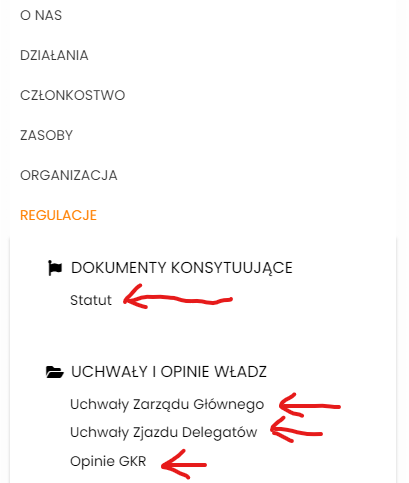
As reminder these issues happens only on mobile devices. On desktop everything works as it should. Also I’m using MaxMegaMenu on my site but it’s not causing any problems.

Hi,
MaxMegaMenu is updated to newest version. I’ve also disabled plugin to check if it interferes with theme but it didn’t change anything. I will contact plugin authors but I think it’s not problem with MaxMegaMenu.
I’ve noticed these two problems after updating Newspaper to newest version. Before update anchor links didn’t work at all(similar problem was decribed in this topic https://forum.tagdiv.com/topic/issue-with-anchor-tags/). They didn’t send to corresponding part of site. After update they started to work, but at same time these 2 problems appeared.
-
This reply was modified 3 years by
paulina_g.
As I said in my first post here menu works when you try to open anchor link while beeing on different page. And it’s what happens on example you’ve send. To see problem try to navigate to # link while beeing on that page already. I’ve pointed out example of 4 links sending to # within one page on screenshot, besides 1st link which reloads page, rest of them doesn’t work for me.
Hi,
Indeed, I managed to create the situation, but I don’t know exactly why it doesn’t work for you, we can take a look and see what can be done there. Please make a full backup to all files and contact us via email at contact@tagdiv.com and provide the following:
–wp-admin URL and credentials
-FTP/cPanel URL and credentials
– a link to this topic in order to identify you
Also, during the investigation know that we will disable the other non tagDiv plugins.
Thank you!
Sorry for long time without answer. I’ve discussed Your proposition with clients and they decided that this problem isn’t big enough and right now their priority is to deploy site to production. We agreed to setup copy of site after we deploy it which should happen this week and then we would give you credentials to site if it’s not a problem.
