


Okay, thanks.
In another matter, I am not using the tagDiv mobile theme or Google MVP. I am fine with the normal mobile version of my newspaper theme. But please, how can I change the font and enlarge the size of the text in the body of my posts, particularly with the mobile?
Thank you.
Hello!
Edit the article with the tagdiv Composer. Click on the mobile viewport: https://www.screencast.com/t/XDQJedlggSB. There, you can see your mobile version and edit or adjust the elements to look better. Change the font here: https://app.screencast.com/h7Z6iSqhibQGe
Documentation here: https://forum.tagdiv.com/font-customization/
Thank you!
Good morning, please.
First, I get “Invalid Reply From Server Endpoint” when I try to access the templates from Composer. Please tell me how to resolve this. My server resources are fine; I have 256 MB of WP-php memory. The problem started two weeks ago.
Second, my web pages are behind a category; Eg. joliba.com.ng/category/world
I would like it to be joliba.com.ng/world
How can I put the URL correctly?
Thank you for your time and expertise in anticipation of your guidance.
Godson
Hello!
Follow this thread: https://forum.tagdiv.com/topic/unable-to-edit-cloud-template-2/
Please change the permalinks from Dashboard -> Appearance -> Permalinks. Make sure you do not use an extra plugin that change the permalinks.
Thank you!
Thank you for your response.
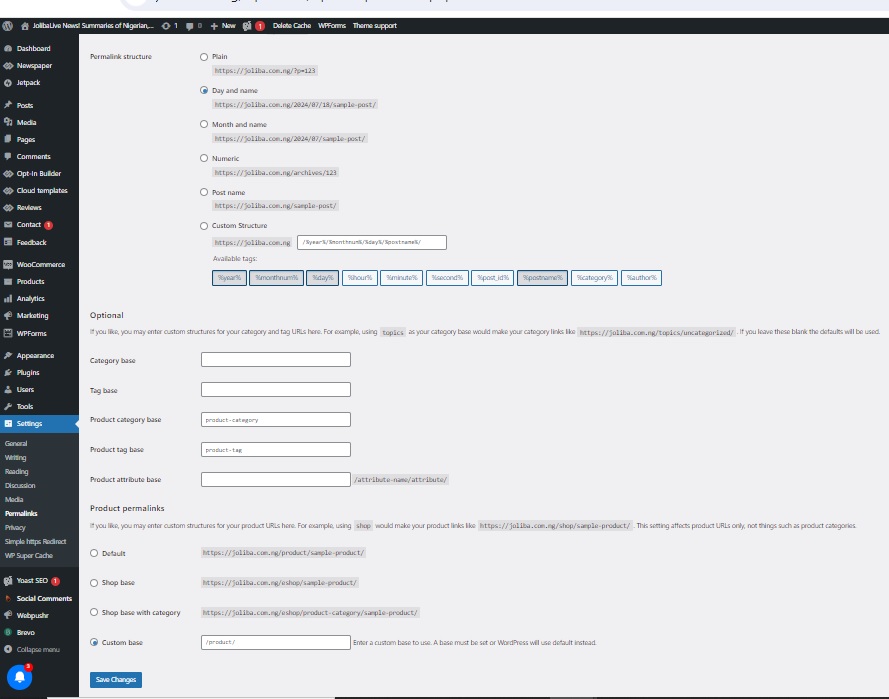
However, I’m sad to report that the path you indicated for me—”Dashboard -> Appearance -> Permalinks”—does not have a permalink. There is only a permalink under Settings…then Permalink.
Please see the image of my permalink page attached.
I can’t figure out how to correct the URL by reordering my webpage structure from the attached permalink page.
For example, my webpage “Nigeria” is currently at https://joliba.com.ng/category/nigeria.
I want it to be https://joliba.com/nigeria.
I don’t need it to be behind the category in the URL.
Do I have the wrong permalink page? How can I do this with my permalink page in the image attached?
Thanks a lot.
Hello!
The permalinks could also be created by a plugin. Make a test and deactivate all plugins except tagDiv ones. Also, if you are using a cache plugin, deactivate it, clear all cache, and try again. If the problem is still there, then please contact us via email at contact@tagdiv.com and provide the following:
– admin url and credentials
– a link to this topic in order to identify you
Thank you!
