

I am using Newspaper theme 12.6.8 with the Mintyside PRO demo as a base.
The Mintyside PRO demo does not seem to include a Pages template, so to create a Terms & Conditions page I go to WP admin and write the text on a new Page, then I open it and edit it with TagDiv Composer.
The thing is, I would like it to look like the Mintyside PRO Single Template for posts, is there a way to duplicate that template and assign it to all Pages I create? even if it is on a page by page basis? I know I could design a page from a blank template, but I can’t find how to insert the content of a WordPress Page inside an element, plus, I am not sure I would be able to replicate in a Mintyside style (maybe this is easier than I think), for instance the basic structure, the main container to hold all the elements.
Thanks :O)

Hello,
No, you can not use a single post template like a page template. The page templates can’t be global on each page, and it is not working as a single template, for example.
Create a new page in Dashboard -> Pages, press the publish button, and view. Edit it with the TagDiv Composer: https://prnt.sc/gGw1zq0zdf3r and start customizing it as you like to add text, using the element column text, image using the elements from tagdiv Composer. You can import from the Cloud Library sections, blocks, etc. already designed. Also, you can save the elements from your page with a right-click and use them on the other pages.
You can create a sidebar like in this guide https://forum.tagdiv.com/sidebars-tutorial/
Thank you!
Thanks. The main issue I have is knowing how to manage the content I already have in pages I already created in the Gutenberg editor. I can’t edit them properly in Composer as the content I created in Gutenberg does not seem to be contained in any Composer element:
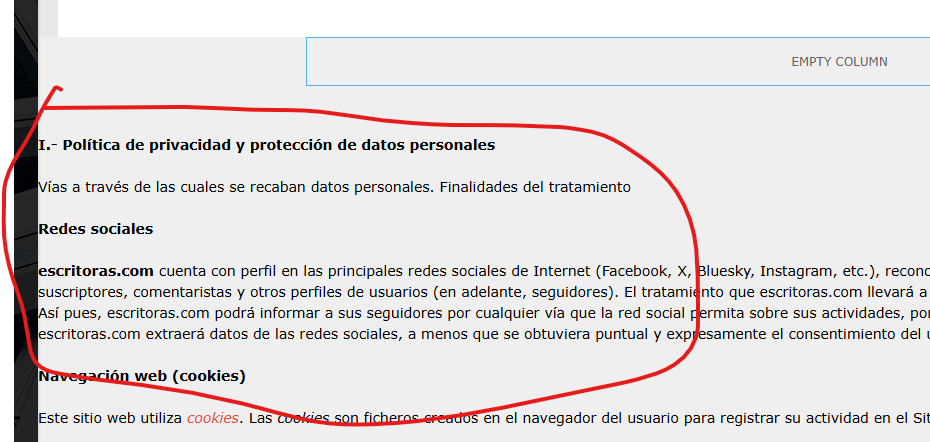
I can, of course, open Composer and copy the content that’s outside any element and paste it inside a Composer Column text element, but then, I guess, I won’t be able to keep using Gutenberg to edit that page (is that it?).
Plus, since I can’t use a single post template for pages, but I want the pages to look like posts, is it the best way to copy element by element from a post template to a new page? or is there a better way, like duplicating or copying an entire single post template, or something like that?
Hello,
You need to add the content from Gutenberg in the element column text from composer, to be able to edit with Composer. Yes, you can not edit the pages created in Gutenberg with tagdiv Composer. You can save the elements from single post template with right-click. Please note that some elements can be used only on the single post template, and it cannot be used on other templates or pages.
Thank you!
