
- Apitd_api_header_style::delete
- Apitd_api_header_style::update_key
- Apitd_api_header_style::update
- Apitd_api_header_style::add
- ApiAPI – Header style – Introduction
- Apitd_api_top_bar_template::update_key
- Apitd_api_top_bar_template::update
- Apitd_api_top_bar_template::add
- ApiAPI – Top Bar Template – Introduction
- Apitd_api_single_template::update_key
- Apitd_api_single_template::update
- Apitd_api_single_template::add
- ApiAPI – Single Template – Introduction
- Apitd_api_footer_template::update_key
- Apitd_api_footer_template::update
- Apitd_api_footer_template::add
- ApiAPI – Footer Template – Introduction
- Apitd_api_smart_list::update_key
- Apitd_api_smart_list::update
- Apitd_api_smart_list::add
 cantoute
Hi,
I’m very new to this theme and exploring it’s logics.
To start with, I wanted to keep things very simple having same sidebar on all the site.
I used a flex5 element to build a news feed without pictures. (a bit like Romania ‘Music’ block on homepage)
Got it working nicely on the home page and when I looked into ways of sharing sidebar across all website seemed the only way was using widgets (am I missing something?)
Ok… so I tried to do this using the {tagDiv} Block 17 but failed on hiding the picture (+ other things…)
Then I thought I was probably much better off just copy past of the shortcode… easy cool !!!
Works like a charm… all most… just a little css to “polyfill”
So I wanted to ark if that type of hack was considered acceptable (stealing shortcodes generated by the builder and pasting it into the html widget) and if so how should I manage the css story? (aka: is there a proper way of doing this?)
Thanks for help me out 🙂
Here is the shortcode I used
[td_flex_block_5 art_title_pos=”bottom” info_pos=”bottom” art_excerpt_pos=”bottom” art_audio_pos=”bottom” modules_category=”” btn_pos=”bottom” hide_image=”yes” show_excerpt=”none” show_audio=”none” show_review=”none” show_com=”none” show_btn=”none” modules_divider=”solid” all_modules_space=”10″ modules_gap=”40″ meta_padding2=”5px 0″ ajax_pagination=”load_more” td_ajax_preloading=”preload” custom_title=”Filinfo” h_effect=”” td_ajax_filter_type=”td_category_ids_filter” td_ajax_filter_ids=”6,2,12″ td_filter_default_txt=”Tout” block_template_id=”td_block_template_17″ title_tag=”” accent_text_color=”#ff036e” f_title_font_size=”eyJhbGwiOiIxNiIsImxhbmRzY2FwZSI6IjIwIiwicG9ydHJhaXQiOiIxNyJ9″ f_title_font_line_height=”1.2″ f_ex_font_size=”=” f_ex_font_line_height=”” tdc_css=”eyJhbGwiOnsiYm9yZGVyLWNvbG9yIjoiI2VlZWVlZSIsImRpc3BsYXkiOiIifX0=” f_header_font_style=”” f_header_font_size=”21″ m_padding=”0 7px” limit=”6″]
 thenickth
I am currently facing some strange problems with tagdiv composer which I have’t had before.
I haven’t install or update any plugins. Tagdiv worked fine a week ago. Now I couldn’t save the template (not be able to right click) And when I try to save after editing. Sometimes it didn’t show content save just the header saving notification. But it actually saved. Any idea?
Regards
 2amarketing
Hello,
Somehow I’ve probably made a conflict of code but not sure where. Any ideas?
https://dev.roadracingworld.com/magazine/issues/

 jaydeedaley1
Dear Support
Is it possible to remove the login on the header? I am using the LA MODE fashion template using the Header Homepage Cloud Template – Fashion PRO and Header Cloud Template – Fashion PRO
I look forward to hearing from you.
JD
 roomza
Hi!
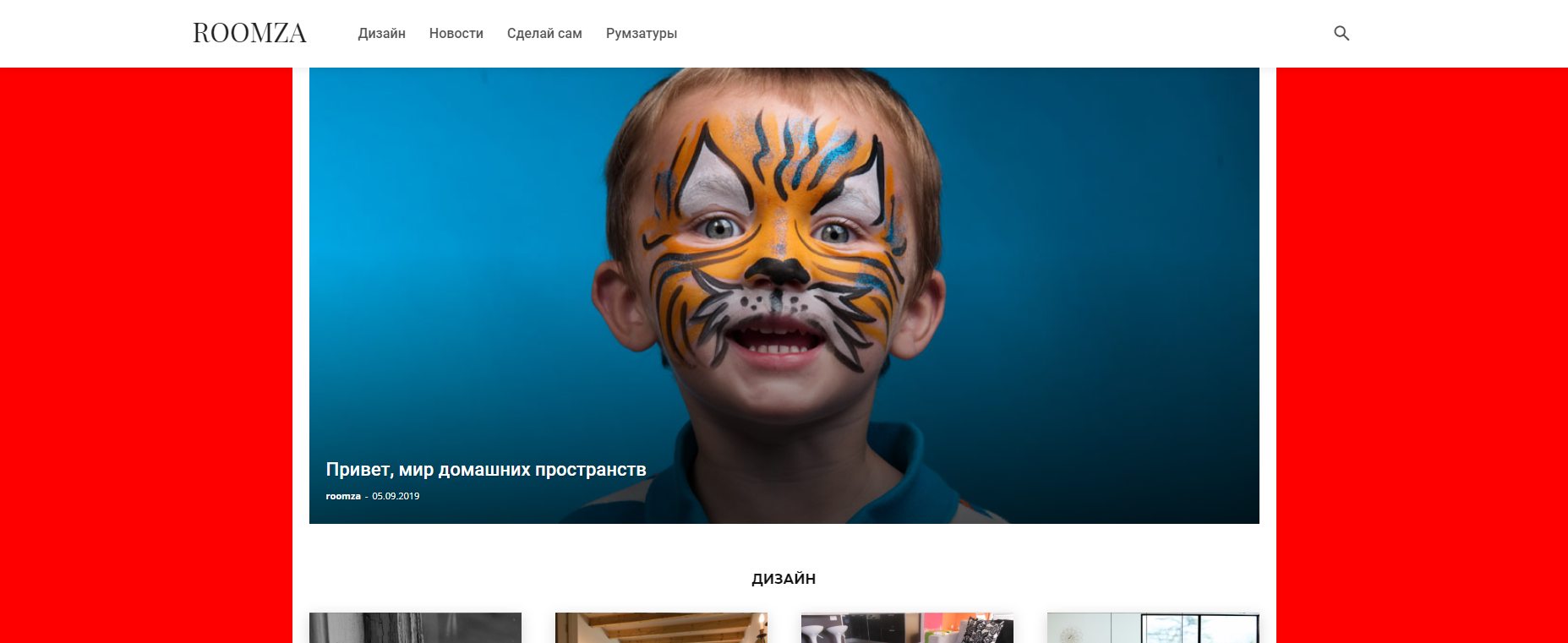
I need to change the background color (in theme colors panel), but when I activate this option it changes the main content container width.
Before:
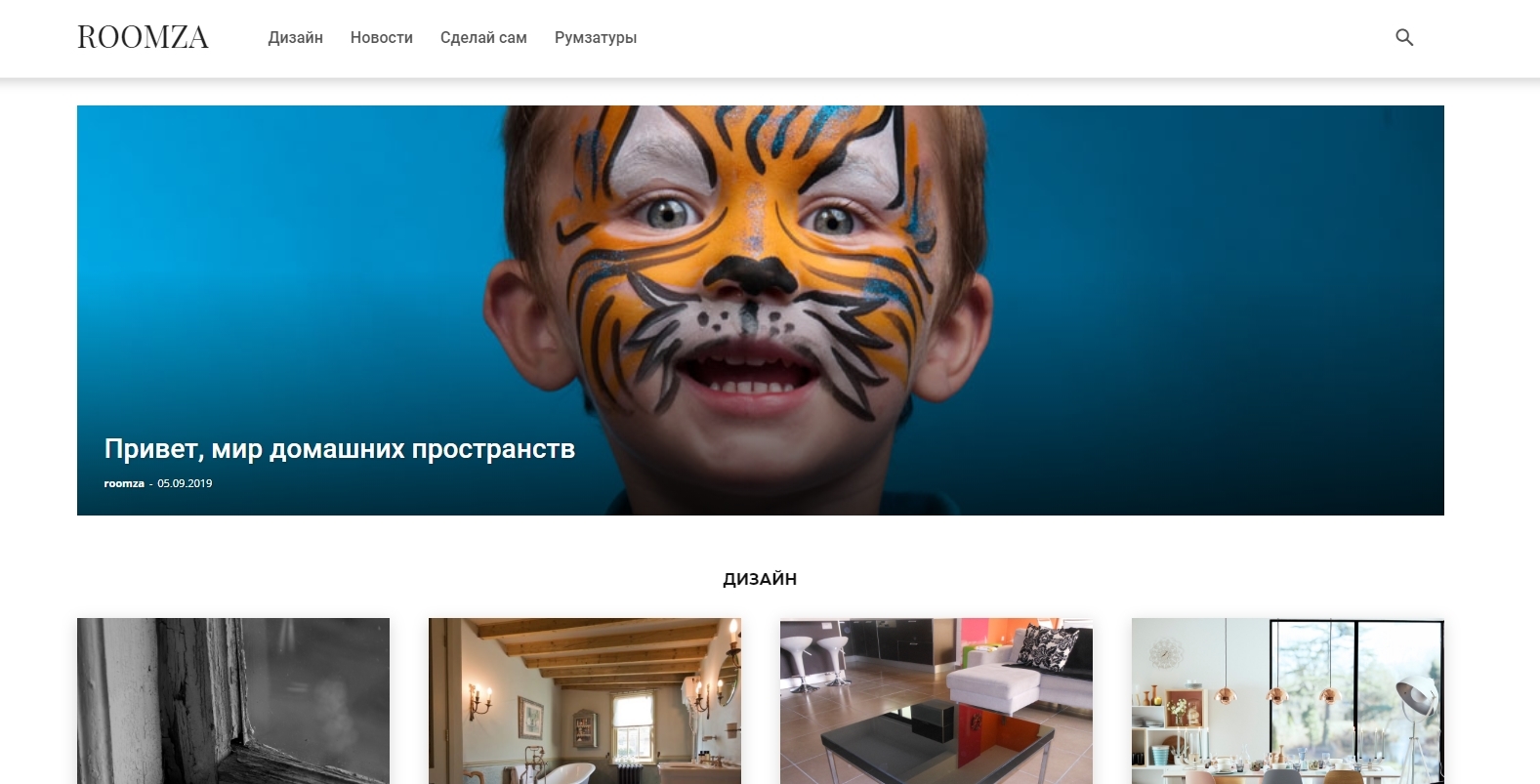
After:
Theme: newspapper
Demo: Fast news
Header: nomad 38
Could you tell me what I do incorrectly? And how can i change background and change container width?
 GregorS
Hi,
What file should I override in my Newspaper child theme in order to place some custom PHP code in the Header? … (I want to have a logo and some other custom element side by side)
thanks
 Tdoc31
 thanks Vlad for your reply,
forgot about the translation panel thing !!
regarding my other question
“If it is not possible to edit the login-in/join process I would like to create a page link from the top header level to a joining or login page”
Any clues on how to do that easily ?
in advance thanks
 Vlad S
 Hello !
You can find that logo in Theme Panel – Header – Logo & Favicon: https://www.screencast.com/t/8Ui38lAYoGpd
Thank you !
Vlad S Hello !
That is a sticky header. That can be modified by activating it in the header manager and modify it using the tagDiv Composer as you can see here: https://www.screencast.com/t/Bzi8kbneOKQc
Thank you !
 Calin
Calin Hello,
Please notice that you do not need to set the tracking code in header.php, you need to set the code in Theme panel > Analytics -> http://prntscr.com/p518l2
Thank you!
 thkmarketing
Hola,
He tratado de agregar el código de seguimiento en mi header.php
del tag manager, lo he hecho muchas veces antes,
Pero en el tema no funciona, lo probé con el tema por defecto de wordpress y funciona bien,
no se por qué con el tema no trabaja.
jaydeedaley1 Hi
I figured it out; increase the margin in the CSS template header.
🙂
jaydeedaley1Dear Support
How can I increase the height of the Fashion LA MODE header to accommodate a larger logo?
I look forward to hearing from you.
JD
 thuanvu
I use header template 7 on cloud template to use for my website. But when I apply this template, It only apply on desktop version. On mobile version, everythig is not same as TD Composer. How do I apply this template on both desktop and mobile version.
Theme on TD Composer

Theme on mobile

 ivandal
 what file???
only i see especific code in single_template_xx.php but all are the same..
original in all files:
<header class=”td-post-title”>
<?php echo $td_mod_single->get_category(); ?>
<?php echo $td_mod_single->get_title();?>
<?php if (!empty($td_mod_single->td_post_theme_settings[‘td_subtitle’])) { ?>
<p class=”td-post-sub-title”><?php echo $td_mod_single->td_post_theme_settings[‘td_subtitle’]; ?></p>
<?php } ?>
<div class=”td-module-meta-info”>
<?php echo $td_mod_single->get_author();?>
<?php echo $td_mod_single->get_date(false);?>
<?php echo $td_mod_single->get_views();?>
<?php echo $td_mod_single->get_comments();?>
</div>
</header>
i edit (all files) so:
<header class=”td-post-title”>
<?php echo $td_mod_single->get_category(); ?>
<?php if (!empty($td_mod_single->td_post_theme_settings[‘td_subtitle’])) { ?>
<p class=”td-post-sub-title”><?php echo $td_mod_single->td_post_theme_settings[‘td_subtitle’]; ?></p>
<?php } ?>
<?php echo $td_mod_single->get_title();?>
<div class=”td-module-meta-info”>
<?php echo $td_mod_single->get_author();?>
<?php echo $td_mod_single->get_date(false);?>
<?php echo $td_mod_single->get_views();?>
<?php echo $td_mod_single->get_comments();?>
</div>
</header>
—
but does not work.. please what file?? and what is the correct code to change order (subtitle above the title)
thank you
 DidierV
 I changed the size of my logo, it measures now (1164×172) but it still does not occupy the whole place of the header 🙁
But I also have the impression that its size is automatically reduced by the theme?
 13fcm
13fcmThe floading header menu keep show the text-logo, icon and underline text even its edited all places to all type units.
Makes me crazy not be able locate this error. Shows on other pc also so not a browser mem. issue.
Try go to page https://hashant.com
Head looks fine for now and show what I edited.
NOW scroll all down on page and scroll a little up again.
THEN the default logo text keep show.
How on earth can I remove this error you have???
Thank you
Calin Hello,
If you do not want to have ads in header just remove the code from here -> http://prntscr.com/p4lb58 also if you are using a plugin for ads you ned to check the settings from that plugin.
Thank you!
 aleabuamer
 Ok, I’ll try to ask my question by another way:
I don’t want to use any ads in header but I need a header: how could I did it?
thx
Calin Hello,
I think that was a misunderstanding, you can achieve what you need with both versions ( mobile theme and responsive version ), if you do not want to use the mobile theme you can use the responsive version and a header template, indeed this option isn’t in the base theme functionality it is only if you use cloud template.
Thank you!
 acarter960
 Hi, I reinstalled newspaper 9 “City News” due to this issue and 1 other issue, NO Plugins what-so-ever.
1. Logged-in users get my “custom” color(#174970 blue), users NOT logged-in(revert to default RED color) so please don’t blame it on plugins.
2. I Cannot change color in the header, Desktop changes but mobile does not. Also, the “home page” stays at default RED color on mobile, however when you click on an article color changes to the customer color I picked(#174970 blue).
3. I have read some of the posts here on the forum, your support reps state that is mostly “custom” Demos, does that mean that a normal user with reasonable WordPress skills cannot reproduce the page unless they are a web developer? .css ninja?
Respectfully waiting on a response. Thank you
ivandalHi!
i need to change subtitle order, just above the title but i dont find the php file to edit the code.. where is???
no css solution please.
<header class=”td-post-title”>
<h1 class=”entry-title”>text title</h1>
<p class=”td-post-sub-title”>text subtitle
</header>
to
<header class=”td-post-title”>
<p class=”td-post-sub-title”>text subtitle
<h1 class=”entry-title”>text title</h1>
</header>
thanks
 IlliniPulse
 What’s odd is that it works for every view except desktop

I can’t deactivate all of my plugins – that would be disastrous.
Tdoc31Hello
congratulation to you for the newspaper 9.8, very nice, enjoying working with it
I am now at the sign-in/join process
I can notfind a way to edit the process ? I mean change the wording, get it translated (I run my site in EN-FR-IT) etc…
I see that I can change the backgroud color in the Theme panel, but thats really not enough !
If it is not possible to edit the login-in/join process I would like to create a page link from the top header level to a joining or login page
how can I do that ?
in advance thanks for your response
jaydeedaley1Dear support
I have a problem with changing the header. I have imported the Fashion header,the default header; when I try to upload my logo, the default logo remains in place. On the cloud template page I see the below error. My new logo is seen on the template page but not live on the site.
Errors at columns elements: 3(models) : 0(dom). The model does not match the content Current state has involved an issue. You could try an UNDO operation (CTRL+Z / CTRL+SHIFT+Z)
