
- TutorialsFrom WPBakery to tagDiv Composer
- TutorialsWhat is Ajax preloading?
 Calin
Calin Hi,
Please provide some more details about the problem you are facing with mobile theme in Newspaper X, until now we do not received any problems regarding the mobile theme on Newspaper X.
Thank you you for your understanding!
 Vlad S
 Hello !
You can try TheRiz sugesstion in order to see if your auto ads are active but we have tried on multiple mobile devices and we still cannot see it.
Thank you !
Calin Hi,
Please notice that the mobile theme will not display the sidebar, there is no option for this.
The mobile version is look like that because you have the mobile theme plugin that provide you a better speed then responsive version of theme, but in order to achieve that speed you’ll need to create a new content for pages because in the most of cases those were made with builders ( tagDiv Composer, WPBakery ) and you need to use only the mobile editor ( you need to set the content for pages in mobile editor and this content will be display on mobile theme)
-> https://www.screencast.com/t/ebUIzt4se
Since Newspaper v9.7.4 you can show the responsive version on mobile theme -> http://prntscr.com/oh6r2s you can check more details about mobile theme in our documentation -> https://forum.tagdiv.com/the-mobile-theme/
Thank you for your understanding!
Calin Hi,
If you want to do this on mobile homepage, then you need to make some changes in theme files in wp-content/plugins/td-composer/mobile/front-page.php move the the_content() at the start class for td-container -> http://prntscr.com/pu4fiy -> http://prntscr.com/pu4g2f
Hope this will help you!
Thank you!
 meri Calin
 Hi,
The mobile version is look like that because you have the mobile theme plugin that provide you a better speed then responsive version of theme, but in order to achieve that speed you’ll need to create a new content for pages because in the most of cases those were made with builders ( tagDiv Composer, WPBakery ) and you need to use only the mobile editor ( you need to set the content for pages in mobile editor and this content will be display on mobile theme)
-> https://www.screencast.com/t/ebUIzt4se
Since Newspaper v9.7.4 you can show the responsive version on mobile theme -> http://prntscr.com/oh6r2s you can check more details about mobile theme in our documentation -> https://forum.tagdiv.com/the-mobile-theme/
If there is still a problem, please provide some more details and some screenshots.
Thank you for your understanding!
Calin Hi,
The mobile version is look like that because you have the mobile theme plugin that provide you a better speed then responsive version of theme, but in order to achieve that speed you’ll need to create a new content for pages because in the most of cases those were made with builders ( tagDiv Composer, WPBakery ) and you need to use only the mobile editor ( you need to set the content for pages in mobile editor and this content will be display on mobile theme)
-> https://www.screencast.com/t/ebUIzt4se
Since Newspaper v9.7.4 you can show the responsive version on mobile theme -> http://prntscr.com/oh6r2s you can check more details about mobile theme in our documentation -> https://forum.tagdiv.com/the-mobile-theme/
If there is still a problem, please provide some more details and some screenshots.
Thank you for your understanding!
 notizieoggi
 Yes, I have found that folder, but there are many php files. The problem is about JS.
I need to know why the “defer” option in the script of ads (for mobile) doesnt work.
I have this:
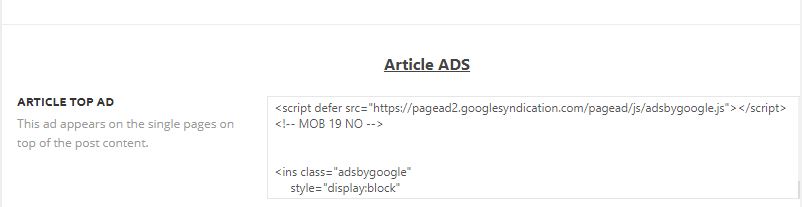
For something that I dont know, this “module” works for desktop (that defer the scripts), but not for mobile. Maybe mobile script are managed differently than desktop.
Calin Hi,
All the code for mobile can be found in this folder -> wp-content/plugins/td-composer/mobile
Also here are some topics about:
Loading Third-Party JavaScript -> https://developers.google.com/web/fundamentals/performance/optimizing-content-efficiency/loading-third-party-javascript
Reduce the impact of third-party code -> https://web.dev/third-party-summary/
Hope this will help you!
Thank you!
Calin Hi,
Sorry, I forgot about the mobile version, for this you’ll need to set this code in this file -> wp-content/plugins/td-composer/mobile/header.php
Thank you!
 Alsok
Alsok In Composer it’s looks good.
https://yadi.sk/i/TYEnRV6Y6od62g
And in my mobile it’s bad.
https://yadi.sk/i/d3CvB5NtOLjtJg
Thanks you!
Alsok This header is good for laptop, but for the mobile version I would like to greatly reduce this element or replace it completely.
Screenshot: https://yadi.sk/i/O3QuMVV6gh_UBA
Site: http://t1.auroville.ru
Thank you!
 bdlca
bdlcaI don’t understand, This is a brand new site, new domain everything.
I loaded Newspaper theme to newyorkhispano.net but it takes upwards of 5 seconds to load the page on desktop and mobile.
How do I fix this? i set up without any changes. Just plugins:
-really simple ssl
– smush
– wordfence security
– Yoast
– WPS hide login
– WP Supercache (which I only installed after it was slow – currently deactivated)
What should I do?
 TheRiz
 You might have auto-ads enabled through Google Adsense. These types of banners appear through auto-ads on mobile.
TheRiz As long as the mobile site home page and the desktop site homepage are the same URL, all you need to do is make sure the canonical link element is listed as the homepage, and not /page2 or whatever.
This should tell Google to only consider content on the homepage and not additional pages like /page2 as an alternate version that needs to be indexed.
 tgamble
The Mobile theme is not showing the sidebar content at the bottom of post pages. I do not se an option to turn this on or to have specific (limited) mobile sidebar content.
tgambleI would like my mobile content to be above the homepage grid, not below. It’s the introductory content to the site, so it has to start at the top above posts. Is there some custom code I can use to overwrite this or is there a setting? i tried turning of the mobile version but i would rather use the optimized version of the site.
https://drive.google.com/file/d/1OT9s-iVxcsCEoGbSqFzCUfOAc_egA1jZ/view?usp=sharing
tgamble so… very hidden and not related but this content showed up when i turned on the “front page grid” on the mobile theme.
i do however still need help with the content that is showing up. looks like hard returns in the text are not being recognized and all the content clumps together. <p></p> not working, <br> is not working. i put code in the text side and once i switch to the visual it is being removed.
 miejan
For some reason, all the text in posts is appearing centered, not flush left, in the mobile theme. If you’ve heard of this before, is there a fix?
tgambleWe have added in mobile content on the homepage (in the WP editor at the bottom) but its not showing in the activated mobile theme. This feature is working on other pages. In gutenberg editor the mobile settings are turned on. Reading settings are set to “a static page”. I have utilized the delete cache feature in the admin as well. Only latest articles display on the homepage.
need the WYSIWYG content to show on the homepage
 Shurick924
 Да, в панели перевода всё ок, в десктопной версии всё ок, в варианте mobile theme + amp не всё ок.=(
notizieoggi The problem is this:
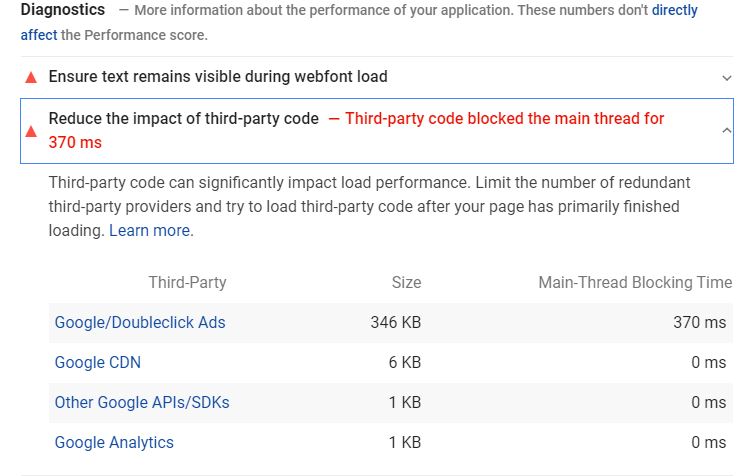
I have resolved on desktop (with “defer” on google’s scripts) but on mobile still is there (I have put “defer” into mobile scripts)
Shurick924While everything is translated on desktop I still see some English terms in mobile theme (screenshots attached)
https://yadi.sk/i/XRh3atrq_AoW_g
https://yadi.sk/i/Xst2HywDA9-wmw
I could hide things like that:
.td-mobile-footer-wrap .block-title {

    margin: 0 0 10px 0;

    visibility: hidden;

}
But:
1. it’s not good at all;
2. ‘LATEST ARTICLES’ doesn’t have distinct class for mobile.
When do you plan to fix this issue?
 Thomas
Hello
Before updating to the last version of the theme, I want to know the folder, name and lines where I can fin the link to a member profile when is log.
On our site it has to point to this adress
https://www.virtualmagie.com/profil/
Could I have the information for computer and mobile please?
Regards
 Amit
Amit @vlad-s I am facing same issue, can you post the solution here?
PHP Notice:  Trying to get property 'ID' of non-object in /wp-content/plugins/td-composer/legacy/common/wp_booster/td_wp_booster_functions.php on line 895

PHP Notice:  Undefined index: REQUEST_SCHEME in /wp-content/plugins/td-mobile-plugin/td_mobile_theme.php on line 183
