



Hi,
That seems to be a code related to the rank math plugin. You need to add it in the theme functions file, or with a plugin like this one https://wordpress.org/plugins/insert-headers-and-footers/
But before entering it I see you have to enter the IDs of your guest authors. Are they regular user accounts or guest author accounts added by a plugin?
Normally the IDs can be seen while editing the profile of the user, for example https://prnt.sc/qRJPDFO8No5Y -> https://prnt.sc/Qq-ogm_gdHwW The ID of that user is 2.
Once you replace the IDs in the code with yours https://prnt.sc/7-GZZrbQOawY then the code can be loaded on the website using the methods I mentioned.
Thank you!
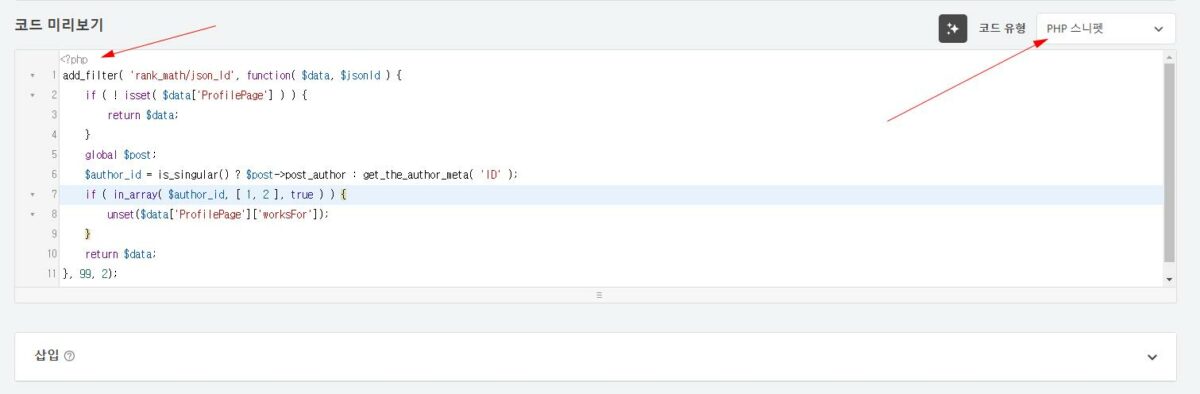
Can I add it like this? Please find where I made a mistake
Is that a plugin that loads code snippets? I can’t tell what that is exactly, unfortunately. As long as the code is loaded in the functions file it will work fine, doesn’t matter if its entered directly in the theme functions or with a plugin.
With the plugin I mentioned is very easy, you just add a new PHP snippet and enter the code https://prnt.sc/c9mskFSsfDGG Then remember to activate it as well https://prnt.sc/9QeVV3H71g0j But most plugins have something similar.
Thank you!
Yes, that’s right, Mr. Simeon, I downloaded the plugin you recommended, set it up as shown in the screenshot, and clicked activate. That’s it?
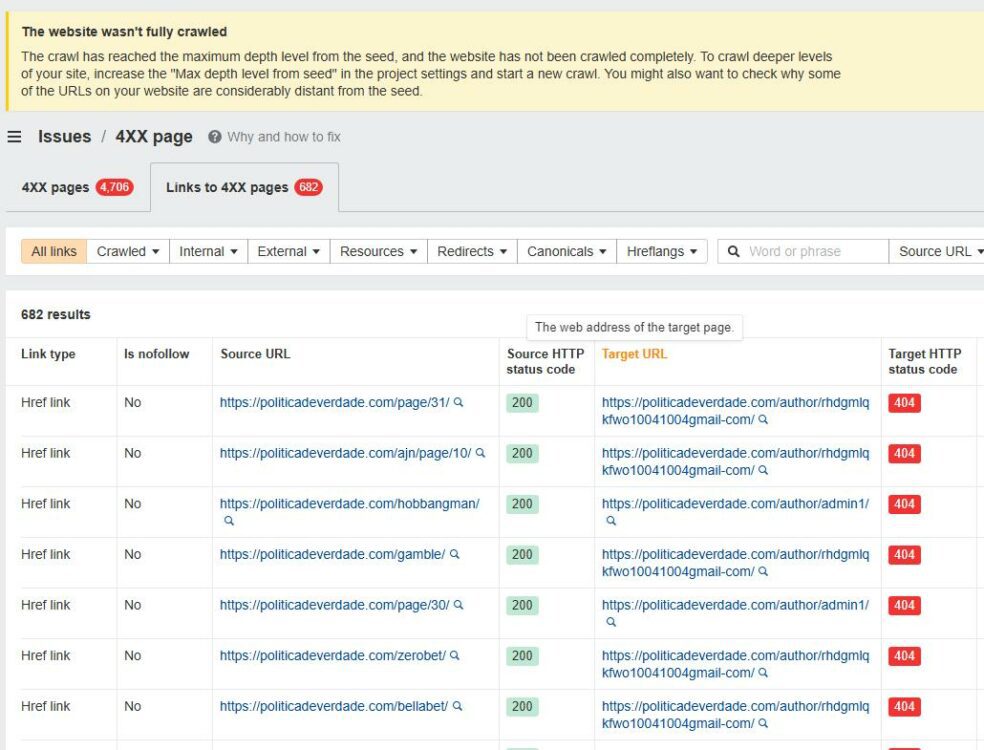
https://politicadeverdade.com/author/rhdgmlqkfwo10041004gmail-com/
https://politicadeverdade.com/author/admin1/
The two author URLs keep giving me a ton of 404 errors. Could you please tell me how to solve this perfectly?
I assume those 2 authors are not available on the website anymore and won’t be restored. Then you could redirect those 2 URLs to the homepage for example, with a redirection plugin. From what I find its best to use a 410 status for them https://yoast.com/deleting-pages-from-your-site/
Also you could permanently remove those 2 URLs from Google: https://support.google.com/webmasters/answer/9689846?hl=en
Google says that if the pages return a 404 or 410 you can remove them permanently https://prnt.sc/rWQkHvI9_bvr
Thank you!

I see that author url everywhere. And it causes a lot of errors, how can I get rid of it?
It’s in the rank math schema https://prnt.sc/3afU4-bNAoRm so it will probably be loaded for all the types of content. Maybe you could try the solutions from this article https://rankmath.com/blog/remove-the-author-name-wordpress this one https://prnt.sc/N7EQlWnr_Vgr I haven’t tried it myself, but maybe it works. Other t5han this, maybe the rank math support has a better solution.
Thank you!
