

I can’t insert new Custom Ad. I didn’t check out the widget. I followed this guide –> https://forum.tagdiv.com/topic/sidebar-ads/#post-21850
You can write it to the new version of the theme?
Thanks
Here do not appear “Custom_ad_4″…5…6 etc -> https://dl.dropboxusercontent.com/u/22334399/Schermata%202015-03-17%20alle%2010.32.14.png

Hi,
Sorry for delay!
I have tested this for newsmag theme and you have to edit td_config.php and custom ads like this: http://screencast.com/t/g0EhX0jYqlY0
After that you can use this code http://pastebin.com/LVgzm2zR for each custom ad like this: http://screencast.com/t/GoIidqYT Just change ID for each custom ad.
Result: http://screencast.com/t/1CzIudWsVP6x
Hope this helps!
I did everything, but here it does not appear yet -> https://dl.dropboxusercontent.com/u/22334399/Schermata%202015-03-17%20alle%2010.32.14.png
Hi,
Do you see the ad in Theme Panel > Ads section: http://screencast.com/t/UdS2KpRt
If it appears there it should also appear in Ad Box settings: http://screencast.com/t/jRCVqNFbUXwT
I have tested this again following the steps I suggested above and with the code I provide to you (just changed ID) and it works fine: http://screencast.com/t/qTBpQ9yny0 – http://screencast.com/t/PgsiPueLb7oJ
Result: http://screencast.com/t/vxD7f70fKDMN – http://screencast.com/t/bRM3fLFX5Q
It should work also in your case just take it step by step and verify the code.
Thanks!
OK done. But these banners that I have a style? Why don’t I put the margin? -> https://dl.dropboxusercontent.com/u/22334399/Schermata%202015-03-18%20alle%2021.48.40.png
Hi,
Please provide a link to the issue, as I checked your homepage and did not found any issues: http://screencast.com/t/KUipCt2XqT8
Thanks!
Hi,
Please use these divs to show banners just add the image src for each device in the divs below:
<div class="td-visible-desktop">
 <a href="http://google.com" target="_blank"><img src="http://demo.tagdiv.com/newsmag/wp-content/uploads/2014/08/rec728.jpg" alt=""></a>
</div>
<div class="td-visible-tablet-portrait">
 <a href="http://google.com" target="_blank"><img src="http://demo.tagdiv.com/newsmag/wp-content/uploads/2014/08/rec468.jpg" alt=""></a>
</div>
<div class="td-visible-phone">
 <a href="http://google.com" target="_blank"><img src="http://demo.tagdiv.com/newsmag/wp-content/uploads/2014/08/rec320.jpg" alt=""></a>
</div>
I tested with this and the result is: http://screencast.com/t/qoAE3aTUTf
You can find more info on our documentation: https://forum.tagdiv.com/ads-system-full-guide/
Hope this helps
-
This reply was modified 11 years by Alin [tagDiv].
I put this-> https://dl.dropboxusercontent.com/u/22334399/Schermata%202015-03-19%20alle%2015.31.55.png
Because it’s not centered?
-
This reply was modified 11 years by
OverPress.
Hi,
I just tested this and this is happens because of custom ad that you use. If you use above divs the ad will be centered: http://screencast.com/t/nm1cP7X9w
And for margin top you will need to use this custom css like the default ads: http://screencast.com/t/BZQdbCen
.td-a-rec-id-home_300{

margin-top: 20px;

margin-bottom: 20px;

}
Thanks!
and margin left and right?
Hi,
Please use those divs it will be automatically centered for all your custom ads. For example just paste this code in your custom ad:
<div class="td-visible-desktop">
 <a href="" target="_blank"><img src="http://185.17.107.54/sitonuovo/wp-content/themes/Newsmag/images/demo/ad_sidebar/rec300.png" alt=""></a>
</div>
Thanks!
-
This reply was modified 11 years by Alin [tagDiv].
No that it is not apply on that div. Please let me know how it goes.
Thanks!
Hi,
You can try what css code you want/need in Theme Panel > Custom Css. I just explained to you how this new custom ads will be centered and apply some margin top, to look just like default custom ads. If you don’t have basic css/html experience I suggest get someone to help you with this as we cannot offer any custom work.
Thanks!
I created new Custom Ad but every time I update my theme settings deletes all adsense codes that I post inside. How can I fix?
These are the two files I modified to insert the Custom Ad.
td_config.php -> https://dl.dropboxusercontent.com/u/22334399/td_config.php
td_panel_ads.php -> https://dl.dropboxusercontent.com/u/22334399/td_panel_ads.php
Hi,
We know about this behavior and we are currently trying to find the cause of it. We will provide a solution for this as soon as we have one.
We’re very sorry for the inconvenience!
Thanks!

Where exactly is this td_config file located?
This is what my includes folder looks like. Version 4.6.1.
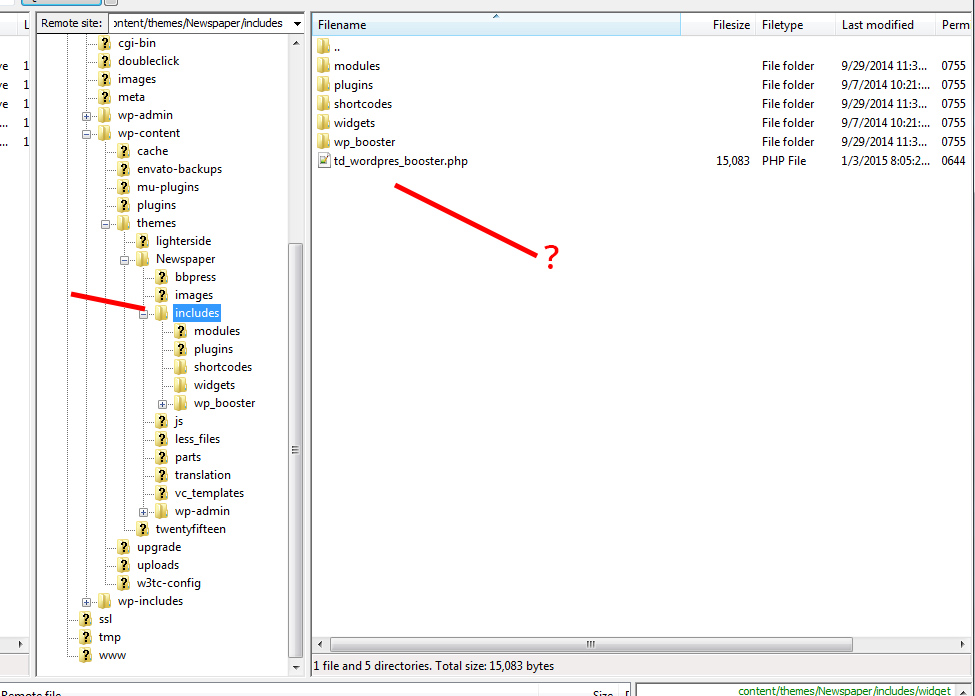
Is the config file in a different location in 4.6.1?
Definitely looking to ad more custom ads in the theme panel.
Thanks
Alin,
Actually I found the same code you mentioned here: http://screencast.com/t/g0EhX0jYqlY0
But it was in the td_ad_box.php file. Not the td_config file.
Is this right?
looks like everything worked. I found both files, although different in name, and in different folders.
added the “custom ad #4” line of code to /includes/shortcodes/td_ad_box.php
and added the larger associated set of code to /newspaper/wp-admin/panel/views/panel_ads.php
It seemed to work.
My only question is this… when I update to the latest version of newspaper, will the directory structure change and will I have to do this over again?
Thanks for confirming if I’m on the right path.
Hi,
Here you can find this solution for Newspaper theme you can take a look and see if you did this like that: https://forum.tagdiv.com/topic/sidebar-ads/#post-21850
Unfortunately when you update the theme, that file will be overwritten, but you can make a backup of your current theme installation and then update and overwrite the files via FTP so you would have to do the changes once again.
Please post your issues in the Newspaper section: https://forum.tagdiv.com/forum/newspaper/
Thanks!



