

Hi, I’ve read all the articles about how to add google fonts, but I’m still stuck sorry.
I’m just wondering from this article, where do I actually put the following html code calling the specific font? :
https://developers.google.com/fonts/docs/getting_started#Subsets
Do I have to create a new style sheet somewhere, or is there a section within dashboard I can add this code? Thanks.

Hello !
Please take a look at this tutorial regarding font customization: https://forum.tagdiv.com/font-customization/
Thank you !
Thankyou but that still doesn’t help.
How can i add this font for example?
https://fonts.google.com/specimen/Nanum+Pen+Script?selection.family=Nanum+Pen+Script
Hello !
If you want to use a custom font file make sure it has a .woff extension, else just convert it to .woff using one of the multiple online solutions.
In order to use a custom font file it is enough to upload the font file by using the font upload buttons and provide a name for your fonts in the designated fields:
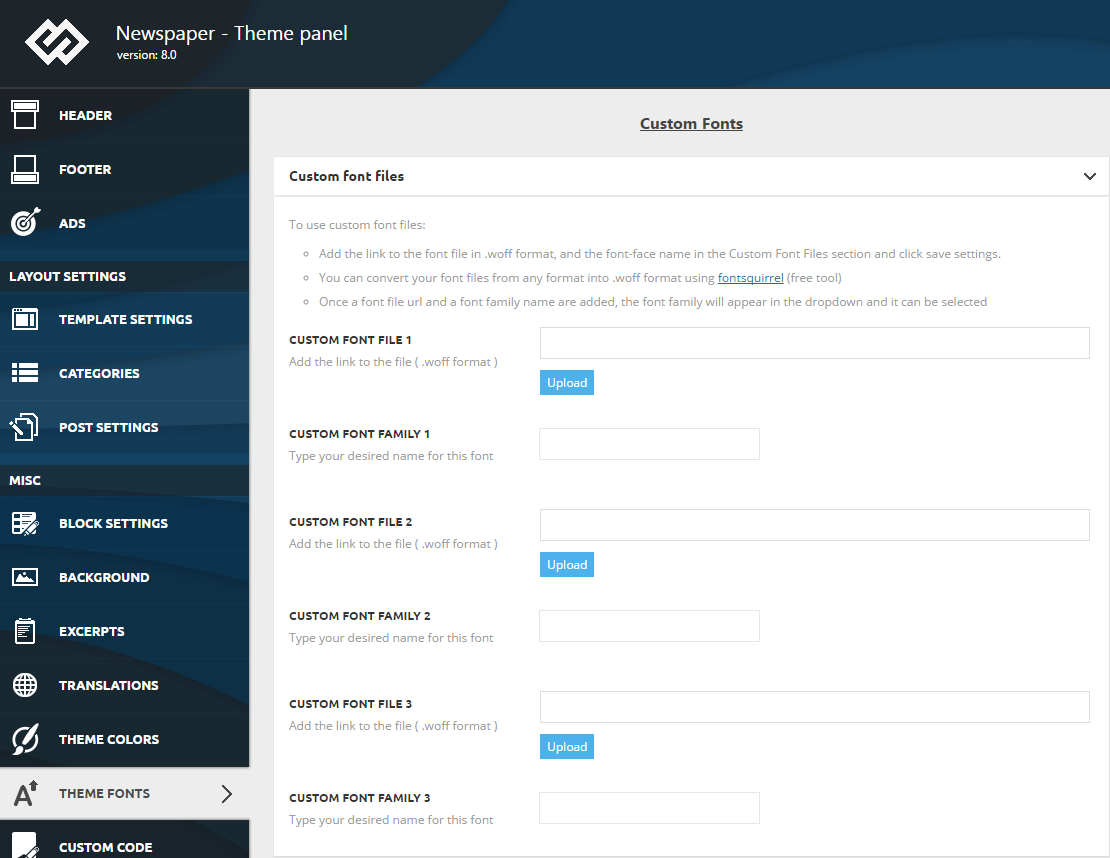
Thank you !

Hi @brael,
Using the html code to add a custom google fonts is not very recommended because if you’ll make a theme update and the code is not set in a child theme all changes will be lost.
If you still want to add the style in theme files, you’ll need to set the code in child theme in css file -> http://prntscr.com/oweugr -> http://prntscr.com/oweuro -> http://prntscr.com/oweuxj -> http://prntscr.com/owev2e -> results -> http://prntscr.com/oweve6
Also this can be achieve with out child theme, but the code is set in theme panel like this -> http://prntscr.com/owew8g -> http://prntscr.com/owew1t
Hope this will help you!
Thank you!
