Hi all,
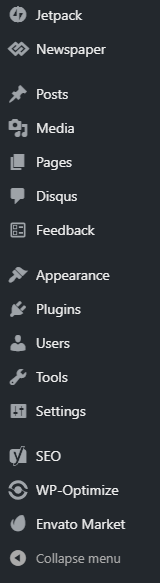
AMP is not appearing in my installations sidebar. I am on the latest version.
In addition, site speed is dramatically slower. Previously, on 9.5, it was 2.4 seconds: https://gtmetrix.com/reports/www.thenerdystudent.com/Z10lATRl
Thanks
Seems to appear when I disable the mobile theme. I have enabled AMP in the mobile theme using the Mobile+Amp option.
-
This reply was modified 7 years by
GiacomoLaw.
Seems like its working: https://www.google.com/amp/s/www.thenerdystudent.com/2018/11/putio/amp/
However some elements are not loading, such as the star icons.

Hi,
I checked your website and you are not using mobile theme with amp -> https://www.screencast.com/t/eZjxmQlwKp it should look like this -> https://www.screencast.com/t/rMcBAcO7
Thank you!
Hi there,
That’s odd, I have checked it in the mobile menu: https://imgur.com/a/O6baNkS
The issue is AMP isn’t appearing in the sidebar, so I can’t do some of the steps in guide: https://user-images.githubusercontent.com/9038673/56297973-432bad00-6129-11e9-8e5a-c41895167903.png
Looks like AMP is being picked up: https://www.google.com/amp/s/www.thenerdystudent.com/2018/11/putio/amp/
But icons aren’t loading in. I’ve spent all morning trying to fix this but have no clue.
Thanks 🙂
Just an update, I have had to disable AMP because users were getting 404s when tapping on the links, and have set up a redirect.
Could you let me know when this is fixed? Essentially, despite having all the required settings selected, AMP was not working. It was not showing in the sidebar whilst the mobile theme was active.
Thanks
-
This reply was modified 7 years by

Hi,
Please make update to v9.7.1 and check this problem is still there -> https://www.screencast.com/t/r64BHLL5aPJ
Please make sure that you do not have a plugin conflict, please deactivate all non theme plugins, also if you are using child theme or cache plugin, please deactivate them, clear all cache and try again.
Thank you!
Hi there, I disabled all plugins and the child theme apart from the amp ones and still no success. I am on 9.7.1.
Thanks

Hi GiacomoLaw,
what do you mean with “AMP not appearing”? Since version 9.6 of Newspaper AMP is not anymore a part of the Newspaper-Theme and there is no AMP-menu inside the theme-settings anymore. You have to install the official AMP-Plugin of WordPress and do your configurations there. As soon as you have installed the offical AMP-Plugin there is a menu-entry (but not inside Newspaper anymore).
https://de.wordpress.org/plugins/amp/
-
This reply was modified 7 years by
be2name.
I’ve done that. However the amp plugin doesn’t appear in the sidebar: https://user-images.githubusercontent.com/9038673/56297973-432bad00-6129-11e9-8e5a-c41895167903.png
And amp authentication doesn’t pick up any amp links in the standard site after a cache clear.

Nope, still doesn’t appear when I deactivate the child theme.

Hello @giacomolaw
Try this-
1. Disable Child theme
2. Enable default theme (Twenty Nineteen) or any other.
3. Now enable Newspaper theme (not a child theme).
4. AMP will work now.
If you see More article block at the end of the AMP page then you need to disable More article box option from theme panel. Refer: http://prntscr.com/nf7d64
Hope this will help you. All the best!
Thanks, I did this however it still does not appear in the sidebar.
I found that disabling the mobile theme plugin makes it show, but then I cannot use it…
Thanks!
Should I do it with the TagDiv plugins enabled, and amp enabled? Or should I uninstall amp and then reinstall after those steps?
Thanks!
of course, after step 3 goto Newspaper >> Welcome and follow the instructions.
refer:http://prntscr.com/nf7r7g
Worked, thanks! Now I just need to transfer my customisations over.
You are a lifesaver, thank you so much 🙂
Thank you!
-
This reply was modified 7 years by