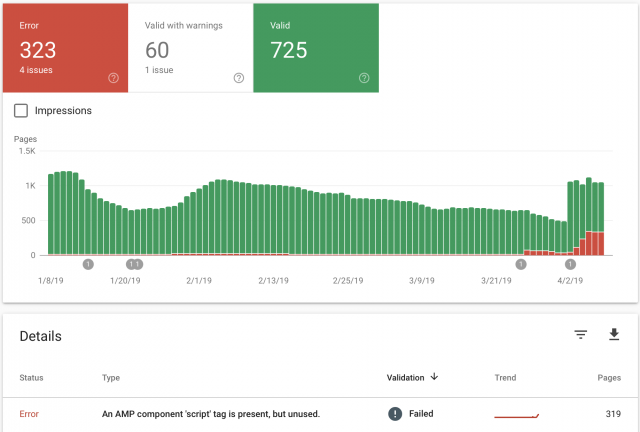
I recently updated the theme and the feature to use “mobile”, “Mobile + AMP” or “AMP” has started to create AMP errors, when previously there were none. It keeps telling me there, “An AMP component ‘script’ tag is present, but unused”. This was never an issue until after the upgrade. I had AMP Ads formatted the correct way without using the “Script” tag. As you can see from the image I attached, the errors started around March 26th, right around the time I updated. My website is GoingFor2.com. I currently have it set at “Mobile Only” because I don’t want to keep racking up errors, but I want to be able to use AMP as well. Thank you. Here is the link to the image: http://goingfor2.com/wp-content/uploads/2019/04/Screen-Shot-2019-04-08-at-10.12.43-PM.png

Okay. I activated my AMP. I’m using AMP+Mobile. I currently do not have an amp ad set up as I originally thought that was the issue. But even after removing it, i was getting the script error. I know that AMP ads are different and I was using them properly. They worked fine before the update. Now, they do not.
Does the “mobile ads” need to be in AMP format? Before they were separate.
Hi,
If you have AdSense, you need to add the Ads only through the Mobile Ads and them should not be in AMP format, because the theme automatically converts them when the AMP mode is enabled. Also, if you have some AMP Auto Ads, all of these sohuld have to be added through AMP ADS section.
Thank you!
Hi,
I have checked your website on AMP and it seems to returns good results, as you can see here -> https://www.screencast.com/t/KCeULW2pHi6 Also, the menu seems to works as expected. Provide more details about your problem so I can identify it closer and also, so I will be able to provide a more accurate response.
Thank you!
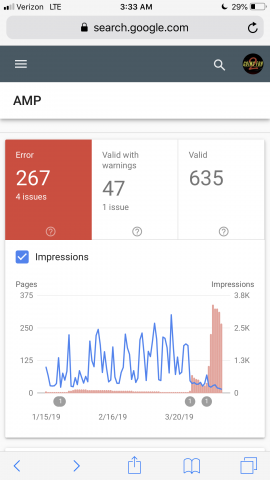
Okay. It looks like AMP is showing up properly now, but is it possible to revert back to the older version? Take a look at this image, I’ll give you one guess as to when I upgraded to the new version. Right about the time you see my impressions take a nose dive and my errors skyrocket. Here is the image: http://goingfor2.com/wp-content/uploads/2019/04/9ADB38E9-4EE1-4261-B205-29028F44ABAE.png
Hi,
If you want to roll back to an old version of AMP, you need to downgrade the theme but notice that we do not recommend to do this, sorry! The latest version of AMP with the theme works as expected and we do not have any bad reports in this case, sorry! Check your setup configuration and all of your used plugins in order to achieve good theme results. Also, if you are using some untested plugins you need to disable all of them because these might interact with the theme and causes a lot of unknown issues.
Thank you!
Okay. I understand that it’s not recommended I downgrade, but I would still like to do so. I tried everything you’ve mentioned from turning off plugins, checking and re-checking my setup. None of its working and I’m losing traffic and google Ranking because of it. Everything thing worked perfect before the upgrade, as you can see from the photo. If you could explain how I downgrade. Thank you.
Hi,
Please send us an email and request there an older version of the theme. I think that you want version 9.6 at the theme. Our email is contact@tagdiv.com.
Thank you!