Hi. I know that you have a lot of posts about this, and i have read all of them, but i didn’t found any answer yet!
I use for homepage : Homepage – with article list . I had made also a comment in themeforest and the answer from staff was this:
Only one template comes with h1 page title – http://screencast.com/t/lrtO3f9ny
The page title (H1) or subtitle (H2) can be added manually using visual composer – http://screencast.com/t/fgekI1Gb – http://screencast.com/t/Uj6edkvf
Or by modifying the template files – http://screencast.com/t/2fcHKsQyVJ34
The other elements on page like block/modules titles use h3 and h4 tags. When we built the templates we followed the best practices used by Yoast and other SEO specialists.
If you hide the title on page using css display: none or moving it outside of the visible screen area (ex. position: absolute; top: 9999px; ) Google will penalize you. Here are some discussions on the subject – http://stackoverflow.com/questions/3239202/whats-the-correct-way-to-hide-the-h1-tag-and-not-be-banned-from-google
But it is not good for style to have a text as h1 visible! Any other suggestion? If i set logo with h1, also in posts i am going to have 2 h1 tags, and this is not right.
My website is this: http://www.radarnews.gr/


Hi,
You can add the h1 tag on page and use custom css to style it to make it look like you want it http://screencast.com/t/AukWcJliZCE
Hope this helps!
Thanks

Hi,
None of theses links I’m clicking on to get the information are working for me.My problem is I used the news-mag theme homepage template and my website Url seo droped back in serps. When I checked the homepage threw source I realized that the page has no h1 tags.How do I change my homepage so it work’s best for SEO.
Paul…
-
This reply was modified 10 years by
ptec1.

You can add H1 tag to your home page by simply adding a text box in a VC row, or in home custom sidebar.
Custom style the h1 font/size with a new class like homeh1 and apply that to the h1 tag wrapping your 20 words, which should ideally match the title tag in your home page meta data.
This applies to both the newsmag and newspaper themes — or any theme, really.

Hello,
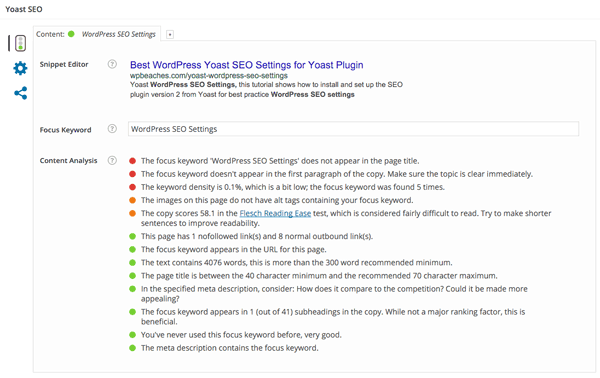
Generally the yoast plugin will analyse your page and display the seo issues: https://wpbeaches.com/yoast-wordpress-seo-settings/ – https://wpbeaches.com/wp-content/uploads/2015/03/wordpress-yoast-seo-local-post-settings.png Try both methods and see what result does the plugin provide and use the solution ‘aproved’ by the seo plugin.
Thanks.

Hello ptec1,
You can always get a freelancer from sites like, http://studio.envato.com/ if you don’t know how to do it yourself.
Hope this helps!
Thank you for the message!
Tip for asdding meta data to your home page with YOAST …
first “read the friendly manual” (help) included with Yoast …
second, go to your “page” you have setup for your home page, and note the Yoast custom elements on the “page” for your home page. THAT is where you set all the custom elements for your home page in the meta data.
Lots of folks do miss that 🙂

Hi 🙂 Why ar you using this website? http://www.screencast.com/
all image just 404…