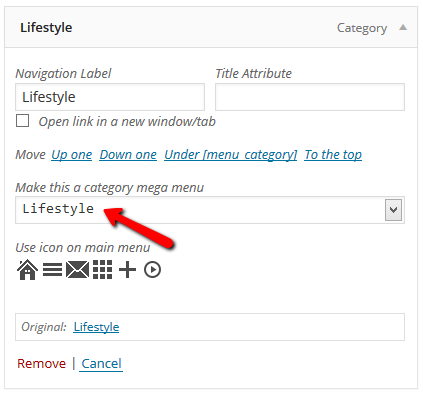
Hello,
Firstly, Thank you very much for this amazing theme! I’ve been trying to create a category mega menu without success for a few hours already so I allow myself to post a topic here. 2 questions:
1. What I would like is all my categories to appear like subcategories in a mega menu just like that: https://forum.tagdiv.com//wp-content/uploads/2014/02/2014-02-24_1704.png
For that I created a parent category called “catégories” (French) and put it in my Menu structure. Here I know I should just select it in a dropdown menu to make it a “category mega menu” just like that: https://forum.tagdiv.com/wp-content/uploads/2014/02/2014-02-24_1708.png
…but the dropdown menu doesn’t appear! What should I do??
2. How can I edit Mega Menu appearance, if I want to change its color, font size, position, etc.?
Thanks a lot in advance!
Best,
Sam

Hi,
1. First of all if you have set it right the drop-down should be there so double check that you have done this right and disable all plugins laving just the visual composer active this is to make sure you don’t have another plugin which could cause this. Also make sure you empty your cache if you use any.
If this doesn’t helps please let us know about it and provide more details and also your site’s URL so we can inspect this.
2. You can change the appearance of the mega menu is to change the theme accent color from theme panel > theme color or for the font you can do it form theme panel >custom typography section: http://screencast.com/t/MYr8tWhkDYY1
Another way would be to do it via custom css an add it in theme panel > custom css filed.
Hope this helps!
Thanks
Thank you very much! It seems a plugin was indeed preventing the dropdown menu to appear…
Now I’d like to have more than 5 sub-categories appearing… I changed the td_menu.php show_child_cat parameter to 15 but it doesn’t have any impact. I cleared my cache but nothing seems to change.
Any clue?
Thanks again!
Sam
Hi,
Yes, please make sure you have at least one post in any of your newly created subcategories as if you don’t have posts in it, that subcategories isn’t added to the menu.
Please make sure you do that and then check it, I have also tested this and should work fine: http://screencast.com/t/qkyFK2WsYdG
Thanks
Hi,
Thanks a lot for your answer, it worked great! 3 related questions now coming:
1. It seems there is still only 5 subcategories showing on mobile.. I changed the parameter to 15 too in td_menu.php but didn’t change anything:
if ($sub_categories_count == 15) { // only show 15 subcategories in the mobile menu – the same limit applies to the mega menu
Any clue?
2. How can I have the article thumbnails on 2 lines so that I don’t have a big grey area now that I have a lot of subategories? Basically, I’d like something like that: http://screencast.com/t/PUfQGITF3gzb but combined with my category mega menu… I changed the ‘limit’ parameter of the array to 10 in the td_menu.php but it doesn’t seem to change anything. Could you please help?
3. Is there a way I can remove or change the display effect for the page thumbnails in this white area? Right now it looks like a “arrive from top” fade in as you can see on: http://www.imagespourapprendre.com
Thanks a lot in advance for your answers!
Best,
Sam
Hi,
1. Changing this value should fix this: http://screencast.com/t/KBvo5bdFb
Make sure you did the same and let me know if something changes.
2. Use this method: https://forum.tagdiv.com/topic/enabling-hover-menu-dropdown/#post-23186
3. Unfortunately the theme doesn’t have an option for that and you will need custom work to achieve it. You can always get a freelancer from sites like: http://studio.envato.com/ if you don’t know how to do it yourself.
Thanks