Hello
On the very bottom of the website, left side – there is a Newpaper Copyright statement – How do I change this?
I have been everywhere through out site, including cloud templates and even edited the footer.php file – No Change.
Need to know how I replace this statement, copyright with my own.
Thank you.

Hello,
Please let me know what footer template you have, maybe you have a cloud template, and you need to edit with tagdiv Composer scroll until footer select the copyright and change it https://imgur.com/EPeTe19
Thank you!
Hi,
I need more details please. It does not seem that I am using a footer template at all, as there is no footer cloud template. I have tried to change the copyright statement manually through footer.php – but it doesn’t do anything. HOW else can I change this statement? Bottom-left side @ http://fodphotosite.com
Every time an update is done to the theme, something always seems to get messed up. Footer/Copyright is very difficult to change – please provide me with full details.
Thank you so much.
Hi,
It is not recommended to make changes in the theme files. If you have a Standard Prebuilt Website you can add the copyright to the footer in Theme Panel -> Footer -> Footer info content => https://www.screencast.com/t/1mUchAid or in sub footer settings => https://www.screencast.com/t/Rrn6KKx
Thank you!
Hello,
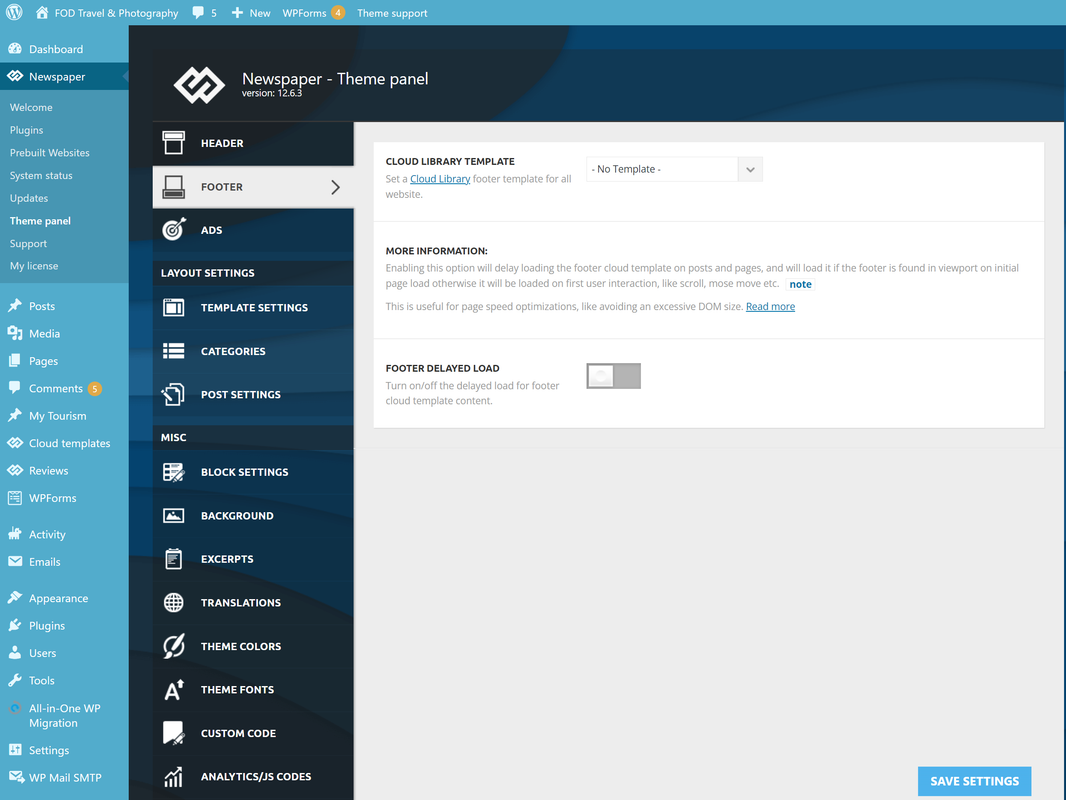
Thankyou for the reply.. BUT, I don’t have that footer info box in my panel?
Not sure why. I have latest Newspaper version 12.6.3 – but NO footer panel, as you show in your screen shot.
Here is my screen-shot -> https://i.postimg.cc/wxb2TwFF/nofooter.png
How do I get it back and make this copyright change?