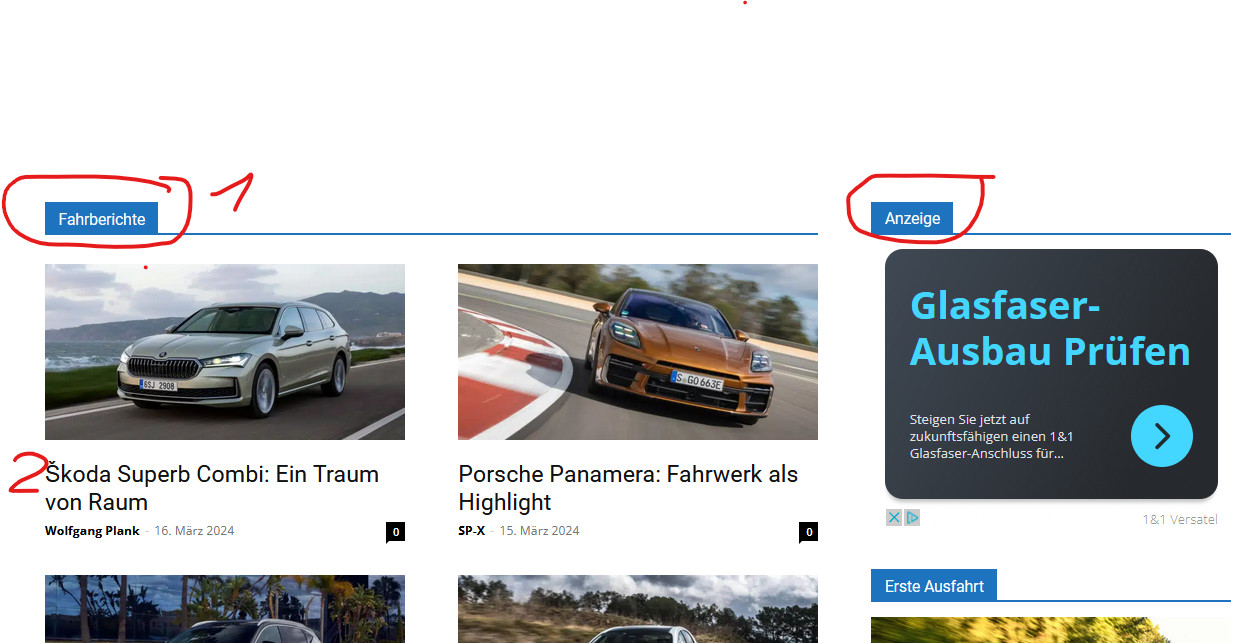
Hi
can you please tell me what the elements marked in blue in den URL below (1, Fahrberichte, Anzeige etc.) in the theme panel are called? Where exactly can I change their color? I thinke it ist under Theme Colors? I do not now what I have to change exactly theire.
The Icons must be blue as in the URL: https://www.autozukunft.de/wp-content/uploads/2024/03/BackgroundColour.jpg, but are
but on the article pages they are after the theme update black, what is wrong: https://autogazette.de/fahrberichte/ford/bronco-badlands/ford-bronco-badlands-jenseits-von-asphalt-989422491.html
Thank you, Frank

Thank you very much for the quick reply,
where can I find these settings, where exactly are they in the theme panel?
And which of the three marked fields do I have to change if I need to change color, only the first one, Background Color?
Sorry for the repeated question, I am unfortunately not a profound connoisseur of the theme settings.
Regards, Frank
Hello,
You need to go in Appearances – widgets, where you have created them -> https://i.imgur.com/dKtj11l.png
Thank you!
Hello,
You need to find the name of the sidebar https://i.imgur.com/EVSZObi.png, and from there, you can change the color.
Thank you!
Hello Anamaria or Colleagues,
sorry, but in the widget area I do not get a display under the departments as described by you. There are no settings for the color.
Even if I use the Customizer or if I go in the widget area to the tag div blocks, there is no such setting here.
Regards, Frank
Hello,
I would like to take a look. Can you please contact us via email at contact@tagdiv.com and provide the wp-admin access? Include the link to the topic in the email.
Thank you!