

Hi,
I have a webcam that updates a still image every minute. I want to load and display that image on each page load with an image widget or element.
It seems the Composer Single image element doesn’t allow this. When I add the URL to the image link field it still says “Render failed – no image selected”.
How do I display an external image?

Hi,
Unfortunately, our theme do not have this feature, sorry!
You can load only on image on line for example -> http://prntscr.com/pyxqw3 -> http://prntscr.com/pyxrm3 also only http is supported in WordPress links -> http://prntscr.com/pyxsef
Thank you for your understanding!
Hi I tried that but it doesn’t work.
1. I add a Single Image element.
2. I click the Single Image element so it’s properties show.
3. I click the upload icon next to the Image label.
4. I select Insert from URL and paste my URL (https://thegrotto.co.za/webcam/snap_c1.jpg).
5. I click Insert into page.
6. The icon shows next to the Image label but the Single Image element says “Render failed – no image selected”.
Screen shots:

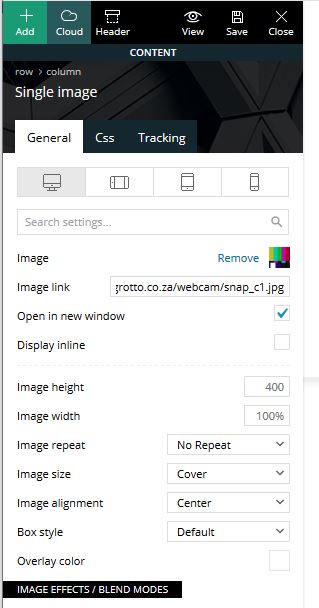

Please help urgently, I’ve been trying for days to get this to work. It’s critical that I can display an image from a URL.

Hello !
In tagDiv Composer that option is to set a url to the photo you upload from media gallery, that option it is not for importing images from URL: https://www.screencast.com/t/Ga5c6B2E0Tg
Thank you !

