

Hello,
i just bought the theme and i made a bit of changes on the block 5. I set it to display the left post on the 65% of the column and the second image on the 35%. The title resized really good and also the second image is responsive to the new layout but the image of the first post doesn’t enlarge even if it is a picture like 3000px x 3000px. How can i enlarge it to make it of the right size ?
Here a preview: 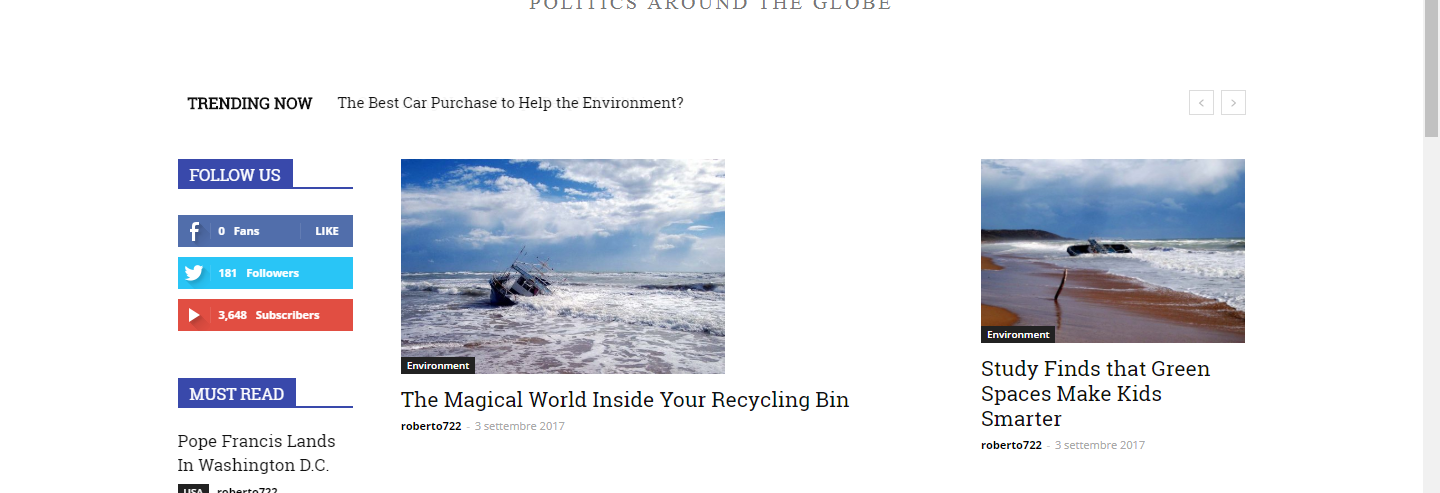
-
This topic was modified 9 years by
roberto722.

Hello roberto722,
Sorry for this inconvenient but please notice that we do not recommend to edit our modules/blocks because you can simply damage the theme layout, sorry! Notice that once you’ve made changes to these locations you will need other adjustments for bringing best theme’s results after your changes which involve such a custom work which cannot provide this, at the moment, sorry! If you are not an advanced user, I’ll recommend you using the blocks/modules in the default state, because we have a big list of modules/blocks, as you can see here -> https://forum.tagdiv.com/theme-blocks-modules/ Also, if you do not like these, you should create it as you want and if you are not aware of the steps which are needed to take in this case, please consider hiring a freelancer/developer to help you because we cannot provide this type of services at the moment, sorry!
Thanks for your understanding!
Hello roberto722,
You can do this only for Latest Articles page template, according to our documentation here -> https://forum.tagdiv.com/page-templates-2/ and for categories page, like this -> https://forum.tagdiv.com/category-templates/
Hope this helps!
Thanks.
