Hello Support,
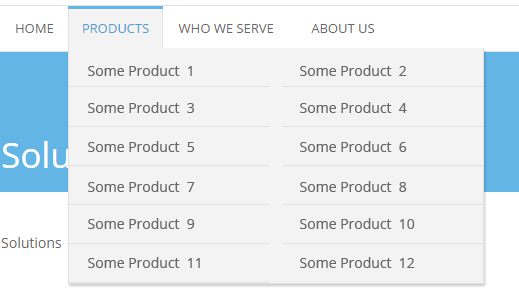
We have a menu which list too many items and for same its not visible completely on computer screen and for same we want to divide menu into two columns instead of one.
Pls check # http://grbnnews.com/ and then check menu # Featured guests > Author list
Pls help us in fixing this issue.
Regards
Tarun

Hi,
You could make the sub-menu smaller of fixed height and use a vertical scroll using this code, just enter it in Theme panel->Custom Css
#td-header-menu .menu-item-5976 .sub-menu .sub-menu {

height: 400px;

overflow-y: scroll;

}
Result – https://www.screencast.com/t/eiPNypM3GD1
Thanks
Thank you.
Its possible to split menu in 2 columns. same as # http://www.prowebdesign.ro/wp-content/uploads/2014/10/2columns-subs.png
Regards
Tarun
Hi,
Try this code, remove the previous one and enter this one in Theme panel->Custom Css
@media (min-width: 1140px) {

#td-header-menu .menu-item-5976 .sub-menu .sub-menu {

width: 610px!important;

}

#td-header-menu .menu-item-5976 .sub-menu .sub-menu li:nth-child(n+2) {

width: 50%!important;

}

}
Result – https://www.screencast.com/t/BcZO3vesLwd
Thanks

Hi,
You can try this code, it will make the Thematic menu item have a vertical scroll, just enter it in Theme panel->Custom Css
.menu-item-1475 .sub-menu {

height: 350px;

overflow-y: scroll;

}
Result – https://www.screencast.com/t/LZPMR5443z19
Thanks

Hi,
@perisson Of course it will not work, each menu item is unique (has a unique ID). If you want to use the codes you will have to use your own menu IDs. Use the browser inspector to identify this ID
– https://www.screencast.com/t/t53oXDHa
– https://forum.tagdiv.com/create-custom-code-using-the-browsers-inspector/
I believe you are referring to the “Infra Estrutura” menu item. You can add a scroll like this (the height can be modified if you want to)
– https://www.screencast.com/t/DQs7HFSL
.menu-item-1225 .sub-menu {

height: 350px;

overflow-y: scroll;

}
Enter the code in Theme panel->Custom CSS section.