Hi,
I would like to know if it’s possible to hide ads from a certain post by adding a custom fields to that post and create a function in functions.php. I really need this option because some of my posts are not confirm google’s policy. Function could look something like this, but i don’t know the name for the ad spots and i lack php skills so don’t know if this works:
function hide_ads($content) {
                global $wp_query;
		$postid = $wp_query->post->ID;
		if (is_single((get_post_meta($postid, 'top_ad', true) != 'off' )))  {
			$top_ad = do_shortcode('[td_ad_box spot_name="Ad spot -- topad"]');
			}
I’m sure it’s possible to make a function that work!!
Also, i would like the ability to show or hide author info per post. This could also be done with a function, but again: i don’t know what the function and custom field meta should look like!
I really hope you can help me!

Hi,
You can simple make this using this plugin: Advanced Custom Fields install it and create a custom field like here: http://screencast.com/t/aCU7n5ns
Then add this code and !get_field('hide_ad') like here: http://screencast.com/t/5FOgXORGMMpand
Done: http://screencast.com/t/6Zd6NCKRKz
You can make similar for the author box to.
Thanks!
Hi,
Should work, i see one screenshot not work, this one http://screencast.com/t/5FOgXORGMMp
You have added the code like there?
Also that implementation is for inline AD section, not for the Top or bottom post AD.
To hide top and bottom add the code here: http://screencast.com/t/A7KWAo2hlNRf
Thanks!
Hi Marius,
You i figured out the last word “and” wasnt part of the screencast link so i added the code like you said. But i dont have inline ads, only top and bottom ads so i will test it with those two ads.
How do i use this function to also disable the header ad?
Hi Marius,
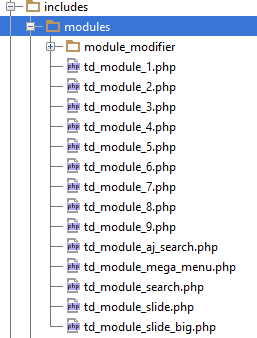
I seem to got the code working, but it only works when i edit the themes blog module. I have a child theme, but when i edit the child themes blog module it doesn’t work. I have copied the blog module file to Newspaper-Child/includes/modules/module_modifier/ but it only works when i edit the file in the normal theme. All other module files i edited in Newspaper-Child/includes/modules/ seem to work fine. How come this file doesn’t work? All other files in my child theme work, so i don’t know if i’m doing anything wrong?
Also, could you tell me where to paste this code to hide the header ad?
Hi,
You need to add the code like here for the header ad: http://screencast.com/t/xFyqF7MGDa
if (!get_field('hide_ad')) {
                        echo td_global_blocks::get_instance('td_ad_box')->render(array('spot_id' => 'header'));
                    }
Thanks!
Hi,
We will fix to work that file with Child theme in the next update.
Make the same for authors.
Create a custom field for author like you have created for ad
And use the code like http://screencast.com/t/G79rInR3hFv
if (!get_field('hide_author')) {
            <?php echo $td_mod_single->get_author_box();?>
            }
Thanks!

Hi Marius, This last code is not working on my site. Infact it’s showing like this.
if (!get_field(‘hide_author’)) {
Author Box: Here is the author bos with above code and below code displaying on post page.
}
You need to create a custom field (I use the Advanced Custom Fields plugin for that) called hide_author or show_author. The name doesn’t really matter. Let’s say you use show_author. The default setting now is that it won’t show the author unless the show_author box is checked when creating a post. By default, no author boxes are shown with this setting, but can be enabled for each post by check the new custom field box.
Can you please give me your single-loop.php file along with a screenshot of advance custom field setup. I will be really grateful. I tried but it’s not working. Can i make a custom field without plugin? I think dreampress hosting has some issues with Advance Custom fields plugin due to varnish cache.
I didn’t edit the loop_single file but the td_module_blog in /includes/modules/module_modifier/.
I’m still running Newspaper v3.x and not v4 because I didn’t had time to update the theme. I’m running a high traffic site and still don’t have a staging site to update the theme to v4 without interupting traffic :p Anyway, I think the post pages in v4 are still generated by td_module_blog so you should give it a shot!
I don’t know about making custom fields with that plugin, I just followed tagDiv’s recomandations on using that plugin for creating additional custom fields.
When opening td_module_blog.php, look for the line (somewhere around line 600 in my version) that says:
if (empty($hideAuthor)) {

            $buffy .= '<div class="author-box-wrap">';
                $buffy .= '<a itemprop="author" href="' . get_author_posts_url($author_id) . '">' ;
                $buffy .= get_avatar(get_the_author_meta('email', $author_id), '106');
                $buffy .= '</a>';
and add and get_field('customfieldname')
Like this (notice i used ‘show_author’ as custom field name):
if (empty($hideAuthor) and get_field('show_author')) {

            $buffy .= '<div class="author-box-wrap">';
                $buffy .= '<a itemprop="author" href="' . get_author_posts_url($author_id) . '">' ;
                $buffy .= get_avatar(get_the_author_meta('email', $author_id), '106');
                $buffy .= '</a>';
Make sure your theme settings are set to show author. When the custom field for showing author is checked in a certain post the author box will show up. Hope this helps!

Thanks r1kay. I am done with it. Your help solved my query. Regards



When i read through the above article, i am really happy to have option to disable post specific ads via Advanced custom fields plugin to add some custom code in…
includes > modules > module modifier > td_module_blog.php
Newspaper child theme documentation https://forum.tagdiv.com/child-theme-documentation/ says that child theme supports for these files https://forum.tagdiv.com/wp-content/uploads/2014/03/04_modules.png
Does the above file supports via child theme?
Kindly help me..

Can we get an update on this tutorial and application for Newsmag theme? Thanks.
Dumb question <noob>
The theme devs use and !get_field('hide_ad') for hiding ads. Why the !
But the theme user above used and get_field('show_author') for showing author. Why no exclamation point?
Nevermind, found the answer by googling.
“Not ( ! ), Not Equal to ( != ), Not Identical to ( !== )
Used in conditional statements to evaluate as true a FALSE result of an expression or if a value is NOT equal to the second value.”
-
This reply was modified 11 years by
Breakwater. Reason: found my own answer

Hey guys…so now with the latest update of both NewsMag (2.0) and of NewsPaper (6+) I don’t seem to see any file named td_module_blog.php in the Modules folder as directed by the screenshot. So exactly where should I now try to add the and !get_field('hide_ad') ? for it to take effect?? Please help!

Hi,
Now you can find it here in td_module_single_base.php – http://screencast.com/t/v8GO9ACb
Thanks!