

I’ve used Newspaper as a theme for years, but there is one thing that has always been bugging me, and I’ve tried several times to work out the issue. Finally I’ve given up, so I’m here asking for assistance.
My header covers the top of my page, and whenever I scroll the page scrolls underneath the header. Which is okay.
What’s bugging me, is that the default offset of all pages and posts is at the top of the browser. Beneath the header.
So all images at the top of posts and pages are cut off. Headers are hidden or cut off.
It’s real easy to see here;

Where the arrow points, there should be a title – like this:
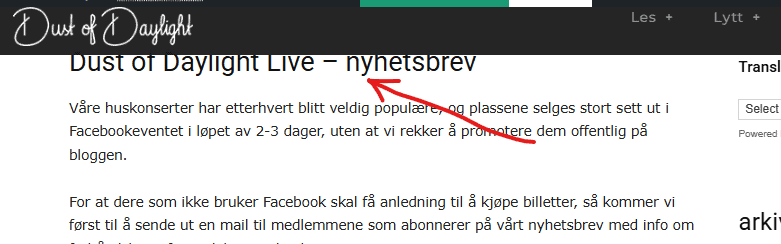
In some browsers you might see half the title, but if I open it in incognito mode, it looks like the first image.
I’m stumped… Header created with TD Composer, I’ve tried putting in empty spaces, extra rows, padding in all thinkable positions, etc. etc. etc. Running v12.7.1, but it’s been this way since I set it up in 2015 (!)
I know the solution is staring me in the face, but I can’t see it, so if anyone has any input – I’ll appreciate it.

Hi,
This situation appears because you are using the header as an overlay, which means that the page content starts from the top, and the header section comes over it. What you should do is to set the header as the default, not the overlay https://i.imgur.com/xsOcQYV.png, and if you want to have a sticky header, then you can add it from the manager. Here is our guide for header – https://forum.tagdiv.com/header-manager/
Thank you!
Thank you for your reply.
On my front page (static) I’ve got it set as Fixed Top, as I want the site to scroll under it.
On all other templates (posts, page etc), it’s already set as default.
Isn’t there a way to offset the start of whatever is shown?
Changing it to default on my front page injects a empty, white row that I can’t remove.
Hi,
Unfortunately, there is no option for the main header to have an offset; only the sticky header has one https://i.imgur.com/IPg1VPa.png
Thank you!


