

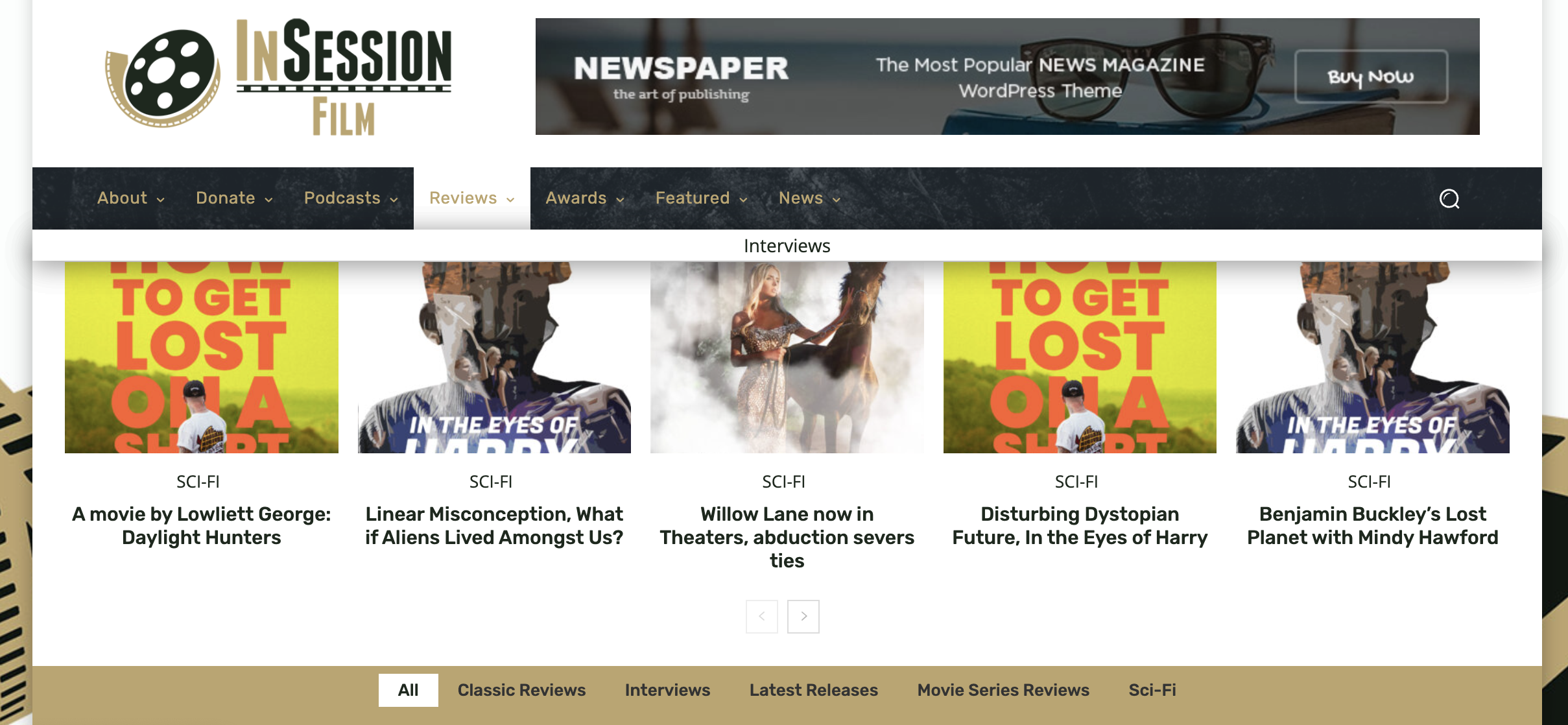
I have a question about the header/menu. In the screenshot above, you see the word “Interviews” above the slider of images. How do I remove that? Also, the submenu at the bottom is not the order I have it set at. In fact, with some categories (such as Podcasts in the main menu), not only is the submenu out of order, but some of them are missing completely. How can I fix this?
For context, if you go to insessionfilm.com (current live site), you can see the menu that I’m trying to copy over.

Hello @insessionfilm!
You need to edit that menu from Appearance -> Menus. Please check the guide to see how the mega menu is built: https://forum.tagdiv.com/mega-menu/
Thank you!
Hey Bettina,
Please forgive my frustration, but I’m still having the same problem. I’m aware of where menu’s are built, and editing the Mega-Menu did not fix the issue. For example, using the screenshot in the original post, all it did was add an arrow under “Interviews” …I still have the same problem.
https://insessionfilm.com/wp-content/uploads/2022/09/Screen-Shot-2022-09-05-at-7.15.48-PM.png
For clarity, here is what I want. This is what I currently have on our live site (which works perfectly), and it’s what I have listed via the Menu option. But it’s not what’s listed on the dev site. Apparently, the menu at the very bottom are the literal subcategories (which I did not realize because *it’s not how I have the menu set up*)
So what’s the best solution here? Is it possible to mingle “Categories” and “Pages” as I have listed? If not should I just turn off the Mega Menu?
Hello @insessionfilm!
In order to add the item there, the item should be a subcategory(child category) of the parent category. And they will be automatically listed in that mega menu. So, you can not add any page there.
Thank you!
Okay, so what’s the solution then? Because I need the menu set up as it is now (via the screenshot above). Should I disable the mega menu? And if so how do I do that?
Hello @insessionfilm!
There is no option to display this menu with the mega menu, sorry.
In order to disable the mega menu, you should edit the menu and uncheck the option to make this category a mega menu. Check the documentation above.
Thank you!
Okay thank you. I was able to uncheck them. Apologies for the hassle, I do love the idea of Mega Menu, but I wish I had more flexibility with it. At any rate, thanks for the help.

