

Hello,
I want to use the construction demo because I really like its design, however I have 3 questions :
1. I couldn’t find where I can change this ( Tel: (+065) 9584 884 844 // Email: contact@yoursite.com )
It is located in the top of the page above the video in CONSTRUCTION DEMO
2. in Construction DEMO there is a video in hero , How can I make the video more clearer ? I mean not darker, but clear to see.
3. In other pages, I want to make something like this :
https://www.cegos.fr/formations/formation#cat1796
a Title –> then you click, and a collapsible text appears
How can I realize this with Newspaper theme ?
Thank you for your time.

Hi,
1. That information can be modified or removed in the Theme panel->Multi-purpose section
– http://prntscr.com/ma1gjl
2. Please check in the CSS tab containing the top header elements, there will be a couple of overlay colors set there
– http://prntscr.com/ma1iyp
3. Maybe with a plugin that you can implement something like that in pages, by shortcode. A plugin in which you can create collapsible text sections as you want, maybe there are such plugins. The tagDiv composer doesn’t have such an element or feature at the moment. Sorry for the inconvenience.
Please let us know if you have more questions.
Thanks
Thank you so much for your help
I have one additional question, which I couldnt figure out the solution
take an example here :
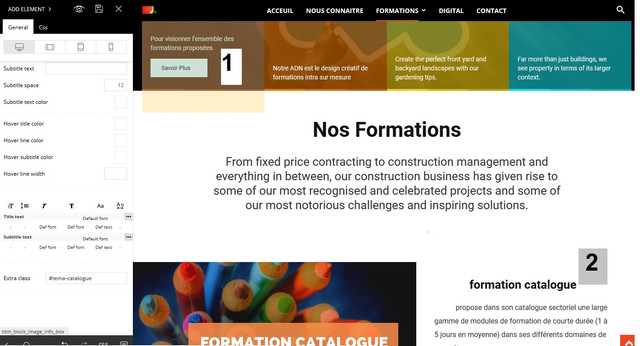
This is what I want :
When someone click on button (number1) …… the page scroll down to Title (Number2) = same as construction demo homepage when you click on something the page scroll down
I couldn’t make it function while I’m creating a page by my own.
Thank you again.
Hi,
Not all elements have a scroll to class option, I believe only the button element has it at the moment – http://prntscr.com/mc0556
The button will allow you to set a class to which the page will be scrolled. The class has to be set as an extra class to the element you want to scroll to.
For example this block has an extra class “test” – http://prntscr.com/mc08qf
If the button has the scroll to class “test” set, it will scroll to the block when clicked
– http://prntscr.com/mc09v8
We will try to add this functionality to other elements in future updates.
