

We noticed if we use links, on the sidebar for example, a default color is added to them:
.widget_text a {
color: #4db2ec;
}
Can you add an option to be able to change it via Theme Panel, in Theme Colors section?

Hello,
You can change the color on widgets in Theme Panel -> Theme colors -> General color => https://www.screencast.com/t/NQ3qTIW3xan -> https://www.screencast.com/t/LYgjyDKB
If this is not what you mean, please let me know!
Thank you!
Well, check this out: 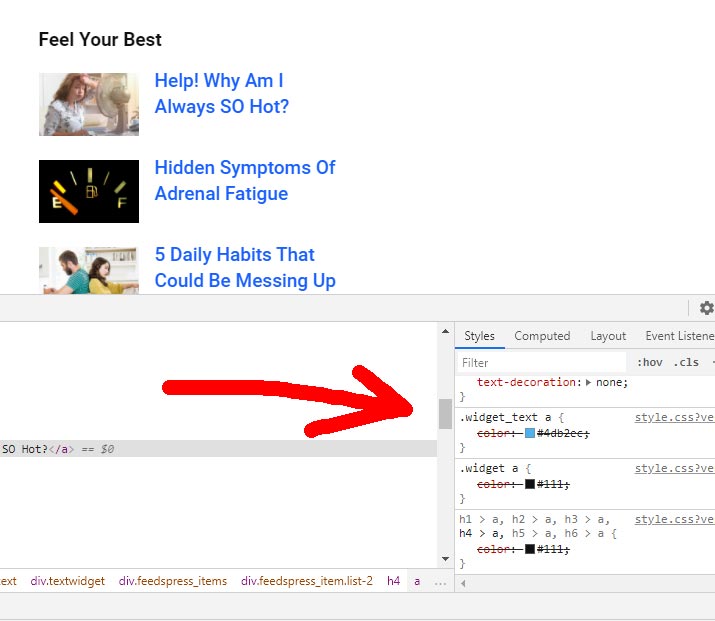
It’s overwritten with custom css, but.. there is still “.widget_text a” style that cannot be overwritten from the Theme Panel. Here’s the live website, you can see the problem in the sidebar “Look Your Best” widget https://reliablenews.org/trumps-impeachment-unlikely-as-gop-backs-him/
Theme Accent color doesn’t work for it. On this specific website, the theme accent color is #1960ff.
-
This reply was modified 5 years by
pavel@earnware.com.
-
This reply was modified 5 years by
Hello,
I checked your website and seems you have set the color => https://www.screencast.com/t/rneynm3nuib with custom CSS. For widgets links, there isn’t any option to set the color from the Theme Panel. This can be done with custom CSS.
Thank you for understanding!
Can you add this option in the future? Why not have the general accent color overwrite it?
Hi,
Right now our theme is base on editing the entire website using the theme editor (tagDiv Composer) on the frontend and there you can edit the website how you like.
Also, I do not know if this option will be added or not in our theme, but I can note it on our list as a suggestion.
Thank you!
