Hi,
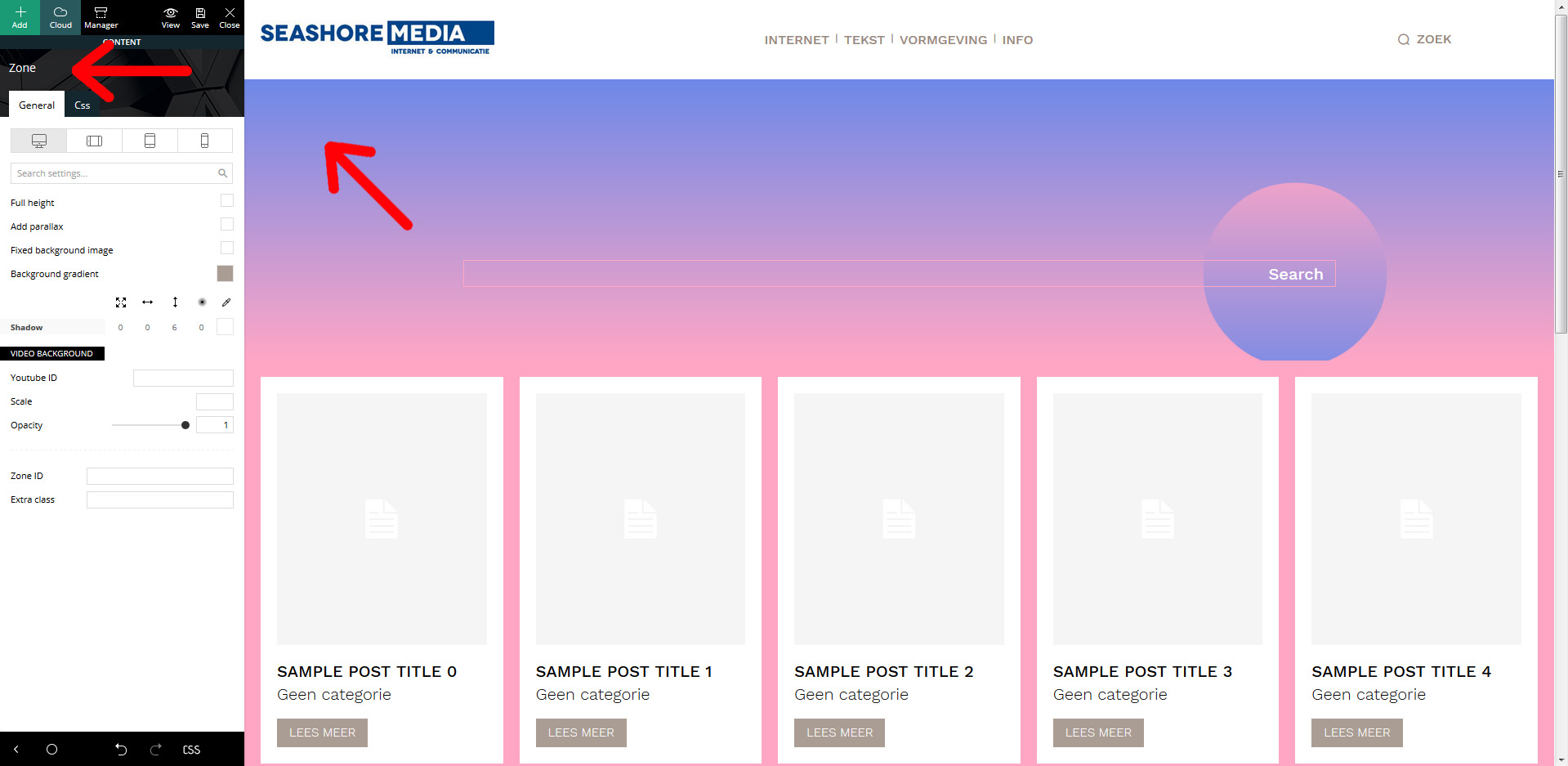
The background colour of the Beauty pro search template is a gradient from blue to pink. But I want to change that to our website colours. But… where to do this? When you click on the background, the info for “zone” appears in tyhe left column, but I can;t find the colours used now there, and hence, don’t see where to edit these.
Cheers,
Martin.

Hi,
You can do that using tagDiv Composer, that is a cloud template and, using tagDiv Composer you can edit it like this -> https://i.imgur.com/DroPIep.jpg select the row and check the css tab -> https://i.imgur.com/vpkF04l.jpg is possible to need to do this for more rows.
If there is still a problem, let me know!
Thank you!
Hi, yes, I understand how it basicly works. But when I want to edit the background, it says “zone”. And in the “zone” settings, there’s nothing in the settings (‘general’, nor ‘css’) that corresponds with the blue to pink background gradient. Hence, I don’t understand how to edit this.
See: https://seashore.nl/uitleg.jpg
Thanks.
-
This reply was modified 5 years by
Seashore.
Hi,
here is a quick video for what you need to do, you need to select the row and there to set the color -> http://www.filedropper.com/f944eac6-29c1-47e2-a4ff-43f54fac1aba
Hope this will help you!
Thank you!